


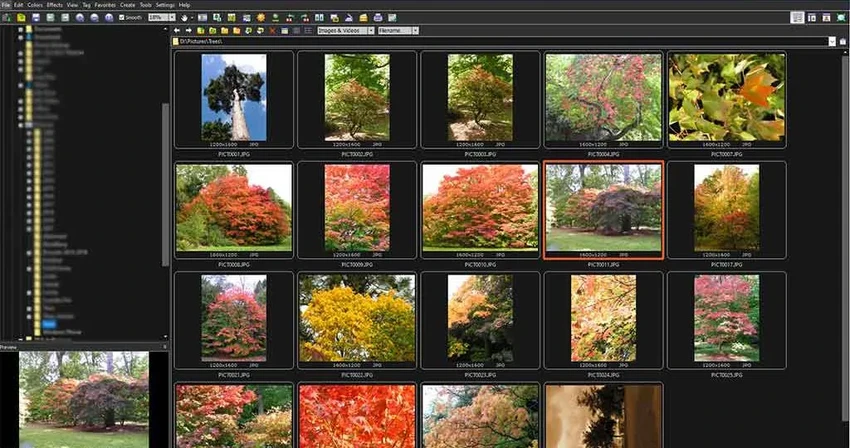

FastStone Image Viewer is a lightweight yet feature-rich image browser, converter, and editor designed for Windows users who need fast access to image management and basic editing tools. It supports a wide range of image formats and includes powerful features such as batch processing, slideshow creation, and color adjustments.
Overview
FastStone Image Viewer combines speed, simplicity, and functionality into a single application focused on image browsing and editing. It is designed to act as an alternative to heavier photo editing software by providing essential tools for everyday image tasks such as viewing, organizing, converting, and performing basic edits. The application features an intuitive Windows Explorer-style interface along with a full-screen viewing mode that enhances productivity by giving users quick access to essential tools via hidden screen-edge menus. With support for both standard image formats and RAW camera files, FastStone Image Viewer is suitable for photographers, designers, and general users who need a reliable image utility without unnecessary complexity.
Features of FastStone Image Viewer
- Fast image browser with Windows Explorer-style interface
- Full-screen image viewer with hidden toolbars
- Image zoom and high-quality magnifier tool
- Basic and advanced image editing tools
- Resize, resample, rotate, crop, and flip images
- Color adjustments including curves, levels, and lighting control
- Image effects such as sepia, grayscale, negative, and artistic filters
- Red-eye removal tool with natural results
- Clone stamp and healing brush tools
- Multi-level undo and redo support
- Side-by-side image comparison (up to 4 images)
- EXIF metadata viewing and editing
- Batch image processing and conversion
- Slideshow creation with 150+ transition effects and music support
- Screen capture functionality
- Scanner support for importing images
- Contact sheet creation
- Image annotation tools (text, shapes, callouts)
- Lossless JPEG transitions and editing
- Portable version available
- Dual-monitor and touch support
- Support for major image formats including RAW files
User Experience
FastStone Image Viewer stands out for its speed and responsiveness. Image browsing feels immediate, even when working with large photo collections or RAW files. The full-screen mode is particularly well-designed, offering quick access to editing tools without cluttering the workspace. The editing features are accessible and practical rather than overwhelming. Users can perform essential adjustments like cropping, resizing, and color correction without needing a separate photo editor. Batch processing is especially useful for users handling large numbers of images, as it significantly reduces repetitive tasks.
The slideshow feature is another highlight, allowing users to create presentations with music and transition effects, making it useful for both personal and professional use cases. While it is not a full professional editing suite, FastStone Image Viewer excels at fast image handling, organization, and lightweight editing tasks.
Who Should Use FastStone Image Viewer?
- Photographers managing large image libraries
- Casual users organizing personal photos
- Users needing fast image browsing
- People working with RAW image files
- Users who require batch image processing
- Anyone needing a lightweight image editor for everyday tasks
System Requirements
- Windows XP
- Windows Vista
- Windows 7
- Windows 8.x
- Windows 10
- Windows 11
Conclusion
FastStone Image Viewer is a fast, reliable, and practical image management tool that combines browsing, editing, and batch processing in a single lightweight application. While it does not replace professional-grade photo editors, it excels at everyday image handling tasks with excellent speed and simplicity.


