


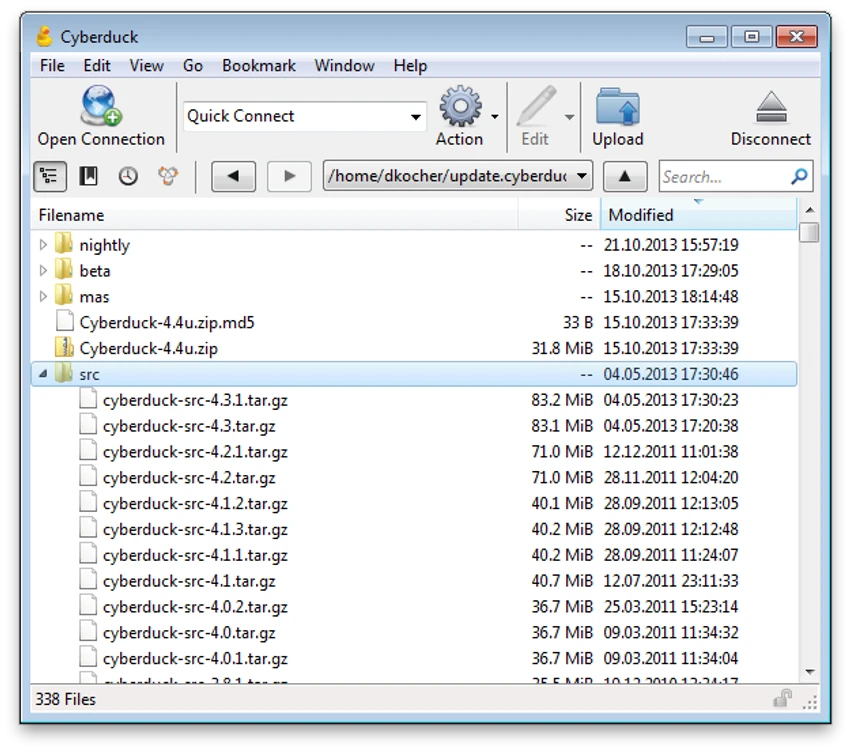

Cyberduck is a free and open-source file transfer and cloud storage client designed for Windows and Mac users. It supports a wide range of protocols and cloud services, including FTP, SFTP, WebDAV, Amazon S3, OpenStack Swift, Backblaze B2, Microsoft Azure, OneDrive, Google Drive, and Dropbox. The software acts as a centralized file manager for remote servers and cloud platforms, allowing users to upload, download, edit, and organize files through a simple and intuitive interface.
Features of Cyberduck
- Support for FTP (File Transfer Protocol) and SFTP (SSH Secure File Transfer)
- WebDAV support for web-based file management
- Cloud storage integration with Google Drive, Dropbox, OneDrive, and Azure
- Amazon S3 and OpenStack Swift compatibility
- Backblaze B2 support for cloud backup workflows
- Bookmark system for quick access to servers
- Drag-and-drop file organization
- Built-in file browser with caching for performance
- Support for editing files using external applications
- Resume interrupted uploads and downloads
- Recursive directory transfers
- Filtering and transfer control using regex rules
- Amazon CloudFront and Akamai CDN integration
- S3 bucket management with encryption and logging options
- Advanced SSH-based SFTP support
- Compatible with Windows 10 (64-bit) and later
User Experience
After reviewing Cyberduck, the software presents itself as a clean and straightforward file transfer client designed for both casual and professional use. The interface focuses on simplicity, making it easy to connect to remote servers or cloud accounts without requiring advanced configuration. One of the most useful aspects is its unified approach to file management. Instead of switching between multiple tools for different cloud services, users can access FTP servers, SFTP connections, and major cloud platforms from a single interface.
The bookmark system improves usability significantly. Frequent connections can be saved and organized, allowing quick access to servers or storage accounts with minimal effort. File browsing is smooth, with caching mechanisms that help improve performance when navigating large directories. Users can also open and edit files directly in external applications, making it practical for developers and system administrators.
Transfer management is another strong point. Cyberduck supports resuming interrupted uploads and downloads, which is essential for large files or unstable connections. Recursive transfers and filtering options add flexibility for bulk operations. Cloud storage integration is one of Cyberduck’s standout strengths. Support for Amazon S3, Google Drive, Dropbox, and other platforms makes it a versatile tool for cloud-based workflows, particularly in collaborative or enterprise environments.
Who Should Use Cyberduck?
- Web developers managing FTP/SFTP servers
- IT professionals working with cloud infrastructure
- Teams using Amazon S3, Azure, or Google Drive
- Users transferring large files across remote systems
- Administrators managing multiple cloud storage accounts
Conclusion
Cyberduck provides a streamlined and flexible solution for managing files across FTP servers and major cloud storage platforms. With strong protocol support, easy navigation, and reliable transfer capabilities, it is a valuable tool for both personal and professional workflows.


