Tixati logo

Tixati 3.43

  • User Rating:
    ★★★★★
    ★★★★★
    0.0 ★ 0Votes
  • Requirements:
    Windows
  • Version: 3.43
  • Latest updated: 2 months ago
  • License: Freeware  
  • Publisher: Tixati Software
  • Size: 21.4 MB
× app stores

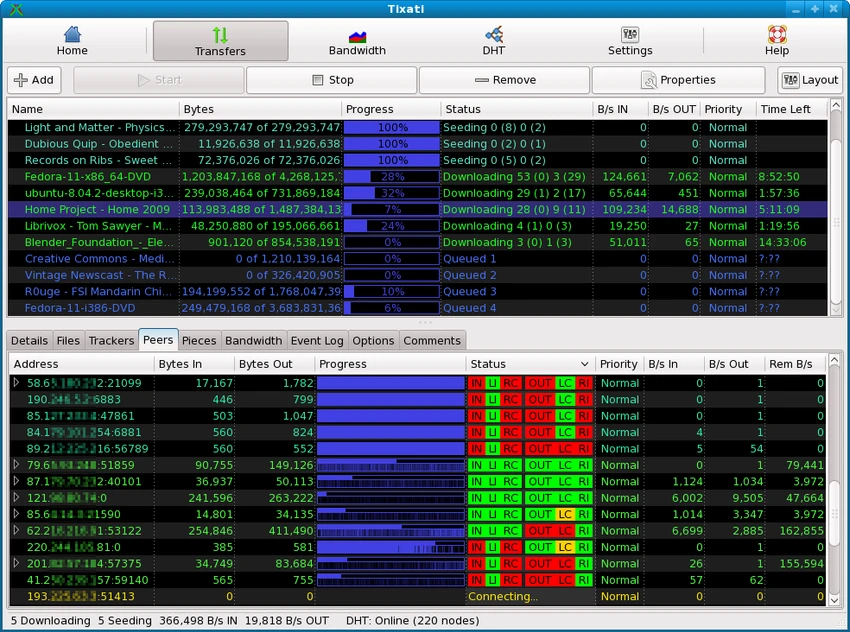
Tixati is a peer-to-peer file sharing application built on the BitTorrent protocol. It is designed to help users download and manage large files efficiently by connecting to distributed networks of peers (swarms). During my experience with it, I found that it focuses heavily on performance, transparency, and detailed control over downloads, making it especially appealing to advanced users who want full visibility into their torrent activity.

Key Features of Tixati

  • Full BitTorrent protocol support
  • Magnet link support (no .torrent file required)
  • Peer-to-peer swarm-based downloading
  • Detailed swarm analysis (peers, pieces, trackers, files)
  • Advanced bandwidth control and throttling
  • Separate classification of upload/download traffic
  • Peer connection encryption for added security
  • DHT (Distributed Hash Table) support for trackerless torrents
  • Detailed event logging for downloads and peers
  • Bitfield graphs showing file completion and swarm health
  • Advanced scheduling and priority controls
  • Efficient peer selection and choking/unchoking algorithms
  • Local file management during active downloads
  • No ads, no spyware, no bundled software

User Experience

After using Tixati, I found it to be one of the most information-rich torrent clients available. The interface is highly detailed, showing real-time data about peers, download pieces, and network activity. While this level of detail can feel overwhelming at first, it provides excellent transparency for users who want to understand exactly how their downloads are performing. Adding a torrent is straightforward. Users can load a .torrent file or use a magnet link, after which Tixati immediately begins connecting to peers and downloading data. I appreciated how quickly the program begins showing swarm activity, including peer connections and transfer speeds.

Bandwidth management is another strong point. Tixati allows precise control over upload and download limits, making it useful for users who need to balance network usage. The ability to prioritize specific transfers or adjust seeding behavior adds flexibility for different usage scenarios. Unlike many modern torrent clients, Tixati does not include ads or unnecessary features, which keeps the experience focused and lightweight. However, its interface is more technical than beginner-friendly alternatives, so new users may need some time to become comfortable with its layout.

Who Should Use Tixati?

  • Advanced torrent users
  • Users who want detailed download analytics
  • People managing large file downloads
  • Users needing precise bandwidth control
  • Privacy-conscious users avoiding ad-supported clients
  • Tech-savvy users who prefer full system visibility

Conclusion

Tixati is a powerful and transparent BitTorrent client designed for users who want complete control over their file-sharing experience. While it may not be the simplest option for beginners, its depth of information and advanced configuration tools make it an excellent choice for experienced users. If you value performance, control, and a clean, ad-free environment, Tixati is one of the strongest torrent clients available.

Pros & Cons

✓

Pros

  • Completely ad-free and spyware-free
  • Extremely detailed swarm and peer information
  • Strong bandwidth control and prioritization
  • Magnet link and full BitTorrent support
  • Lightweight and efficient performance
  • Advanced logging and monitoring tools
✕

Cons

  • Interface can feel complex for beginners
  • More technical than mainstream torrent clients
  • Requires learning to fully utilize advanced features

Frequently Asked Questions

What is Tixati used for?

Tixati is used for downloading and sharing large files using the BitTorrent peer-to-peer protocol.

Does Tixati support magnet links?

Yes. It fully supports magnet links in addition to .torrent files.

Is Tixati free?

Yes. It is free to use and does not include ads or spyware.

Can Tixati control bandwidth usage?

Yes. It includes advanced bandwidth throttling and prioritization features.

Does Tixati show peer information?

Yes. It provides detailed views of peers, trackers, and swarm activity.

Is Tixati suitable for beginners?

It can be used by beginners, but its interface is more technical than most torrent clients.

Does Tixati support encryption?

Yes. It supports peer connection encryption for added security.

Recommended apps [Freeware]:
  • Red Burner 19.7 Red Burner logo a portable disc burning tool for CD, DVD, and Blu-ray with fast ISO handling and a simple interface
  • Edge Remover 2.7 Edge Remover logo a lightweight Windows tool designed to uninstall Microsoft Edge Chromium and UWP versions
  • Speccy 1.34.084 Speccy logo provides detailed PC hardware information, temperature monitoring, and system reports for Windows users
  • AlienFx Tools 9.6.1.1 AlienFx Tools logo a lightweight suite for managing Alienware lighting, fan control, power profiles, and system monitoring
  • Black Menu for Google 31.6.2 Black Menu for Google logo Access popular Google services quickly from your browser with a customizable menu extension for search, Gmail, Maps, Drive, and more.
  • Mullvad Browser 15.0.18 Mullvad Browser logo Browse with enhanced privacy using a Firefox-based browser that minimizes tracking, removes telemetry, and supports VPN connections.
Recommended apps [Shareware]:
  • HyperSnap 10.1.2 HyperSnap logo captures screenshots, scrolling windows, OCR text and video with advanced editing tools on Windows.
  • ON1 Photo RAW 2026.4 ON1 Photo RAW logo advanced AI masking, creative filters, and photo enlargement tools for photographers
  • Axialis IconVectors 1.70 Axialis IconVectors logo a lightweight SVG icon editor for developers, featuring live code previews, vector editing tools, and workflow integration
  • WYSIWYG Web Builder 21.1.1 WYSIWYG Web Builder logo create responsive websites visually with drag-and-drop tools and automatic HTML generation
  • SysTools MBOX Converter 9.0 SysTools MBOX Converter logo batch email migration tool that converts MBOX, MBS, and MBX files into multiple formats with attachment support
  • PrintFab 3.0.7 PrintFab logo advanced printer drivers, RIP functionality, color management, and ink optimization for high-quality printing