


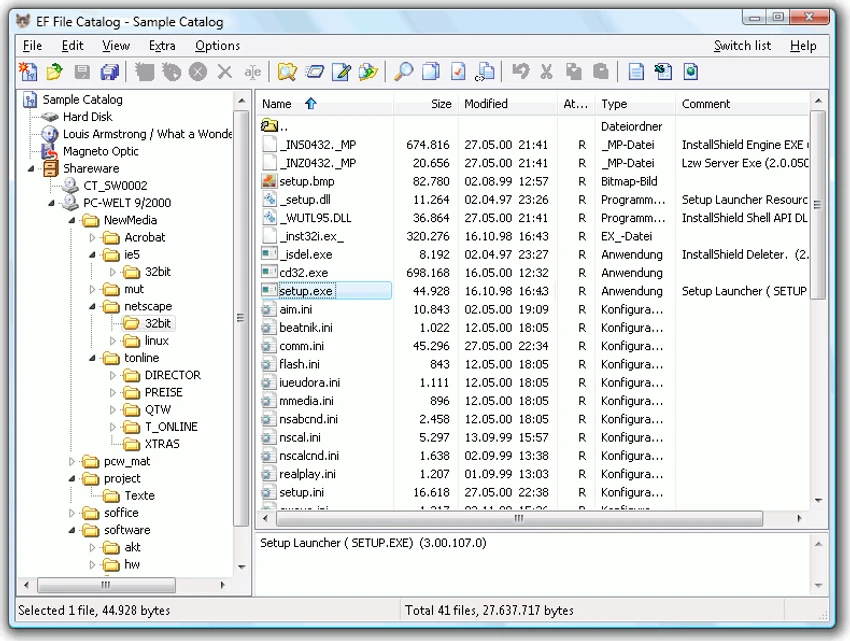

EF File Catalog is a file cataloging and indexing utility designed to help users organize, browse, and search files without requiring the original storage media to be connected. Whether you're managing large hard drives, archived backups, removable media, or extensive collections of compressed files, the software creates searchable catalogs that remain accessible even when the source media is offline. With support for numerous archive and disk image formats, an Explorer-like interface, and powerful search capabilities, EF File Catalog serves as a practical solution for users who need quick access to file information across multiple storage locations.
Key Features of EF File Catalog
Disk & Folder Cataloging
- Catalog entire disks
- Catalog selected directories
- Offline browsing of indexed files
- Explorer-style navigation interface
Archive File Support
Built-in support for numerous compressed formats, including:
- 7Z
- ZIP and Zip64
- RAR
- CAB
- ACE
- ARJ
- BZIP2
- CPIO
- GZIP
- LHA
- RPM
- SFX
- SQX
- TAR
- TAR.7Z
- TAR.BZ
- TAR.GZ
- TAR.XZ
- WIM
- XZ
- Z
- ZOO
Disk Image Support
- ISO
- IMG
- UDF
Extensibility
- Unlimited external packer plugin support
- Unlimited external description plugin support
Search & Discovery
- Fast file searching
- Duplicate file search functionality
- Wildcard support
- Advanced filtering options
- Offline file lookup
Metadata & Descriptions
- Automatic description importing
- Detailed file information
- Extended file catalog details
CD Database Integration
- Extract CD information from CDDB
- Support for freedb.org databases
- Support for local CD databases
Export Options
- Export to Text
- Export to CSV
- Export to HTML
User Interface
- Familiar Explorer-style layout
- Multilingual support
- Easy navigation through catalogs
User Experience
EF File Catalog is designed for users who need to manage large collections of files spread across multiple storage devices. Instead of manually connecting external drives or searching through backup discs, the software allows users to create searchable catalogs that can be accessed anytime. The Explorer-like interface makes navigation intuitive, especially for Windows users familiar with File Explorer. Catalogs can be browsed just like standard folders, providing a comfortable and efficient workflow.
One of the software's strongest advantages is its support for compressed archives and disk images. Rather than simply cataloging visible files, EF File Catalog can index contents stored within ZIP, RAR, ISO, and many other archive formats. This makes it particularly valuable for users who maintain software archives, backup collections, or media libraries.
The search functionality is another highlight. Users can quickly locate files using filters, wildcards, and duplicate search tools without needing direct access to the original storage media. This can save significant time when working with large collections distributed across multiple drives. Automatic description importing and CDDB integration further enhance catalog accuracy by providing additional metadata for stored media and archived content. Overall, EF File Catalog offers a practical balance between file organization, offline accessibility, and efficient search capabilities.
Conclusion
EF File Catalog provides an effective way to organize and access information about files stored across disks, archives, and removable media. Its ability to catalog compressed archives, support offline browsing, and perform fast searches makes it particularly useful for users with extensive file collections.


