HWMonitor Pro logo

HWMonitor Pro 1.58

  • User Rating:
    ★★★★★
    ★★★★★
    0.0 0Votes
  • Requirements:
    Windows
  • Version: 1.58
  • Latest updated: 2 weeks ago
  • License: Free Trial  
  • Publisher: CPUID
  • Size: 4 MB
×

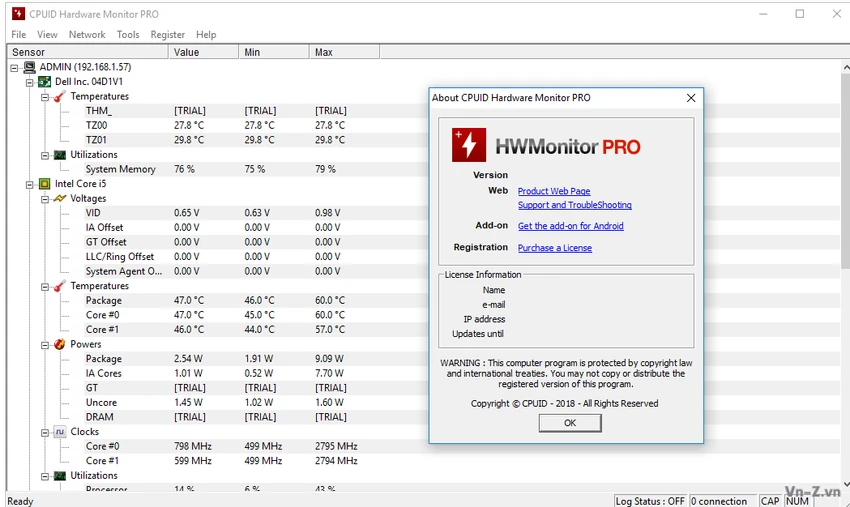
HWMonitor PRO is the extended edition of the classic HWMonitor utility, designed for users who need more advanced monitoring capabilities. While it retains the core function of tracking system health sensors like temperatures, voltages, and fan speeds, it adds professional features such as remote monitoring and data visualization tools.

Overview

Built as an upgrade to the standard HWMonitor, HWMonitor PRO expands hardware monitoring beyond a single PC. It introduces remote access features and improved data handling, making it more suitable for advanced users, IT technicians, and system administrators who manage multiple devices. Like the original version, it reads sensor data from CPUs, GPUs, motherboards, and storage devices, but it enhances how that data can be accessed and analyzed over time.

Features of HWMonitor PRO

  • Remote monitoring of PCs and Android devices via TCP/IP connection
  • Real-time tracking of CPU, GPU, voltage, temperature, and fan sensors
  • Graph generator for saving monitoring data as bitmap files
  • Improved interface with system tray sensor display
  • Editable sensor labels for better customization
  • Support for logging and historical data analysis
  • Compatibility with multiple hardware sensor types

User Experience

HWMonitor PRO feels familiar to users of the classic version but adds more depth for long-term monitoring. The remote monitoring feature is especially useful in multi-device environments, allowing users to check system status without physical access. The ability to generate graphs from logged data makes it easier to analyze performance trends over time. Meanwhile, interface improvements such as tray sensor display and editable labels help reduce clutter and improve usability during continuous monitoring sessions.

Despite these enhancements, the core interface remains simple and focused on sensor data, keeping the learning curve low.

Who Should Use HWMonitor PRO?

HWMonitor PRO is suitable for:

  • IT administrators managing multiple PCs
  • Advanced users who need remote system monitoring
  • Gamers and creators tracking long-term hardware performance
  • Users who want graphical logging of hardware sensor data

Conclusion

HWMonitor PRO builds meaningfully on the original HWMonitor by adding remote access and data visualization capabilities. It is particularly useful for users who need to monitor more than one system or analyze performance trends over time. If basic monitoring is not enough and you need remote control and logging features, HWMonitor PRO is a practical upgrade.

Pros & Cons

Pros

    • Remote monitoring via TCP/IP
    • Graph generation for performance logs
    • Improved interface with tray sensors
    • Editable sensor labels for customization

Cons

    • No advanced analytics details provided
    • Focus remains primarily on monitoring, not system optimization
    • No rating or performance benchmarks included

Frequently Asked Questions

What is HWMonitor PRO used for?

HWMonitor PRO is used for monitoring hardware sensors and extends functionality with remote monitoring and logging tools.

Can HWMonitor PRO monitor multiple devices?

Yes, it supports monitoring one or several distant PCs and Android devices over a network connection.

Does HWMonitor PRO include graphing tools?

Yes, it can generate graphs from saved monitoring data in bitmap format.

What is the difference between HWMonitor and HWMonitor PRO?

HWMonitor PRO adds remote monitoring, graph generation, and interface improvements compared to the classic version.

Is HWMonitor PRO suitable for IT professionals?

Yes, its remote monitoring and logging features make it useful for IT environments managing multiple systems.

Recommended apps [Freeware]:
  • Simple IP Config 2.9.7 Simple IP Config logo a lightweight, portable tool for quickly changing Windows IP, DNS, and network settings
  • IObit Driver Booster 13.4.0.234 IObit Driver Booster logo updates outdated drivers automatically to boost system stability and gaming performance.
  • EarthTime 6.33.4 EarthTime logo displays world clocks, weather, and local times for 120,000+ cities with customizable alarms and maps.
  • WinScan2PDF 9.77 WinScan2PDF logo scan documents and save them as PDFs or JPEGs with minimal setup and low CPU usage.
  • StaxRip 2.52.4 StaxRip logo powerful Windows GUI for video/audio encoding using FFmpeg, x265, AviSynth+, VapourSynth, and more.
Recommended apps [Shareware]:
  • Sidify Spotify Music Converter 2026 Sidify Spotify Music Converter logo convert Spotify songs, playlists, and podcasts to MP3, AAC, FLAC, and WAV formats.
  • SketchUp Pro 2026 SketchUp Pro logo powerful 3D modeling software for architects, designers, and engineers with intuitive tools.
  • Adobe Illustrator 2026 Adobe Illustrator logo professional vector graphic editor for creating logos, illustrations, and scalable designs.
  • Adobe After Effects 2026 Adobe After Effects logo advanced motion graphics, visual effects, compositing, and animation tools for creators.
  • Topaz Photo 1.6.1 Topaz Photo logo advanced AI to sharpen photos, remove noise, and enhance image quality with ease
  • COAA PlanePlotter 6.7.5.9 COAA PlanePlotter logo a Windows tool that decodes live aircraft data like ADS-B and ACARS and displays real-time radar-style tracking