Image Sort logo

Image Sort 2.14.7

  • User Rating:
    ★★★★★
    ★★★★★
    0.0 0Votes
  • Requirements:
    Windows
  • Version: 2.14.7
  • Latest updated: 1 day ago
  • License: Freeware  
  • Publisher: Luca Auer
  • Size: 4 MB
× app stores

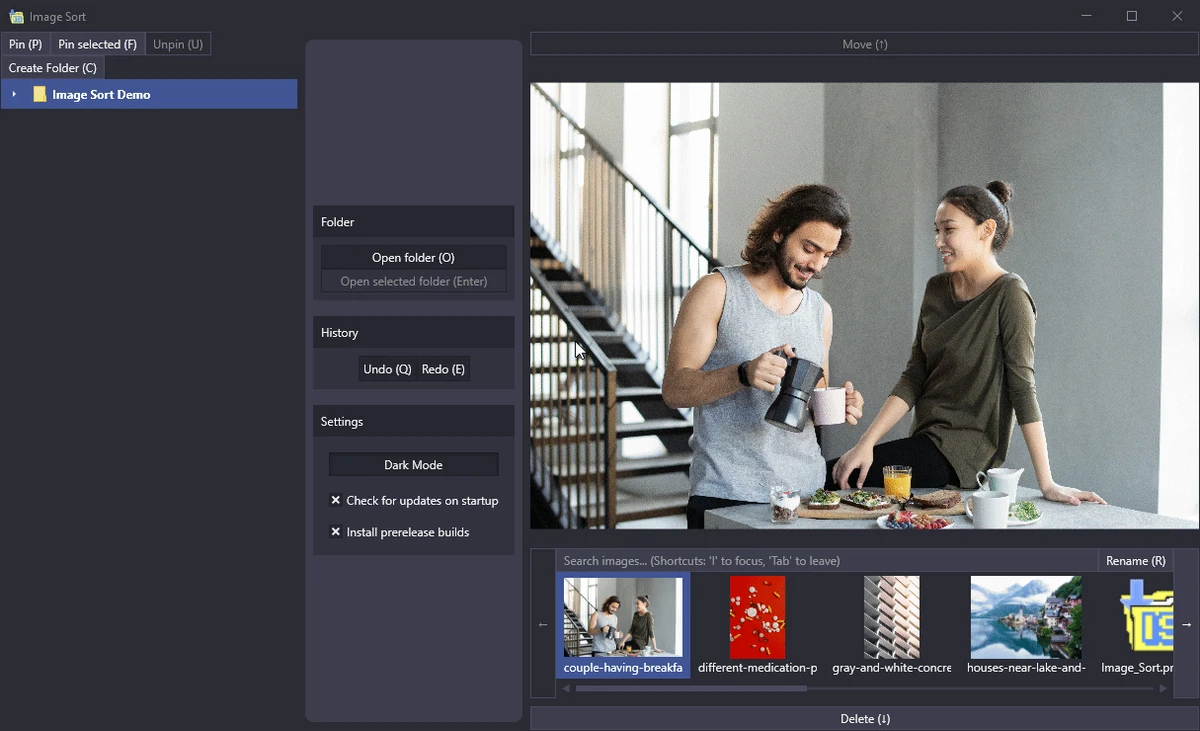
Image Sort is a free and open-source utility designed to simplify the process of organizing large photo collections. Instead of focusing on image editing, it provides a fast workflow for sorting, moving, renaming, deleting, and managing images using an intuitive keyboard-driven interface. Built with speed in mind, Image Sort is ideal for users who regularly process large numbers of photos and want an efficient way to organize them into folders.

Features of Image Sort

  • Free and open-source
  • Organize large photo collections quickly
  • Move images between folders with keyboard shortcuts
  • Skip unwanted images during sorting
  • Delete unnecessary photos
  • Rename images
  • Undo previous move or skip actions
  • Create unlimited folders for photo organization
  • Built-in first-run tutorial
  • Customizable keyboard shortcuts
  • Quick folder search function
  • Light and dark themes
  • Open selected images directly in Windows Explorer

Keyboard Shortcuts

  • F2 – Select a folder
  • F3 – Create a new folder
  • F5 – Open the selected image in Windows Explorer
  • Enter – Open the selected folder
  • Escape – Return to the previous folder
  • Up/Down Arrow – Select destination folder
  • Right Arrow – Move image to the selected folder
  • Left Arrow – Skip the current image
  • Ctrl + Left Arrow – Undo the last move or skip
  • Ctrl + S – Toggle the folder search bar

User Experience

Image Sort is designed around one goal: organizing photos as quickly as possible. Rather than relying on complex menus or drag-and-drop operations, the application encourages users to work almost entirely with keyboard shortcuts, allowing rapid navigation through large image libraries.

The first-launch tutorial provides a helpful introduction to the workflow, making it easier to understand the available commands before processing a large collection. Once the basic controls become familiar, sorting hundreds or even thousands of images feels efficient and responsive. The interface remains clean and uncluttered, with customizable keyboard shortcuts that allow users to tailor the controls to their preferences. One recommended adjustment is changing the default shortcut assigned to deleting images, as the default mapping may increase the risk of accidental deletions during fast navigation.

Folder management is simple, allowing users to create multiple folders before starting a sorting session. Images can then be moved, skipped, renamed, deleted, or restored using the built-in undo function, providing flexibility while organizing large collections. Although Image Sort does not include image editing features, its emphasis on speed and workflow makes it an excellent companion for photographers and anyone who frequently organizes digital photos.

Who Should Use Image Sort?

  • Photographers organizing large photo libraries
  • Users cleaning up Camera Roll or Pictures folders
  • Anyone managing thousands of images
  • Users who prefer keyboard shortcuts for productivity
  • Fans of free and open-source software

Conclusion

Image Sort is a lightweight yet highly effective utility for organizing digital photos. By emphasizing speed, keyboard navigation, and simple folder management, it makes processing large image collections significantly more efficient than traditional file browsing.

Pros & Cons

Pros

  • Free and open source
  • Extremely fast keyboard-based workflow
  • Simple and uncluttered interface
  • Customizable keyboard shortcuts
  • Built-in tutorial for new users
  • Supports undo for recent actions
  • Quick folder search functionality
  • Light and dark themes
  • Efficient for organizing large photo collections

Cons

  • Primarily keyboard-driven, requiring some learning
  • Default delete shortcut may lead to accidental deletions if left unchanged
  • No image editing tools included

Frequently Asked Questions

What is Image Sort?

Image Sort is a free and open-source Windows application designed to help users quickly organize large collections of photos through a keyboard-driven workflow.

Can Image Sort edit photos?

No. Image Sort focuses on organizing images rather than editing them. It allows users to move, rename, delete, and manage photos efficiently.

Is Image Sort suitable for large photo collections?

Yes. The application is specifically designed for quickly processing large numbers of images using keyboard shortcuts.

Can I customize the keyboard shortcuts?

Yes. All key bindings can be remapped to better match your workflow and reduce the chance of accidental actions.

Does Image Sort support undo?

Yes. Users can undo their most recent move or skip action, making it easier to correct mistakes while organizing images.

Recommended apps [Freeware]:
  • FluentCleaner 26.06.04 FluentCleaner logo a lightweight Windows cleaning tool designed to remove unnecessary files using a modern, minimal WinUI 3 interface
  • OcenAudio 3.19.5 OcenAudio logo a fast and easy-to-use audio editor with real-time effects, spectrogram analysis, and VST plugin support
  • TeamViewer 15.79.4 TeamViewer logo a secure remote desktop tool for PC control, file transfer, and remote support worldwide
  • Disk Benchmark 1.0 Disk Benchmark logo measures SSD, HDD, NVMe, and USB drive performance with detailed speed, IOPS, and latency tests
  • DISMTools 0.8 DISMTools logo open-source GUI for Windows DISM that simplifies image management, system repair, and maintenance
  • Logyx Pack 25.401 Logyx Pack logo a portable collection of 155 logic, puzzle, board, and brain-training games for players of all ages
Recommended apps [Shareware]:
  • Wondershare Filmora 15.3.20.18660 Wondershare Filmora logo a powerful, user-friendly video editor with effects, transitions, and 4K support.
  • Text Edit Plus 16.5 Text Edit Plus logo a lightweight text editor with text analysis, word frequency statistics, and document editing tools
  • EditPlus 6.1.899 EditPlus logo powerful Windows text editor with syntax highlighting, coding tools, FTP support, and web editing features
  • TweakNow Gallery 1.3.1 TweakNow Gallery logo a fast Windows photo viewer and organizer with slideshow and built-in image conversion tools
  • SysTools SQL Backup Recovery 12.0.0 SysTools SQL Backup Recovery logo Repair and recover corrupt SQL Server BAK files, restore database objects, and export recovered data with ease.
  • Home Manager 2026 v4.10.1002 Home Manager logo track home inventory, store item details, manage repairs, and generate insurance reports