Remo Recover Windows logo

Remo Recover Windows 6.0.0.260

  • User Rating:
    ★★★★★
    ★★★★★
    0.0 0Votes
  • Requirements:
    Windows
  • Version: 6.0.0.260
  • Latest updated: 1 week ago
  • License: Freemium  
  • Publisher: Stevens Creek Blvd
  • Size: 59 MB
× app stores

Remo Recover Windows is a comprehensive data recovery software designed to help users recover deleted, lost, formatted, or inaccessible data from a wide range of storage devices. Whether files were accidentally deleted, removed using Shift + Delete, lost after formatting a partition, or affected by operating system issues, the software aims to simplify the recovery process through an intuitive interface and advanced scanning technology. After reviewing its capabilities, Remo Recover stands out for its broad recovery support, covering everything from individual file restoration to partition recovery and disk image analysis. Its ability to recover over 300 file types makes it a versatile solution for both personal and professional data recovery needs.

Features of Remo Recover Windows

  • Recover deleted files, including those removed with Shift + Delete
  • Restore files emptied from the Recycle Bin
  • Recover data from formatted and re-formatted partitions
  • Recover lost, deleted, or inaccessible partitions
  • Support for recovery after Windows reinstallation
  • Advanced raw signature search for identifying file types
  • Recover more than 300 file formats
  • Recover professional RAW photo files
  • Restore documents, spreadsheets, presentations, PDFs, images, videos, audio files, and executable files
  • Create disk images to bypass bad sectors
  • Recover data from previously created disk images
  • Recover data from repartitioned drives
  • Support for RAID 0, RAID 1, and RAID 5 recovery scenarios
  • Sort recovered data by name, date, size, and file type
  • Save scan information to resume recovery later
  • Support for hard drives, USB drives, memory cards, external drives, and FireWire devices
  • Compatible with FAT16, FAT32, NTFS, NTFS5, and ExFAT file systems

User Experience

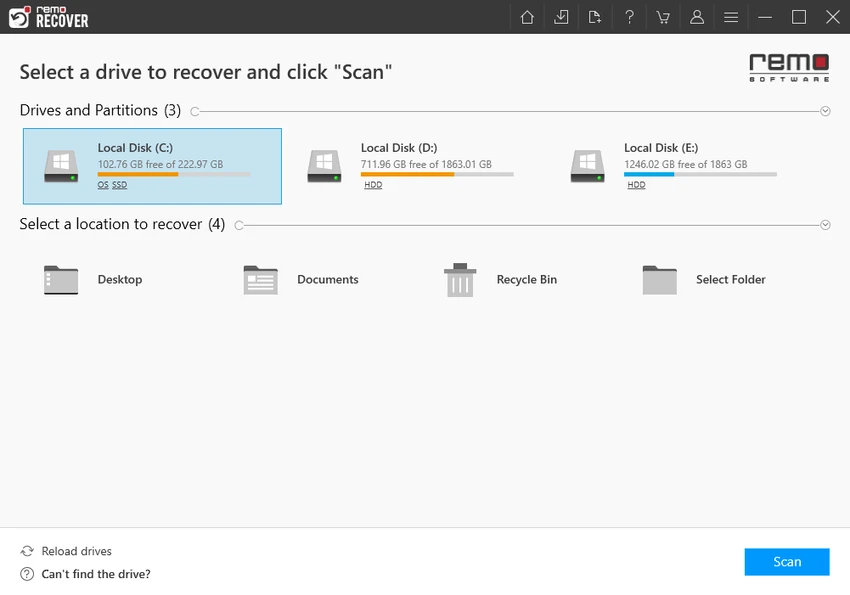
One of the strongest aspects of Remo Recover Windows is its accessibility. The interface is designed to guide users through the recovery process without requiring advanced technical knowledge. Even complex recovery scenarios are presented through a straightforward workflow that minimizes confusion. The software's scanning engine is particularly useful in situations where data loss extends beyond simple file deletion. Recovering files from formatted partitions, corrupted partitions, or drives affected by operating system reinstallation is often a challenging task, yet Remo Recover is specifically built to address these situations.

Conclusion 

Remo Recover Windows provides a robust and user-friendly approach to data recovery. Its ability to recover deleted files, restore formatted partitions, handle RAID recovery, and create disk images makes it suitable for a wide range of recovery scenarios.

Pros & Cons

Pros

  • Recovers deleted files, formatted partitions, and lost partitions
  • Supports recovery after Windows reinstallation
  • Recovers over 300 file types
  • Includes RAW photo recovery support
  • Disk imaging feature helps bypass bad sectors
  • Supports RAID 0, RAID 1, and RAID 5 recovery
  • User-friendly interface suitable for beginners
  • Resume recovery sessions with saved scan information

Cons

  • Deep scans on large drives may take time
  • Recovery success can vary depending on the extent of data overwriting

Frequently Asked Questions

What is Remo Recover Windows?

Remo Recover Windows is a data recovery application that helps users recover deleted, lost, formatted, or inaccessible files from various storage devices.

Can Remo Recover recover files deleted with Shift + Delete?

Yes. The software supports recovering files that were permanently deleted using Shift + Delete, provided the data has not been overwritten.

Does Remo Recover support formatted partition recovery?

Yes. It can recover data from formatted and re-formatted partitions, as well as deleted and lost partitions.

Can Remo Recover restore data after Windows reinstallation?

Yes. The software is designed to recover files even after a Windows operating system reinstallation.

Does it support RAID recovery?

Yes. Remo Recover supports data recovery from RAID 0, RAID 1, and RAID 5 arrays.

What storage devices are supported?

The software supports hard drives, USB drives, memory cards, external drives, FireWire drives, and other common storage media.

Which Windows versions are supported?

Remo Recover Windows supports Windows 11, Windows 10, Windows 8, Windows 7, and Windows Server 2019, 2016, and 2012.

Recommended apps [Freeware]:
  • EarthTime 6.33.6 EarthTime logo displays world clocks, weather, and local times for 120,000+ cities with customizable alarms and maps.
  • CalendarTask 3.30.290.9088 CalendarTask logo lightweight desktop calendar with note-taking, cloud sync, reminders, and desktop scheduling tools
  • Burp Suite 2026.4.3 Burp Suite logo Test, analyze, and secure web applications with Burp Suite’s advanced proxy, scanning, and penetration testing tools
  • ToDoList 9.2.0 ToDoList logo customizable task manager for Windows with subtasks, reminders, notes, tracking, and project tools
  • Revo Registry Cleaner 2.2.1 Revo Registry Cleaner logo Clean, monitor, tune, and back up the Windows Registry with Revo Registry Cleaner for improved system maintenance
  • MSI Dragon Center 2.0.156.0 MSI Dragon Center logo monitor CPU, GPU, and RAM, optimize gaming performance, and control RGB and system settings on MSI PCs
Recommended apps [Shareware]:
  • Foxit PDF Editor 2026.1.1.36485 Foxit PDF Editor logo complete PDF solution for businesses, offering advanced editing, collaboration, and document security features.
  • Charles 5.2.0 Charles logo HTTP proxy tool for web debugging, allowing developers to inspect, modify, and analyze network traffic in real time
  • VovSoft Batch Audio Converter 2.0 VovSoft Batch Audio Converter logo a Windows tool for fast bulk audio conversion with drag-and-drop simplicity and format flexibility
  • Drive SnapShot 1.51.0.1811 Drive SnapShot logo creates complete disk image backups while Windows runs, allowing fast system recovery and file restoration
  • Royal TS 7.4.50622 Royal TS logo centralizes remote connections, credential management, automation, and secure team collaboration.
  • Lansweeper 12.8.1.3 Lansweeper logo network discovery and IT asset management tool for software inventory, compliance reporting, and device tracking