Stellarium logo

Stellarium 26.2

  • User Rating:
    ★★★★★
    ★★★★★
    0.0 0Votes
  • Requirements:
    Windows
  • Version: 26.2
  • Latest updated: 5 days ago
  • License: Freeware  
  • Publisher: Stellarium
  • Size: 455 MB
× app stores

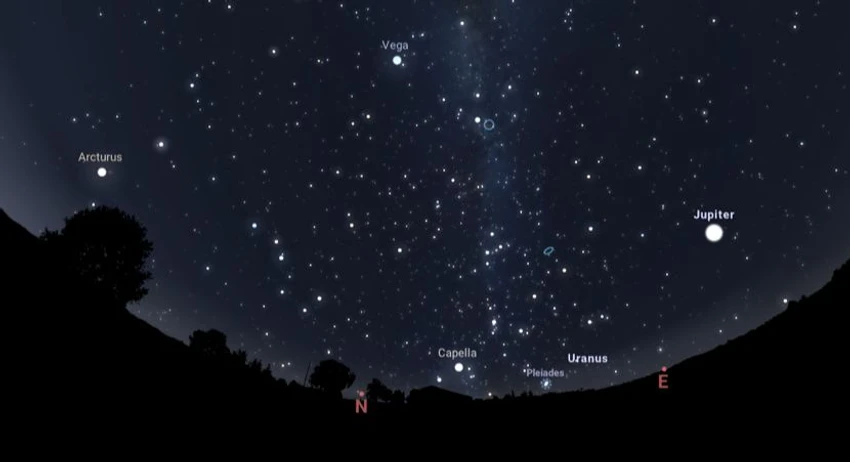
Stellarium is an open-source astronomy application that transforms your computer into a realistic 3D planetarium. It allows users to explore stars, planets, constellations, and deep-sky objects with highly detailed visualizations and accurate real-time sky simulation.

Stellarium is designed for both casual stargazers and astronomy enthusiasts who want to explore the night sky in a visually immersive way. The software renders a realistic sky dome with stars, planets, nebulae, and celestial phenomena such as eclipses. It includes a large star catalog from the Hipparcos Catalogue and provides detailed information about celestial objects. Users can simulate astronomical events, navigate the sky smoothly, and switch between different viewing modes such as telescope-like zoom or full-dome projection. The program also includes constellation artwork and mythological figures, making it both educational and visually engaging.

Features of Stellarium

  • Over 120,000 stars from the Hipparcos Catalogue
  • Real-time simulation of planets and major satellites
  • Accurate eclipse and transit simulations
  • 88 constellations with names and mythological figures
  • Over 70 textured nebulae including Orion and M31
  • Photorealistic Milky Way rendering
  • Star twinkling and atmospheric effects
  • Shooting stars simulation
  • Adjustable landscape and horizon views
  • Realistic sunrise and sunset atmosphere rendering
  • Automatic eye adaptation to sky brightness
  • Equatorial and azimuthal coordinate grids
  • Ecliptic and equator reference lines
  • Smooth real-time navigation controls
  • Powerful zoom for telescope-like viewing
  • Multiple projection modes (including fisheye and dome projection)
  • Time control with real-time and accelerated simulation
  • Clickable celestial objects with detailed information
  • Full-screen and windowed modes
  • Planetarium dome support (180° projection mode)

User Experience

Using Stellarium feels like having a personal observatory on your computer. The sky rendering is smooth and visually impressive, especially when switching between time periods or zooming into planets and nebulae.

Navigation is intuitive, allowing users to explore the sky freely or search for specific celestial objects. Clicking on stars or planets provides detailed information instantly, which enhances the educational value.

Time control is one of the most engaging features. Users can fast-forward or rewind time to observe astronomical events such as eclipses or planetary alignments, making it highly useful for learning and teaching astronomy.

Who Should Use Stellarium?

  • Astronomy students and educators
  • Amateur astronomers and stargazing enthusiasts
  • Planetarium presenters
  • Anyone interested in learning about the night sky
  • Users exploring space simulation tools

Conclusion & Recommendation

Stellarium delivers a highly immersive and scientifically accurate sky simulation experience. Its combination of realism, depth, and ease of exploration makes it a standout tool for astronomy education and personal discovery.

Pros & Cons

Pros

  • Highly realistic 3D sky simulation
  • Large star and deep-space object database
  • Accurate astronomical calculations
  • Educational and visually immersive
  • Free and open-source software
  • Supports advanced projection modes
  • Real-time and accelerated time simulation

Cons

  • Requires some learning for advanced features
  • Can be resource-intensive on older PCs
  • Interface may feel complex for beginners at first

Frequently Asked Questions

What is Stellarium used for?

Stellarium is used to simulate and explore the night sky in 3D, including stars, planets, constellations, and deep-space objects.

Is Stellarium free?

Yes. Stellarium is an open-source and free astronomy software.

Can Stellarium show real-time sky positions?

Yes. It accurately simulates real-time positions of planets, stars, and satellites.

Does Stellarium support eclipses?

Yes. It can simulate solar and lunar eclipses with accurate positioning.

What celestial objects can Stellarium display?

It displays stars, planets, moons, nebulae, constellations, and the Milky Way.

Can Stellarium be used for education?

Yes. It is widely used in classrooms and planetarium settings for teaching astronomy.

Does Stellarium work on Windows?

Yes. It supports Windows 7, 8, 10, and 11.

Recommended apps [Freeware]:
  • Simple IP Config 2.9.7 Simple IP Config logo a lightweight, portable tool for quickly changing Windows IP, DNS, and network settings
  • OCCT 16.1.11.99 OCCT logo hardware monitoring and stress testing tool for CPU, GPU, memory, and power supply performance analysis.
  • Vivaldi Browser 8.0.4033.54 Vivaldi Browser logo a Chromium-based browser with built-in mail, calendar, notes, ad blocker, and deep customization features.
  • AOMEI Backupper 8.4.0 AOMEI Backupper logo easy-to-use Windows backup software for system imaging, disk cloning, and file restoration
  • AB Download Manager 1.9.2 AB Download Manager logo Download files with features such as queue management, scheduling, speed control, and browser integration.
  • MSI Dragon Center 2.0.156.0 MSI Dragon Center logo monitor CPU, GPU, and RAM, optimize gaming performance, and control RGB and system settings on MSI PCs
Recommended apps [Shareware]:
  • DBF Converter 7.85 DBF Converter logo convert DBF files to CSV, Excel, SQL and text with fast batch processing and filtering
  • Text Edit Plus 16.5 Text Edit Plus logo a lightweight text editor with text analysis, word frequency statistics, and document editing tools
  • EF File Catalog 26.05 EF File Catalog logo Catalog disks, folders, archives, and media for fast offline browsing, searching, and file organization
  • Lyric Video Studio 1.5.49 Lyric Video Studio logo a Windows app for creating lyric videos with AI tools, subtitles, motion tracking, and 4K video editing
  • Advanced Installer 23.8 Advanced Installer logo Windows MSI packaging tool for developers to build, customize, and deploy reliable installers
  • reaConverter Pro 8.0.229 reaConverter Pro logo batch image converter and editor supporting 700+ formats with automation and advanced processing tools