


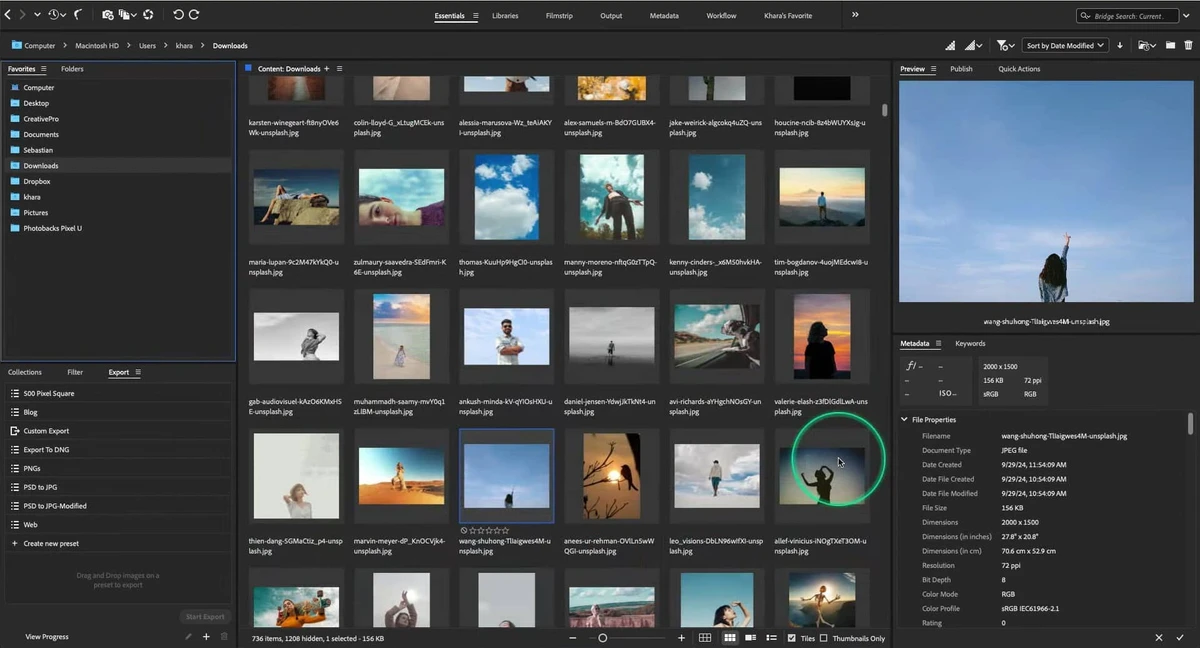

Adobe Bridge is a digital asset management tool designed to help creatives organize, preview, and manage large collections of files. It acts as a central hub for Adobe Creative Cloud users, making it easier to handle images, videos, and project assets efficiently.
Adobe Bridge is built to streamline creative workflows by providing centralized access to files and media assets. Instead of opening multiple applications, users can browse, organize, and process content in one place. The software is especially useful for photographers, designers, and content creators who work with large volumes of media. It integrates closely with Adobe Creative Cloud, allowing users to manage libraries, batch process files, and maintain consistent color and metadata settings across projects.
With features like batch editing, metadata management, and centralized cache handling, Adobe Bridge focuses on improving productivity and reducing repetitive file management tasks.
Features of Adobe Bridge
- Centralized access to files and creative assets
- Integration with Adobe Creative Cloud Libraries
- Bulk import, export, and preview of assets
- Batch processing and flexible file organization tools
- Edit photo capture time for RAW and JPEG files
- Upload images directly to Adobe Stock
- Publish content to Adobe Portfolio
- High-quality previews for library items
- Support for stacking panoramas and HDR images
- Metadata tagging and keyword generation
- On-demand thumbnail and cache generation
- Shared and centralized cache management
- Media cache optimization for audio and video playback
- Drag-and-drop file management across Explorer and Finder
- Support for Adobe XD file previews and metadata
- Retina and HiDPI display support with scaling options
User Experience
Adobe Bridge feels like a control center for creative workflows. The interface is structured around file browsing and asset organization rather than editing, which makes it highly efficient for managing large projects. Navigation is smooth, especially when working with Adobe Creative Cloud Libraries. The ability to preview, tag, and organize files without opening heavier Adobe applications significantly speeds up workflow.
Features like batch processing, cache management, and drag-and-drop file handling make it practical for professionals dealing with thousands of assets. However, it is clearly designed for users already within the Adobe ecosystem, so standalone users may find it less useful.
Who Should Use Adobe Bridge?
- Photographers managing large photo libraries
- Graphic designers working in Adobe Creative Cloud
- Video editors organizing media assets
- Creative teams sharing centralized file libraries
- Users who need advanced batch file organization tools
Conclusion
Adobe Bridge is a powerful and reliable digital asset manager that enhances productivity in creative workflows. Its deep integration with Adobe tools and strong organizational features make it an essential utility for professionals handling large media libraries.


