


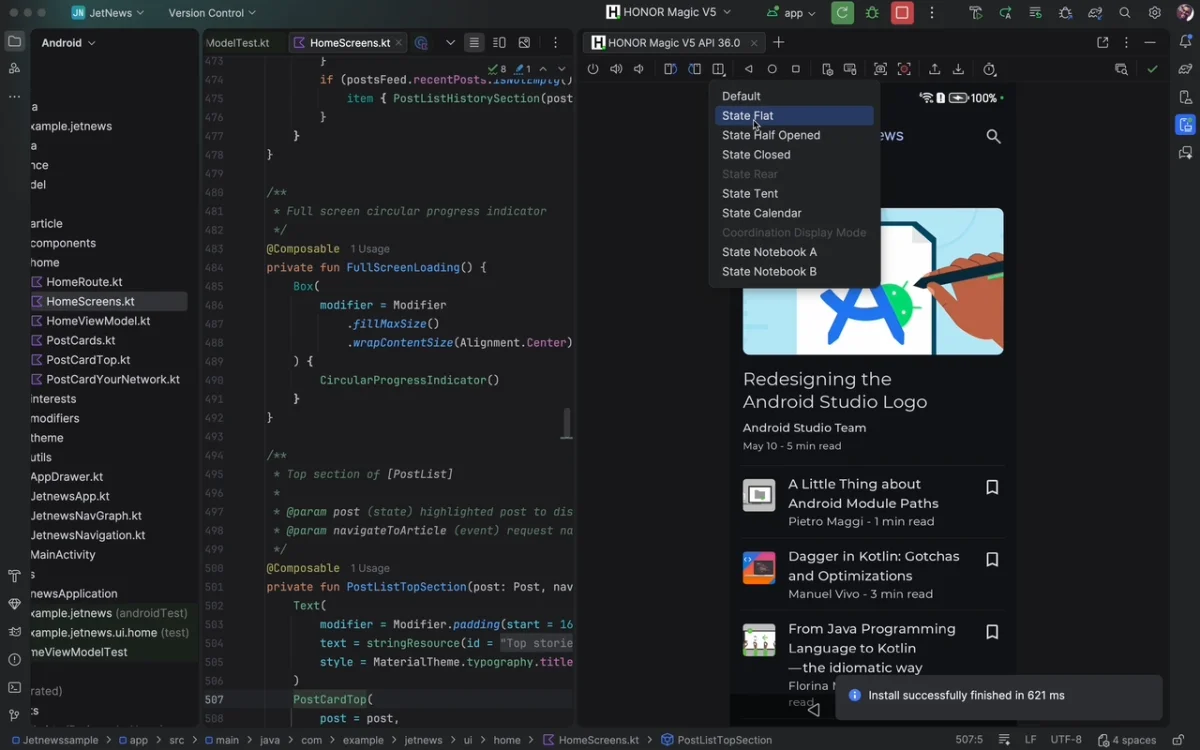

Android Studio is Google’s official Integrated Development Environment (IDE) for Android app development. It provides developers with a complete set of tools for designing, testing, and building applications across all Android devices.
Overview
Based on JetBrains’ IntelliJ IDEA, Android Studio combines a modern, feature-rich code editor with Android-specific tools. It includes the Android SDK, an emulator system image, and Gradle for flexible builds. Designed to streamline workflows, it also supports Google Cloud integration, static code analysis, and assisted coding for faster, more reliable development.
Features of Android Studio
- Instant Run for quick app deployment
- Intelligent code editor with suggestions and refactoring
- Fast and feature-rich emulator for testing
- Robust and flexible Gradle build system
- Team collaboration support
- Develop for all Android devices
- Prebuilt code templates and sample apps
- Lint tools for version compatibility and bug detection (Lintelligence)
- C++ and NDK support for native code
- Google Cloud Platform integration
- Vector Asset Studio for scalable graphics
- Translations Editor for multilingual apps
User Experience
From the moment you launch Android Studio, the interface feels intuitive and responsive. The layout mirrors IntelliJ IDEA, so developers familiar with JetBrains tools will feel at home. Its code editor intelligently suggests completions and highlights potential issues, saving time and reducing errors.
The built-in emulator is fast and reliable, making testing smooth across multiple device configurations. Gradle integration allows custom builds without complex setup. Wizards and templates simplify common tasks like creating activities or connecting to cloud services. Overall, it balances powerful functionality with a manageable learning curve, making it suitable for both beginners and advanced developers.
Who Should Use Android Studio?
Android Studio is ideal for professional developers, hobbyists, and teams focused on Android app development. It suits anyone who wants a full-featured IDE that integrates coding, testing, and cloud services into one environment.
Conclusion
Android Studio stands out as the go-to IDE for Android development. Its intelligent editor, fast emulator, and cloud integration make it highly efficient for building high-quality apps. Whether you’re coding solo or collaborating in a team, Android Studio provides everything needed for productive, streamlined development. Download it today to simplify your Android app projects.


