Eusing MultiClip logo

Eusing MultiClip 2.2

  • User Rating:
    ★★★★★
    ★★★★★
    0.0 ★ 0Votes
  • Requirements:
    Windows
  • Version: 2.2
  • Latest updated: 1 week ago
  • License: Freeware  
  • Publisher: Eusing Software
  • Size: 0.5 MB
× app stores

Eusing MultiClip is a lightweight productivity utility that helps users manage frequently used text snippets for quick insertion into forms, emails, documents, chat applications, and other text fields. Instead of repeatedly typing common information such as email addresses, phone numbers, templates, or code snippets, users can save them once and recall them instantly using customizable keyboard shortcuts.

Designed to simplify repetitive typing, the software allows each saved text entry to be assigned its own hotkey, making frequently used content available with a single key combination. Users can manually create and organize snippets or automatically generate new entries from clipboard content, providing greater flexibility for different workflows. The program also supports persistent storage, ensuring saved snippets remain available even after restarting the computer.

With support for customizable key combinations, including Ctrl, Alt, and Windows keys, Eusing MultiClip adapts to individual preferences while minimizing conflicts with existing keyboard shortcuts. Its straightforward interface and practical feature set make it a useful tool for anyone who regularly works with repetitive text, helping improve productivity while reducing typing time.

Features of Eusing MultiClip

  • Save frequently used text snippets
  • Assign custom hotkeys for instant text recall
  • Support for function keys and key combinations
  • Store personal information, templates, code snippets, and more
  • Automatically create entries from clipboard content
  • Manually add, edit, and delete text snippets
  • Persistent storage keeps snippets after system restart
  • Multi-scene support for forms, emails, chats, and documents
  • Flexible hotkey customization
  • Lightweight and easy-to-use interface

Interface and Usability

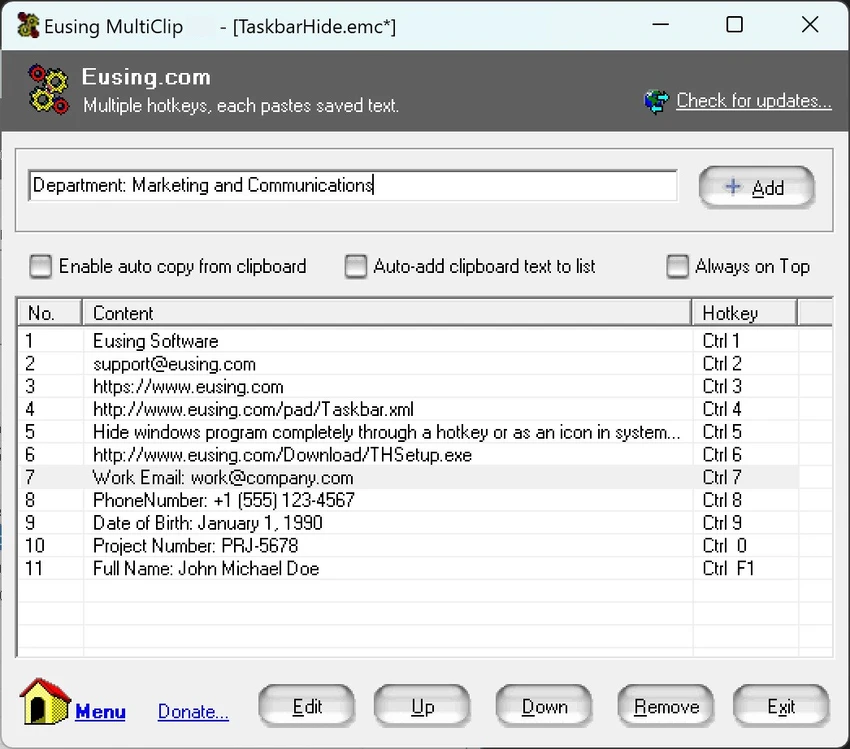
Eusing MultiClip features a simple interface that focuses on making text management quick and accessible. Adding a new snippet requires only a few steps, and assigning a custom hotkey is straightforward. Existing entries can be edited or removed whenever necessary, allowing users to keep their collection organized.

The software integrates smoothly into everyday workflows by enabling users to insert frequently used text without repeatedly copying and pasting it manually. Support for customizable keyboard shortcuts allows users to choose key combinations that best match their preferences while avoiding conflicts with other applications. The ability to automatically generate entries from clipboard content also helps reduce manual setup for users who frequently copy recurring text.

Who Should Use Eusing MultiClip?

  • Office workers handling repetitive text entry
  • Customer support representatives
  • Administrative professionals
  • Developers storing reusable code snippets
  • Content creators using recurring templates
  • Users who frequently complete online forms
  • Anyone looking to improve typing efficiency

Conclusion

Eusing MultiClip offers a practical solution for users who regularly type the same information throughout the day. By combining customizable hotkeys with persistent text storage, it reduces repetitive typing and speeds up common tasks such as completing forms, responding to emails, or inserting templates. Its lightweight design and straightforward interface make it easy to integrate into daily workflows without a steep learning curve.

Pros & Cons

✓

Pros

  • Easy-to-use interface
  • Customizable keyboard shortcuts
  • Stores frequently used text permanently
  • Supports automatic clipboard-based entries
  • Flexible hotkey combinations
  • Useful for forms, emails, documents, and chats
  • Lightweight productivity tool
✕

Cons

  • Focused primarily on text snippets rather than full clipboard history
  • Limited to text management features

Frequently Asked Questions

What is Eusing MultiClip used for?

Eusing MultiClip is a clipboard utility that stores frequently used text snippets and allows users to insert them quickly using customizable keyboard shortcuts.

Can I assign my own hotkeys?

Yes. The software lets users assign custom hotkeys, including function keys and combinations with Ctrl, Alt, or the Windows key, for quick access to saved text.

Does Eusing MultiClip remember saved snippets after restarting the computer?

Yes. The software uses persistent storage, so saved text snippets remain available after the system is restarted.

Can Eusing MultiClip automatically save clipboard content?

Yes. In addition to manually creating entries, the software can automatically generate new text entries from clipboard content.

What kinds of text can I save?

You can store virtually any text, including email addresses, phone numbers, document templates, social media captions, frequently used responses, code snippets, and other recurring text.

Is Eusing MultiClip suitable for business use?

Yes. The software can help improve productivity for office workers, customer support teams, administrators, developers, and anyone who frequently enters the same text throughout the day.

Recommended apps [Freeware]:
  • Smart Defrag 11.4.0.508 Smart Defrag logo a fast Windows disk defragmenter that optimizes hard drives, improves speed, and system stability.
  • Blank And Secure 8.41 Blank And Secure logo a portable Windows tool that securely deletes files by overwriting data to prevent recovery.
  • FTP Rush 3.6.7 FTP Rush logo cross-platform FTP/SFTP and cloud storage client supporting server-to-server transfers, scripting, and multi-protocol file management
  • MEmu Android Emulator 9.5.5.1 MEmu Android Emulator logo Play Android games and run mobile apps on Windows with MEmu Android Emulator, featuring customizable controls and multi-instance support
  • CustomFolder 4.0.0 CustomFolder logo customize folder icons with colors, emblems, and styles for better organization and visibility
  • Converseen 0.15.2.6-1 Converseen logo Convert, resize, compress, and edit multiple images at once with a free cross-platform batch image processing tool.
Recommended apps [Shareware]:
  • Wondershare Filmora 15.3.20.18660 Wondershare Filmora logo a powerful, user-friendly video editor with effects, transitions, and 4K support.
  • FlexiPDF 2025.420.0626 FlexiPDF logo Windows PDF editor for editing text, images, OCR scanning, and converting PDFs into Word and other formats
  • Freemake Video Converter 6.0.1.3 Freemake Video Converter logo Convert videos, burn DVDs, create slideshows, and edit media with Freemake Video Converter for Windows
  • Adobe Animate 2024 Adobe Animate logo Create interactive animations, characters, web content, games, and multimedia projects with professional drawing and publishing tools.
  • SecureCRT 9.7.3 Build 3916 SecureCRT logo Secure remote connections with SSH, Telnet, scripting, session management, and secure file transfer tools for professionals.
  • AppCheck Anti-Ransomware 3.1.45.8 AppCheck Anti-Ransomware logo Protect files from ransomware with real-time monitoring, automatic backups, threat detection, quarantine, and rollback capabilities.