S3 Browser logo

S3 Browser 13.3.5

  • User Rating:
    ★★★★★
    ★★★★★
    0.0 0Votes
  • Requirements:
    Windows
  • Version: 13.3.5
  • Latest updated: 3 weeks ago
  • License: Freemium  
  • Publisher: NetSDK Software
  • Size: 6 MB
× app stores

S3 Browser is a Windows-based client designed for managing Amazon S3 and Amazon CloudFront services. It provides a graphical interface for interacting with cloud storage, allowing users to upload, download, organize, and control files stored in Amazon S3 buckets. In practical use, S3 Browser simplifies cloud storage management by replacing command-line AWS operations with a structured desktop interface. It is especially useful for users who regularly work with large-scale data storage, backups, or content distribution workflows through CloudFront.

From my evaluation of its capabilities, the software focuses heavily on making cloud operations more accessible—whether you're managing a few buckets or working with millions of files in enterprise environments.

Features of S3 Browser

  • Upload and download files to and from Amazon S3.
  • Create, browse, and delete S3 buckets.
  • Share buckets with other Amazon S3 users.
  • Access buckets shared by other users.
  • Manage Amazon CloudFront distributions.
  • Support for multiple Amazon S3 accounts and S3-compatible storage providers.
  • Client-side encryption (AES-256) and compression.
  • High-speed multipart upload and download with pause/resume support.
  • Support for Amazon S3 versioning and version management.
  • Sync folders with “upload only new or changed files” option.
  • Full support for AWS Identity and Access Management (IAM).
  • Server-side encryption and secure transfer options.
  • Bucket policies, lifecycle rules, and access control management.
  • Support for large files up to 5 TB.
  • Command-line tools for automation.
  • Bandwidth throttling and proxy support.
  • Drag-and-drop file transfers from Windows Explorer.
  • CloudFront distribution management tools.
  • Support for static website hosting on S3.
  • Cross-account file copy and move operations.

Interface and Usability

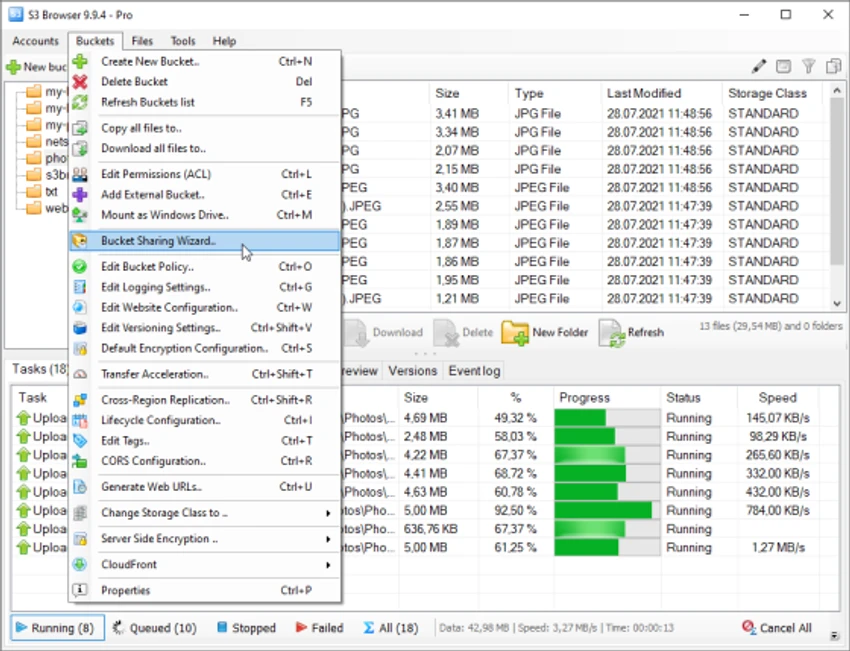
S3 Browser provides a structured, Windows-style interface centered around S3 buckets, making cloud storage feel more like local file management. The ribbon-style toolbar groups essential actions such as upload, permissions, and bucket management in a way that is easy to access.

During use, I found the tabbed layout particularly helpful when working across multiple buckets or tasks simultaneously. Features like drag-and-drop uploads and folder synchronization reduce friction for everyday operations, while more advanced tools—such as IAM and policy management—remain accessible without overwhelming the interface. Although it offers enterprise-grade functionality, the software maintains a relatively approachable workflow, especially for users familiar with Windows file managers.

Who Should Use S3 Browser?

S3 Browser is well suited for:

  • AWS developers and system administrators
  • DevOps engineers managing cloud infrastructure
  • Businesses using Amazon S3 for backups or storage
  • Content delivery teams using CloudFront
  • Users who prefer GUI-based cloud management over AWS CLI
  • Organizations managing large-scale file storage systems

Conclusion

S3 Browser is a powerful and practical tool for managing Amazon S3 and CloudFront services from a Windows desktop environment. It replaces complex cloud operations with a user-friendly interface while still supporting advanced AWS features like IAM, encryption, and lifecycle policies.

Pros & Cons

Pros

  • Easy-to-use graphical interface for Amazon S3
  • Supports uploads, downloads, and bucket management
  • Strong support for security features (IAM, encryption, policies)
  • Handles very large files (up to 5 TB)
  • Supports multi-account and S3-compatible storage
  • Built-in CloudFront management
  • Automation via command-line tools
  • Efficient handling of large file volumes

Cons

  • Focused specifically on AWS ecosystem (limited general cloud support)
  • Advanced features may require AWS knowledge

Frequently Asked Questions

What is S3 Browser used for?

S3 Browser is used to manage Amazon S3 storage and Amazon CloudFront distributions. It allows users to upload, download, organize, and control cloud files through a Windows-based graphical interface.

Does S3 Browser support multiple Amazon S3 accounts?

Yes. S3 Browser supports multiple Amazon S3 accounts and can also work with S3-compatible storage providers, making it useful for users managing multiple cloud environments.

Can S3 Browser handle large files?

Yes. The software supports very large file transfers, including files up to 5 TB, using high-speed multipart upload and download technology.

Does S3 Browser support encryption?

Yes. It supports both client-side AES-256 encryption and Amazon S3 server-side encryption, helping secure data during storage and transfer.

Can I automate tasks in S3 Browser?

Yes. S3 Browser includes command-line tools that allow users to automate repetitive tasks such as uploads, downloads, and synchronization operations.

What are the system requirements for S3 Browser?

According to the available information, S3 Browser supports Windows 7 SP1, Windows 8.1, Windows 10, Windows 11, and Windows Server 2008 R2 SP1 through Windows Server 2025.

Recommended apps [Freeware]:
  • EarthTime 6.33.7 EarthTime logo displays world clocks, weather, and local times for 120,000+ cities with customizable alarms and maps.
  • ToDoList 9.2.4.0 ToDoList logo customizable task manager for Windows with subtasks, reminders, notes, tracking, and project tools
  • VirtualBox 7.2.12 VirtualBox logo Run multiple operating systems on one PC with VirtualBox, a free open-source virtualization platform for Windows
  • Mp3tag 3.35.1 Mp3tag logo Edit, organize, and manage audio tags easily with Mp3tag. Supports MP3, FLAC, M4A, WMA, and online tag lookup
  • CreateInstall 8.11.2 CreateInstall logo Build customizable Windows installers with CreateInstall, featuring scripting, flexible compression, and full install control
  • Resolume Arena 7.27.0 rev 14395 Resolume Arena logo Professional software for live video mixing, projection mapping, edge blending, and synchronized audiovisual performances.
Recommended apps [Shareware]:
  • Adobe After Effects 2026 Adobe After Effects logo advanced motion graphics, visual effects, compositing, and animation tools for creators.
  • MediaHuman YouTube to MP3 Converter 3.9.22 MediaHuman YouTube to MP3 Converter logo downloads audio from YouTube, SoundCloud, and other platforms in high-quality MP3 format
  • Jutoh 3.31.7 Jutoh logo Create, edit, and publish ebooks in multiple formats with Jutoh
  • QILING Disk Master Professional 8.8 QILING Disk Master Professional logo a backup and recovery tool for Windows offering system imaging, restore, and disk management
  • Argente Malware Cleaner 3.0.8.4 Argente Malware Cleaner logo Detect and remove malware with flexible scan modes, restore point creation, and an easy-to-use on-demand security scanner.
  • Blocker Web 1.1.5.0 Blocker Web logo Block distracting websites on Windows, manage blocked URLs, and stay focused with a lightweight website blocking utility.