Qmmp logo

Qmmp 2.3.3

  • User Rating:
    ★★★★★
    ★★★★★
    0.0 ★ 0Votes
  • Requirements:
    Windows
  • Version: 2.3.3
  • Latest updated: 2 weeks ago
  • License: Freeware  
  • Publisher: Qmmp
  • Size: 24 MB
× app stores

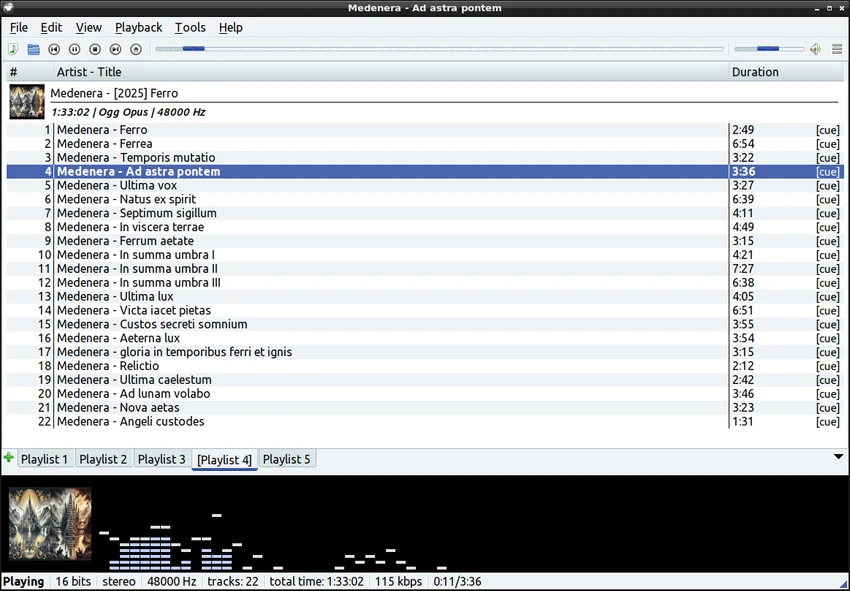
Qmmp is a free and open-source cross-platform audio player built with the Qt widget toolkit in C++. Designed for users who appreciate the classic Winamp experience, it delivers a familiar interface while supporting modern operating systems, including Windows, Linux, and FreeBSD. Rather than focusing on video playback or media libraries, Qmmp is dedicated to providing a fast and efficient music listening experience with extensive audio format compatibility.

The player supports a wide range of popular and lossless audio formats, making it suitable for both casual listeners and audio enthusiasts. In addition to common formats, it can handle tracker modules, MIDI files, CD Audio, and numerous retro chiptune formats. Support for FFmpeg and libsndfile also expands playback compatibility with many additional codecs.

Qmmp offers flexibility through multiple audio output systems depending on the operating system, including ALSA, PulseAudio, JACK, WaveOut, DirectSound, and WASAPI. Users can also choose from alternative user interfaces if they prefer a different appearance. Its lightweight design and straightforward functionality make it an appealing choice for anyone seeking a reliable desktop music player without unnecessary complexity.

Features of Qmmp

  • Free and open-source cross-platform audio player
  • Classic Winamp-inspired user interface
  • Built using the Qt widget toolkit
  • Official support for Windows, Linux, and FreeBSD
  • Alternative user interface options
  • Supports Ogg Vorbis
  • Supports Ogg Opus
  • Supports native FLAC and Ogg FLAC
  • Supports Musepack
  • Supports WavePack
  • Supports tracker module formats (MOD, S3M, IT, XM, and more)
  • Supports ADTS AAC
  • CD Audio playback
  • Supports WMA, Monkey's Audio, and additional FFmpeg-supported formats
  • Supports PCM WAVE and formats provided by libsndfile
  • MIDI playback
  • SID playback
  • Supports numerous chiptune formats including AY, GBS, GYM, HES, KSS, NSF, NSFE, SAP, SPC, VGM, VGZ, and VTX
  • Multiple audio output systems including OSS4, ALSA, PulseAudio, JACK, WaveOut, DirectSound, and WASAPI

Interface and Usability

Qmmp immediately feels familiar if you've ever used Winamp or XMMS. During testing, I found the interface to be clean, responsive, and focused entirely on music playback. The classic layout makes common controls easy to access without cluttering the screen with unnecessary features.

Navigation is straightforward, and the player launches quickly even on modest hardware. The availability of alternative user interfaces gives users some flexibility in how the application looks and feels. While Qmmp prioritizes simplicity, its broad format support means there is little need to install additional players for different types of audio files. Overall, the software provides an efficient listening experience for users who value performance and compatibility over modern streaming-oriented features.

Who Should Use Qmmp?

  • Users looking for a lightweight desktop music player
  • Fans of the classic Winamp interface
  • Linux, Windows, and FreeBSD users
  • Audiophiles with collections in multiple audio formats
  • Users who regularly play lossless audio files
  • Retro gaming enthusiasts who listen to tracker modules and chiptune music

Conclusion

Qmmp is an excellent choice for users who want a dedicated desktop audio player with broad format compatibility and a classic interface. Its lightweight design, extensive codec support, and cross-platform availability make it particularly appealing for users with large local music collections or specialized audio formats.

Pros & Cons

✓

Pros

  • Free and open-source
  • Lightweight and responsive
  • Familiar Winamp-inspired interface
  • Excellent support for numerous audio formats
  • Cross-platform compatibility
  • Multiple audio output options
  • Alternative interface styles available
✕

Cons

  • Focused exclusively on audio playback
  • Advanced features may vary depending on available libraries and operating system

Frequently Asked Questions

Is Qmmp free to use?

Yes. Qmmp is free and open-source software, allowing users to use and modify it under its open-source license.

Which operating systems does Qmmp support?

Qmmp officially supports Microsoft Windows, Linux, and FreeBSD.

What audio formats can Qmmp play?

Qmmp supports a wide range of formats, including FLAC, Ogg Vorbis, Opus, AAC, WMA, WAVE, Musepack, WavePack, MIDI, CD Audio, tracker modules, and many additional formats provided through FFmpeg and libsndfile.

Does Qmmp support lossless audio?

Yes. Qmmp supports several lossless audio formats, including native FLAC, Ogg FLAC, WavePack, and PCM WAVE.

Can Qmmp play retro game music formats?

Yes. Qmmp supports many chiptune and retro audio formats, including NSF, SPC, SID, VGM, VGZ, GBS, and several others commonly used in classic gaming.

Is Qmmp a good alternative to Winamp?

Yes. Qmmp is widely recognized as a lightweight open-source alternative to Winamp thanks to its similar interface, responsive performance, and strong focus on audio playback.

Recommended apps [Freeware]:
  • Adobe DNG Converter 18.4 Adobe DNG Converter logo Convert camera-specific RAW files to Adobe DNG format for improved compatibility and flexible photo workflows
  • PointerStick 7.17 PointerStick logo a virtual pointer to Windows desktops, helping presenters highlight mouse movements on large screens
  • AnyDesk 9.7.10 AnyDesk logo fast remote desktop access with secure connections, file sharing, and remote support for Windows users
  • Total Commander Ultima Prime 9.4 Total Commander Ultima Prime logo enhanced file manager package with plugins and tools for advanced file and system management on Windows.
  • Driver Magician Lite 5.82 Driver Magician Lite logo Backup, restore, update, and manage Windows device drivers with a utility designed for hardware maintenance and system recovery.
  • Wappalyzer 6.12.4 Wappalyzer logo Identify website technologies, CMS platforms, frameworks, analytics tools, and services with a powerful browser-based technology detector.
Recommended apps [Shareware]:
  • Secret Disk 2026 v324 Secret Disk logo create hidden, password-protected virtual drives to securely store private files on Windows
  • Fast Video Cataloger 10.0.4.0 Fast Video Cataloger logo Organize, search, browse, and manage large video collections with Fast Video Cataloger for Windows
  • Araxis Merge 2026.0 Araxis Merge logo a powerful file comparison and merging tool for developers, legal teams, and professionals handling version control
  • MobiKin Backup Manager for Android 2.0.30 MobiKin Backup Manager for Android logo Back up and restore Android data with one click using MobiKin Backup Manager for Android for Windows PCs
  • CMDebug 36.50.70 CMDebug logo batch scripting IDE and debugger for Windows, supporting CMD and TCC-RT script development
  • JWIZARD Cleaner 1.11.2.3 JWIZARD Cleaner logo Clean junk files, browser data, and temporary files with JWIZARD Cleaner to free up disk space and optimize Windows performance