


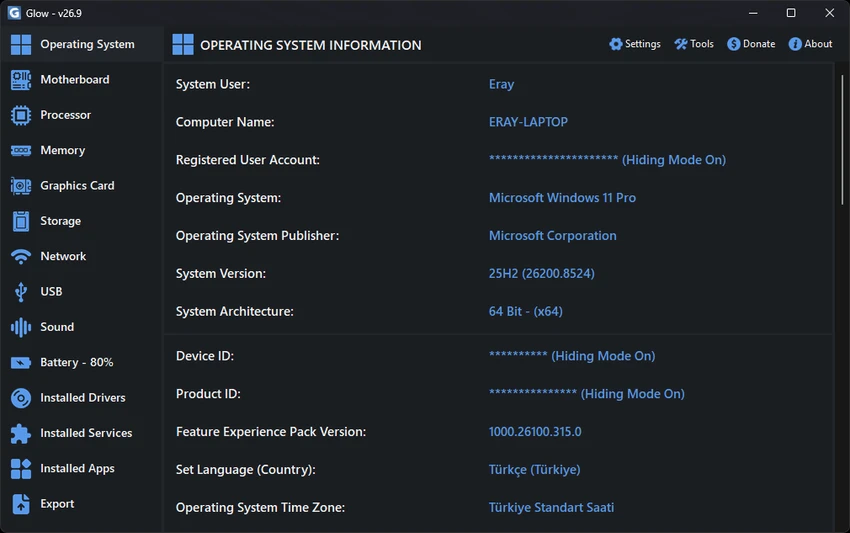

Glow is an advanced system analysis software designed to provide deep visibility into both hardware and software components of a Windows PC. Unlike standard system information tools, it explores low-level system architecture details, offering extensive technical data that is often hidden from typical utilities.
With a focus on clarity and depth, Glow presents complex system information in an organized interface, making it useful for both technical professionals and users who want to better understand their machine.
Overview
Glow acts as a comprehensive system diagnostic and analysis platform. It collects and displays detailed information about CPU, GPU, memory, storage, drivers, network interfaces, and installed software.
Beyond system reporting, it also includes built-in maintenance and diagnostic tools such as performance benchmarks, system repair automation, and network troubleshooting utilities. The software emphasizes local processing and privacy, ensuring all analysis remains on the user’s device.
Features of Glow
- Deep system analysis across hardware and software layers
- Detailed CPU, GPU, RAM, motherboard, and storage inspection
- Real-time system monitoring and performance insights
- Installed drivers, services, and application inventory
- Network diagnostics and connectivity monitoring tools
- Storage health and partition structure analysis
- Hardware-level details including BIOS, microcode, and cache hierarchy
- Portable application (no installation required)
- Local processing with no external data transmission (privacy-focused)
- Export system reports in TXT, HTML, or Markdown formats
- Built-in system repair tools (DISM & SFC automation)
- Cache cleanup and system junk removal utilities
- Benchmarking tools for CPU, RAM, and disk performance
- Monitor testing tools (dead pixel detection, color accuracy, pixel repair)
- Wi-Fi and system ID utility tools
- Multilingual support and modern UI design (Light/Dark themes)
Advanced Tools Menu
Glow includes a built-in suite for system maintenance:
- DISM & SFC Automation: Automated system file repair and image health management.
- Cache Cleanup: Instantly clear system, browser, and temporary junk files.
- Performance Benchmarks: High-precision CPU, RAM, and Disk performance testing modules.
- Screen Overlay: Real-time system monitoring overlay for power users.
- Network Suite: DNS Test Tool and Network Troubleshooting for connectivity issues.
- Security & Access: Wi-Fi Password Showing Tool and System ID Generation.
- Connectivity Tools: Bluetooth Information utilities.
- Monitor Test Suite:
- Dead Pixel Test: Identify faulty pixels across various color ranges.
- Dynamic Color Range: Test your monitor's color depth and accuracy.
- Stuck Pixel Repair: Advanced tool designed to revive unresponsive pixels.
Conclusion
Glow is a powerful and highly detailed system analysis tool that provides deep insight into every layer of a Windows PC. Its combination of hardware diagnostics, performance tools, and system repair features makes it especially valuable for advanced users.


