


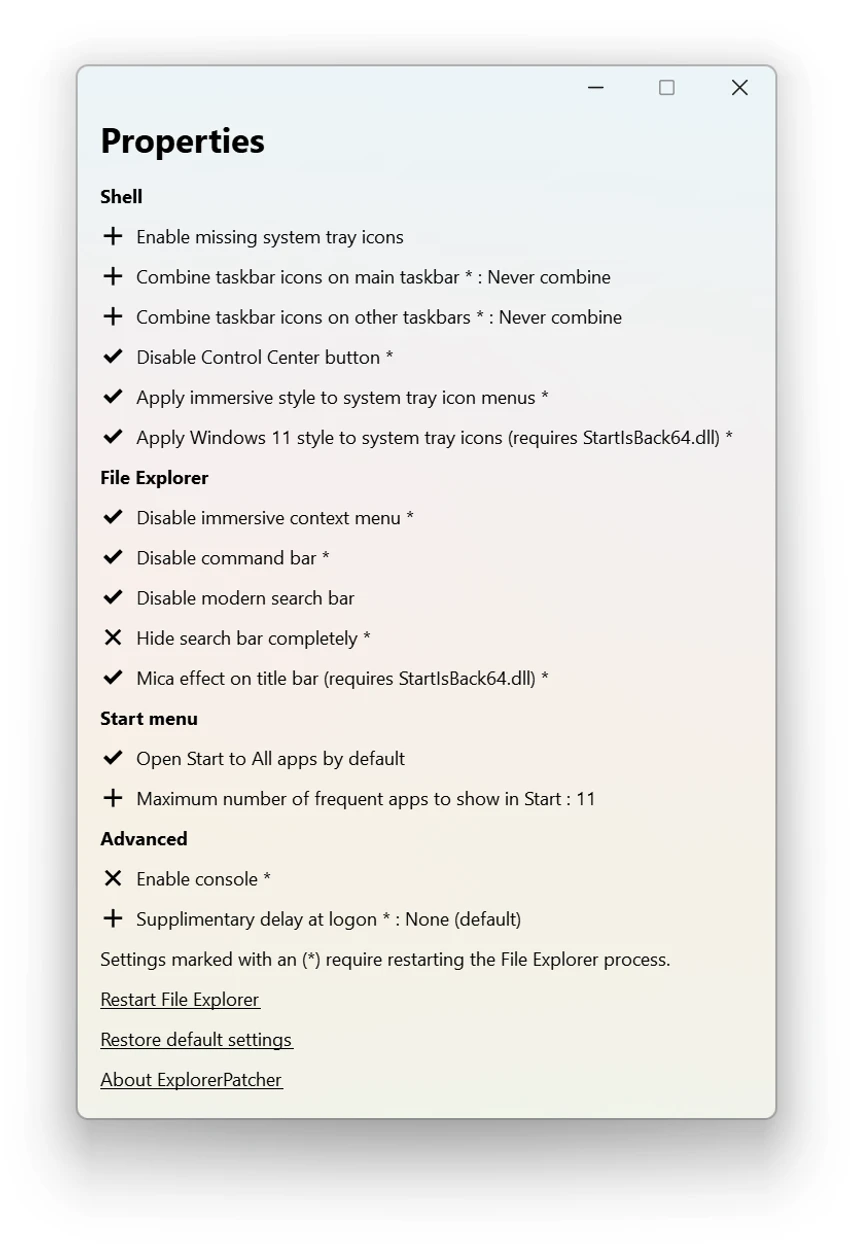

ExplorerPatcher is a system-level customization tool designed to restore the classic Windows 10 user interface experience on Windows 11. It modifies Windows Explorer and shell behavior to bring back familiar menus, taskbar functionality, and navigation patterns that many users miss in the newer operating system. During my experience with it, I found that it focuses heavily on restoring usability rather than introducing new features.
Features of ExplorerPatcher
- Restores Windows 10-style taskbar on Windows 11
- Reverts classic Start menu behavior and layout options
- Restores legacy power user (Win+X) menu behavior
- Enables classic “All apps” list access
- Option to hide or adjust Windows 11 search bar
- Customizable Explorer shell behavior
- Configuration GUI accessible via taskbar properties
- Lightweight patch-based system modification (DLL-based)
- Works by modifying Windows Explorer behavior
- Designed for Windows 11 (with some Windows 10 compatibility noted)
User Experience
After applying ExplorerPatcher, the most noticeable change is the return of a familiar Windows 10-style workflow. The taskbar and Start menu behave more traditionally, reducing the extra steps that some users feel are required in Windows 11’s redesigned interface. The configuration interface is accessible through the taskbar properties menu, which makes it relatively easy to adjust settings without needing to manually edit system files. I appreciated having the ability to fine-tune features like search visibility, menu behavior, and taskbar layout.
Because ExplorerPatcher works at the system shell level, changes feel deeply integrated into the operating system. However, this also means users should proceed carefully, as it modifies core Windows behavior. Setup involves placing components into the system directory and restarting Windows Explorer. Once configured, the system loads additional components and applies the chosen settings after restart. While it is effective at restoring a familiar workflow, it is clearly designed for users who strongly prefer the Windows 10 interface model over Windows 11’s redesigned experience.
Who Should Use ExplorerPatcher?
- Users who prefer the Windows 10 interface
- Windows 11 users frustrated with taskbar changes
- Power users customizing system UI behavior
- Users wanting classic Start menu and Explorer behavior
- Enthusiasts modifying Windows shell functionality
Conclusion
ExplorerPatcher is a highly effective tool for users who prefer the classic Windows experience and want to restore familiar taskbar and Explorer behavior on Windows 11. While it offers strong customization and usability improvements, it also modifies core system components, so it should be used with awareness of potential stability considerations. For users committed to a Windows 10-style workflow, ExplorerPatcher is one of the most practical solutions available.


