


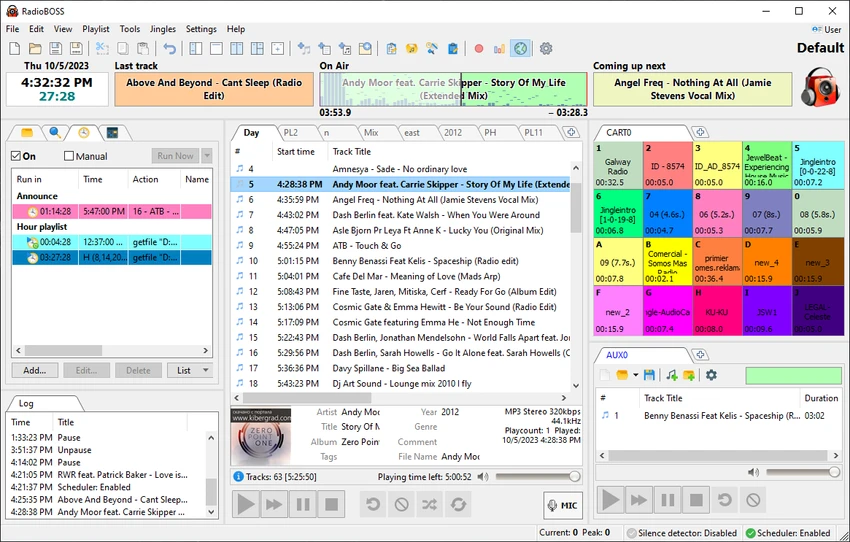

RadioBOSS is a professional radio automation and audio scheduling software designed for continuous, unattended broadcasting in both internet and traditional radio environments. It enables users to create fully automated playlists that combine music, advertisements, jingles, voice tracks, and announcements using templates, rotation rules, and time-based scheduling. This makes it suitable for radio stations as well as businesses such as retail stores, clubs, hotels, gyms, and other venues that require constant background music.
The software includes a powerful music library system with tagging, filtering, and usage statistics, helping users organize large audio collections efficiently. It also provides automatic playlist generation for long-duration programming, along with audio processing tools such as normalization, crossfading, silence trimming, and mixing enhancements for smooth playback.
RadioBOSS supports internet streaming through Shoutcast, Icecast, and Windows Media servers, and can also function as a standalone streaming solution. Additional features include advertisement scheduling, detailed reporting, cart wall instant playback, microphone input support, and remote control via API. Overall, it is a complete automation platform for reliable, professional audio broadcasting with minimal manual operation.
Features of RadioBOSS
- Professional radio automation and playback system.
- Supports all major audio formats.
- Advanced playlist generator with templates and scheduling rules.
- Advertisement scheduling with customizable commercial breaks.
- Music library management with tagging and search tools.
- Automatic playlist creation for long-duration broadcasts.
- Crossfading, volume leveling, and silence trimming.
- Built-in 12-band equalizer and audio compressor.
- Support for Winamp and VST plugins.
- Internet streaming support (Shoutcast, Icecast, Windows Media).
- Integrated streaming server functionality.
- Cart wall for instant audio playback.
- Microphone and line-in input support.
- Report generation for playback history and analytics.
- Export reports in formats such as PDF and XLS.
- Remote API control for advanced automation.
- User profiles and access control management.
- Metadata export via FTP, HTTP, XML, or text files.
- Support for multichannel audio outputs (5.1, 7.1 systems).
Interface and Usability
RadioBOSS provides a structured and function-rich interface designed for professional broadcast environments. From my perspective, it is clearly built for operational reliability rather than simplicity, with multiple panels dedicated to playlists, scheduling, and library management.
While the system may feel complex at first, especially for beginners, its workflow becomes highly efficient once configured. The automation tools significantly reduce manual intervention, allowing users to run continuous programming with minimal oversight. The music library and playlist generator are particularly powerful, enabling fast creation of structured radio programming with advertisements, jingles, and scheduled events.
Who Should Use RadioBOSS?
- Internet radio stations and broadcasters.
- FM/terrestrial radio operators.
- Clubs, bars, gyms, and retail stores.
- Hotels and hospitality venues.
- DJs managing automated playlists.
- Businesses needing continuous background music systems.
System Requirements
- Windows 7 (SP1+)
- Windows 8.1
- Windows 10
- Windows 11
- Windows Server 2012 R2 / 2016 / 2019
- 32-bit and 64-bit support
Conclusion
RadioBOSS is a powerful and professional radio automation platform designed for continuous audio broadcasting and playlist management. With its advanced scheduling, streaming support, and automation features, it is well-suited for both traditional radio stations and modern internet-based broadcasters.


