


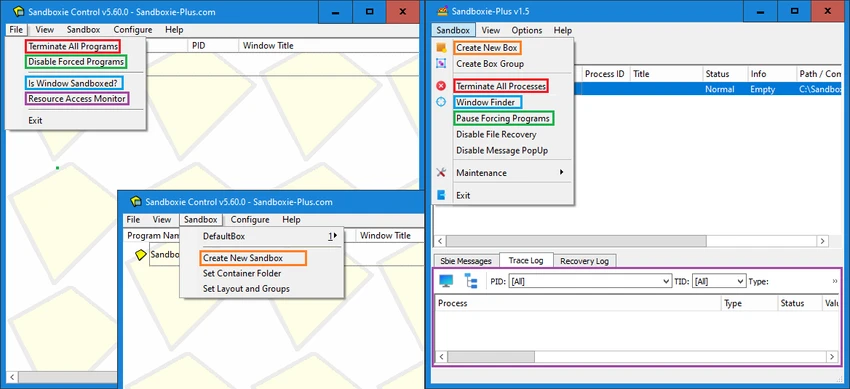

Sandboxie-Plus is a security-focused Windows utility that allows users to run applications in an isolated environment known as a “sandbox.” This prevents programs from making permanent changes to the system, offering a safe way to test software, browse websites, or analyze suspicious files. It is a modern fork of the original Sandboxie project, redesigned with improved security fixes, a new interface, and expanded functionality for advanced users.
Sandboxie-Plus creates a controlled environment where applications operate separately from the main operating system. Any changes made inside the sandbox—such as file modifications, registry edits, or system-level actions—are contained and can be discarded afterward. This makes it particularly useful for security testing, malware analysis, and running untrusted software safely. The project also addresses security vulnerabilities found in older official releases of Sandboxie, improving overall protection against sandbox escape and privilege escalation risks.
A key improvement in Sandboxie-Plus is its modern Qt-based interface (SandMan.exe), which replaces the older legacy control panel while still optionally supporting it for users who prefer the classic design.
Features of Sandboxie-Plus
- Run applications in isolated sandbox environments
- Prevent permanent system changes from sandboxed programs
- Enhanced security fixes addressing known vulnerabilities
- Modern Qt-based interface (SandMan.exe)
- Optional legacy UI (SbieCtrl.exe) still available
- Protection against sandbox escape and privilege escalation
- Supports application testing and safe browsing
- Useful for malware analysis and software experimentation
- API call logging and process analysis capabilities (advanced use)
- Designed as a foundation for future application virtualization features
Sandboxie-Plus offers a more technical experience compared to typical consumer software. Once configured, users can launch programs inside a sandbox with a clear separation from the main system. The modern interface improves usability compared to earlier versions, making sandbox management more accessible. However, it still requires some understanding of system behavior, especially for advanced use cases like security testing or debugging. For everyday users, it works quietly in the background while ensuring that any risky activity remains contained and reversible.
Who Should Use Sandboxie-Plus?
- Security-conscious users
- Malware analysts and IT professionals
- Users testing untrusted software
- Developers debugging applications
- Anyone wanting a safer browsing or testing environment
Conclusion
Sandboxie-Plus is a powerful sandboxing tool that enhances system security by isolating applications from the underlying Windows environment. With improved security fixes, a modern interface, and strong isolation capabilities, it provides a reliable way to test and run potentially risky software safely.


