Serato DJ Pro logo

Serato DJ Pro 4.0.8

  • User Rating:
    ★★★★★
    ★★★★★
    0.0 ★ 0Votes
  • Requirements:
    Windows
  • Version: 4.0.8
  • Latest updated: 3 weeks ago
  • License: Free Trial  
  • Publisher: Serato
  • Size: 1.6 GB
× app stores

Serato DJ Pro is one of the most widely used professional DJ applications, trusted by beginners and internationally recognized performers alike. Built for live performance, club events, festivals, and home studios, it provides a stable platform for mixing music while supporting an extensive range of professional DJ hardware.

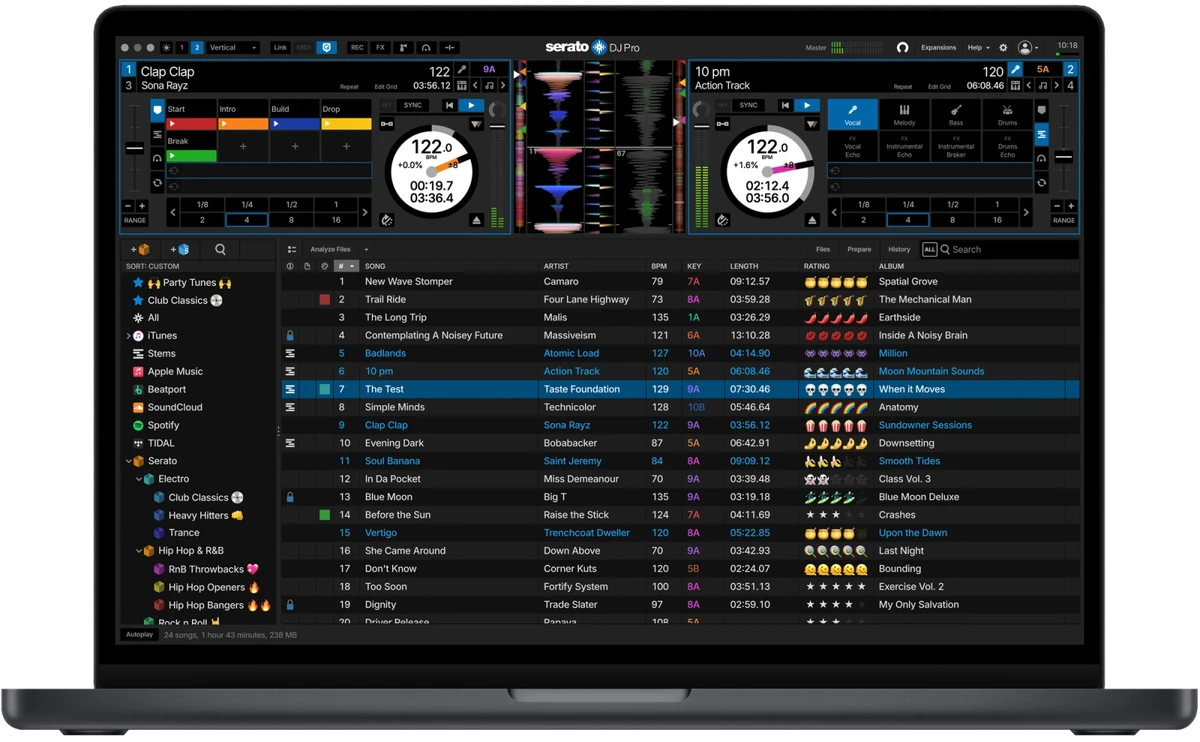
One of its standout features is Serato Stems, which enables real-time separation of vocals, drums, bass, and melody. This allows DJs to create acapellas, instrumentals, mashups, and seamless transitions without preparing tracks in advance. Beyond local music libraries, Serato DJ Pro also supports music streaming services, giving users access to millions of tracks directly from the software. Combined with extensive hardware compatibility and reliable performance, it remains a top choice for professional DJs.

Features of Serato DJ Pro

  • Professional DJ software for live performances
  • Serato Stems for real-time track separation
  • Isolate:
    • Vocals
    • Melody
    • Bass
    • Drums
  • Create instant acapellas and instrumentals
  • Build live mashups and smooth transitions
  • Stems Pad FX for creative performance effects
  • Stream millions of songs directly within the software
  • Official support for more than 90 professional DJ controllers and mixers
  • Tight hardware integration for optimized performance
  • Designed for reliable live performances
  • Suitable for live streaming DJ sets
  • Optimized for multi-deck mixing and demanding performance environments

Interface and Usability

Serato DJ Pro features a professional interface that balances comprehensive functionality with an organized layout. Essential controls for decks, waveforms, effects, and libraries are easy to access, allowing DJs to focus on their performance instead of navigating complex menus. The integration with supported hardware creates a seamless workflow, where software and controller functions work together naturally. The addition of Stems controls is well integrated into the interface, making live remixing accessible without interrupting a performance. Although first-time users may need time to become familiar with advanced DJ workflows, the interface remains approachable for anyone with basic mixing experience.

Who Should Use Serato DJ Pro?

  • Professional DJs
  • Club and festival performers
  • Mobile DJs
  • Wedding and event DJs
  • Music producers creating live mashups
  • DJs who use compatible controllers and mixers
  • Content creators who livestream DJ performances

Conclusion

Serato DJ Pro is a professional-grade DJ application that combines exceptional stability, extensive hardware support, and innovative performance tools in one package. Features like Serato Stems and integrated music streaming provide creative flexibility, while its reliable performance makes it suitable for everything from home practice to large live events.

Pros & Cons

✓

Pros

  • Industry-leading reliability for live performances
  • Powerful real-time Stems separation
  • Excellent hardware compatibility
  • Access to millions of streaming tracks
  • Professional workflow for live mixing
  • Supports creative mashups and transitions
  • Suitable for live streaming setups
✕

Cons

  • Advanced features may require compatible hardware
  • High-performance tasks benefit from more powerful computers
  • New DJs may need time to learn professional workflows

Frequently Asked Questions

What is Serato DJ Pro used for?

Serato DJ Pro is professional DJ software used for mixing music, performing live DJ sets, creating mashups, and managing digital music libraries.

What are Serato Stems?

Serato Stems is a feature that separates a song into vocals, melody, bass, and drums in real time, allowing DJs to remix tracks during live performances.

Does Serato DJ Pro support DJ controllers?

Yes. Serato DJ Pro officially supports more than 90 DJ controllers, mixers, and other compatible hardware from leading manufacturers.

Can I stream music in Serato DJ Pro?

Yes. The software allows DJs to stream millions of tracks directly within the application, expanding access to music without relying solely on local files.

Is Serato DJ Pro suitable for beginners?

Yes. Beginners can learn the basics of DJ mixing with Serato DJ Pro, while its advanced tools provide plenty of room for growth as skills improve.

Can I use Serato DJ Pro for live streaming?

Yes. Serato DJ Pro supports workflows for live streaming DJ performances and is designed to handle demanding performance scenarios.

Recommended apps [Freeware]:
  • RapidRAW 1.5.9 RapidRAW logo a lightweight, GPU-accelerated RAW photo editor with advanced masking, non-destructive editing, and AI tools
  • BitDefender Antivirus Free Edition 27.0.60.339 BitDefender Antivirus Free Edition logo real-time protection against malware, phishing, and viruses for Windows users
  • DoesNotBelong 11.8.3 DoesNotBelong logo free malware removal and Windows repair tool that complements antivirus software with on-demand scanning and system cleanup
  • FreedomGPT 3.0.4 FreedomGPT logo AI chatbot with offline support, local privacy options, and access to modern AI models
  • SecretDNS 3.9.2 SecretDNS logo Improve online privacy with encrypted DNS requests and SNI protection while reducing access issues through secure network features.
  • NETworkManager 2026.7.7.0 NETworkManager logo Manage network connections, diagnose issues, scan devices, and access essential troubleshooting tools with this open-source utility.
Recommended apps [Shareware]:
  • Wipe Professional 2026.08 Wipe Professional logo a Windows cleanup tool that removes junk files, cache, cookies, and browsing traces to improve privacy and performance
  • EF File Catalog 26.05 EF File Catalog logo Catalog disks, folders, archives, and media for fast offline browsing, searching, and file organization
  • TubeMate 6.4.9 TubeMate logo downloads online videos, converts media formats, extracts audio, and manages high-quality video downloads
  • Sejda PDF Desktop 7.9.6 Sejda PDF Desktop logo user-friendly PDF editor for merging, editing, compressing, and signing PDFs across Windows, macOS, and Linux
  • F-Rename 3.001 F-Rename logo Rename multiple files in seconds with F-Rename using custom patterns, dates, numbers, and MP3 metadata on Windows
  • WinTools.net Professional 26.7.1 WinTools.net Professional logo Optimize Windows performance with tools for cleaning files, managing startup items, adjusting settings, and improving system privacy.