LosslessCut logo

LosslessCut 3.69.0

  • User Rating:
    ★★★★★
    ★★★★★
    0.0 ★ 0Votes
  • Requirements:
    Windows
  • Version: 3.69.0
  • Latest updated: 2 weeks ago
  • License: Open Source  
  • Publisher: Mikael Finstad
  • Size: 139 MB
× app stores

LosslessCut is a lightweight video editing application designed for quickly cutting, trimming, and exporting video clips without reducing the original quality. Unlike traditional video editors that usually decode and re-encode files during export, LosslessCut uses a different approach by cutting video segments without performing full encoding operations.

The software uses FFmpeg, which is included with the application, to handle the video processing tasks. Users can load a video file, select the desired start and end points, and export the chosen section as a new video file. The original video remains unchanged, while the edited version is created separately in the same folder as the source file.

LosslessCut supports a variety of commonly used formats and codecs, including MP4, MOV, WebM, MKV, OGG, WAV, MP3, AAC, H264, Theora, VP8, and VP9. However, because it is based on Chromium and uses an HTML5 video player, not every format supported by FFmpeg may be available for playback within the application. The software is mainly focused on speed and simplicity rather than providing advanced editing features. It is designed for users who need a fast way to remove unwanted sections, extract clips, or create shorter versions of videos while preserving quality.

Features of LosslessCut

  • Lossless Video Cutting: Trim and export video sections without re-encoding the original file.
  • Fast Video Processing: Uses FFmpeg to perform cutting operations efficiently.
  • Multiple Format Support: Works with popular formats such as MP4, MOV, WebM, MKV, OGG, WAV, and MP3.
  • Simple Cut Selection: Mark start and end points, then export the selected segment.
  • Original File Protection: The source video is not modified during editing.
  • Snapshot Capture: Capture images from video frames and save them separately.
  • Keyboard Shortcuts: Control playback, set cut points, and export clips using shortcut keys.
  • Metadata Preservation: Maintains EXIF data during export.
  • Video Segment Export: Creates new video files in the same folder as the original video.

Interface and Usability

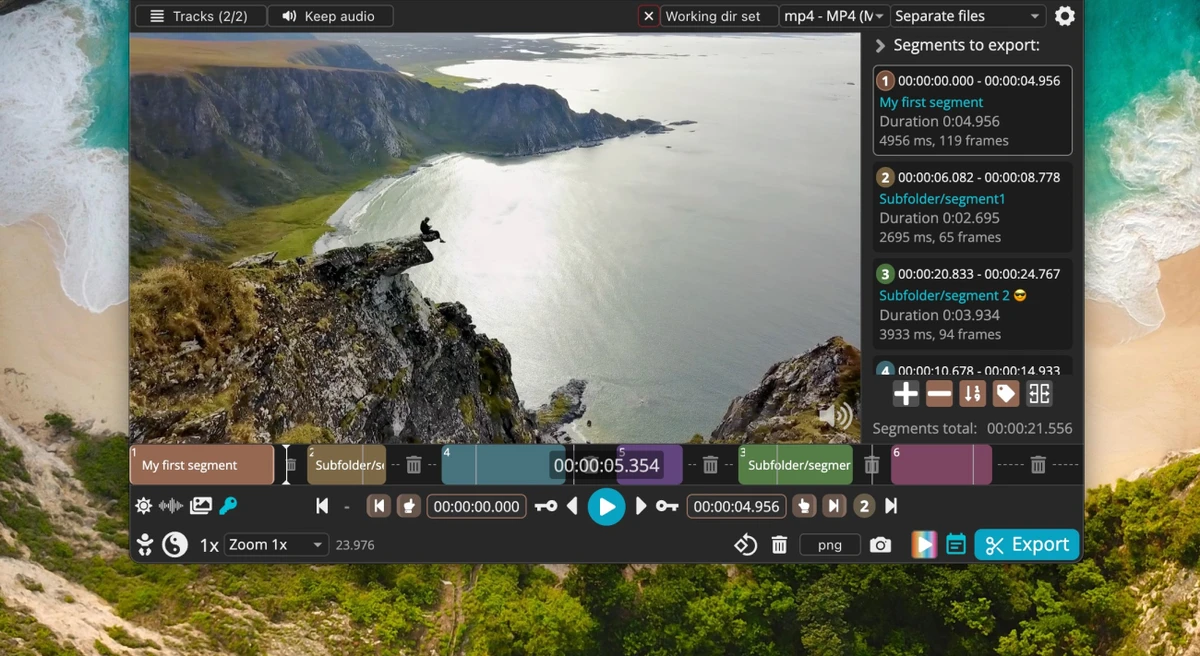
LosslessCut focuses on a simple workflow built around quick video trimming. Users can drag and drop a video file into the player or open one manually, select the beginning and ending points of the section they want to keep, and export the result.

The interface is designed for speed rather than complex editing. There are no unnecessary editing layers or complicated timelines, making it suitable for users who only need basic cutting functions. The playback controls and keyboard shortcuts provide a practical way to navigate through videos and select precise sections.

Because the software focuses specifically on trimming and extraction, users looking for advanced editing tools such as transitions, effects, or multi-track editing may find it limited. Additionally, cutting accuracy can vary around keyframes because the application avoids full re-encoding. Overall, LosslessCut provides an efficient experience for users who need quick video trimming with minimal processing time.

Who Should Use LosslessCut?

  • Users who need to quickly trim videos without quality loss
  • Content creators who frequently extract clips from longer recordings
  • Users working with large video files who want faster editing
  • Anyone looking for a simple alternative to full-featured video editors
  • Users who need a lightweight tool for basic video cutting tasks

Conclusion

LosslessCut is an excellent choice for users who need a fast and efficient way to trim videos without sacrificing quality. Its lossless cutting approach, powered by FFmpeg, makes it especially useful for handling large video files where traditional editing software may take longer due to re-encoding.

Pros & Cons

✓

Pros

  • Cuts videos without re-encoding or quality reduction
  • Fast processing compared with traditional video editors
  • Simple and focused interface
  • Supports many popular video and audio formats
  • Keeps original files unchanged
  • Includes useful keyboard shortcuts for faster editing
✕

Cons

  • Limited to basic cutting and extraction tasks
  • Cutting accuracy can vary around keyframes
  • Not designed for advanced video editing workflows
  • Some FFmpeg-supported formats may not play due to HTML5 player limitations

Frequently Asked Questions

What is LosslessCut used for?

LosslessCut is used for quickly cutting and trimming video files without re-encoding them. It allows users to select specific sections of a video and export them as new files while keeping the original video unchanged.

Does LosslessCut reduce video quality?

No. LosslessCut is designed to cut videos without decoding or encoding the entire file, which helps preserve the original quality.

What video formats does LosslessCut support?

LosslessCut supports many common formats and codecs, including MP4, MOV, WebM, MKV, OGG, WAV, MP3, AAC, H264, Theora, VP8, and VP9. However, playback support may depend on the built-in HTML5 player.

Can LosslessCut edit videos like a professional video editor?

LosslessCut focuses on cutting and extracting video segments rather than advanced editing. It does not provide features such as effects, transitions, or complex timeline editing.

How do I cut a video using LosslessCut?

Users can open a video file, select the start and end points of the desired section, and export the selected segment. The exported file is created separately while the original video remains unchanged.

Does LosslessCut support keyboard shortcuts?

Yes. LosslessCut includes keyboard shortcuts for playback control, moving through the video, setting cut points, exporting selections, and capturing snapshots.

Recommended apps [Freeware]:
  • Bulk Crap Uninstaller 6.2 Bulk Crap Uninstaller logo a free Windows tool that quickly removes multiple applications and cleans leftover files
  • PilotEdit 21.0.0 PilotEdit logo a powerful text and hex editor for large files with FTP support, scripting, encryption, and search tools
  • Winstep Nexus 26.6 Winstep Nexus logo customizable desktop dock for Windows with app launch shortcuts, widgets, and multi-monitor support
  • Image Sort 2.14.7 Image Sort logo a free, open-source photo organizer that helps you quickly sort, move, rename, and delete images
  • Wagnardsoft Tools 1.0.8.2 Wagnardsoft Tools logo Clean temporary files, repair Windows system files, and maintain your PC with Wagnardsoft Tools (WTools)
  • Multi Commander 16.1 Build 3190 Multi Commander logo Manage files faster with a dual-panel, multi-tab file manager offering advanced tools for sorting, searching, scripting, and archives.
Recommended apps [Shareware]:
  • Charles 5.2.0 Charles logo HTTP proxy tool for web debugging, allowing developers to inspect, modify, and analyze network traffic in real time
  • Cubase Pro 15.0.30 Cubase Pro logo a professional DAW for recording, composing, editing, mixing, and music production
  • NOD32 Antivirus 19.2.7.0 NOD32 Antivirus logo Protect your PC with ESET NOD32 Antivirus, offering real-time malware defense, fast scans, and low system impact
  • Offline Map Maker 8.388 Offline Map Maker logo download, customize, and view offline maps from Google and Bing with flexible control and built-in viewer
  • Actual Multiple Monitors 8.15.4 Actual Multiple Monitors logo multi-monitor setups with taskbars, window control, gaming tools, wallpapers, and desktop management features
  • Chris-PC RAM Booster 7.26.0706 Chris-PC RAM Booster logo manages Windows memory usage, optimizes RAM performance, and helps improve application responsiveness