


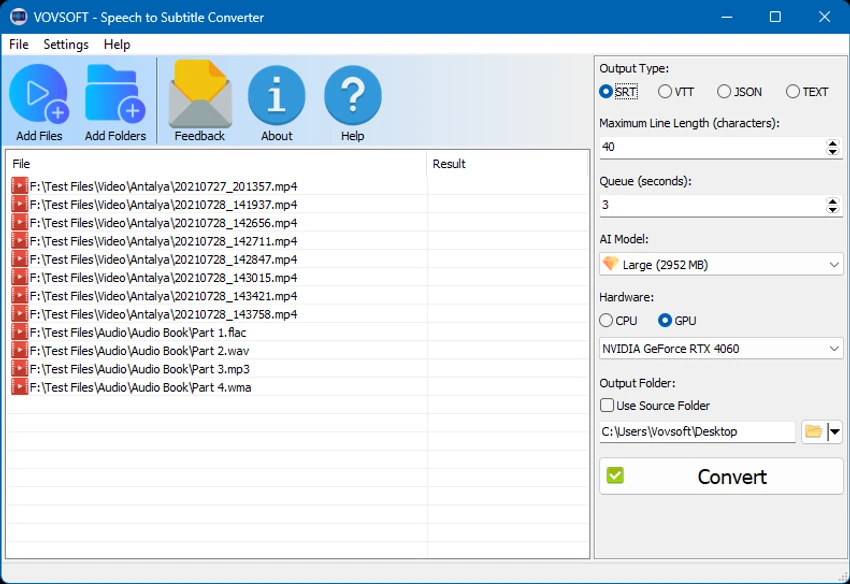

Vovsoft Speech to Subtitle Converter is an automatic transcription tool designed to convert spoken audio and video content into synchronized subtitle files. The software uses speech recognition technology to analyze voice recordings and generate text with matching timestamps, helping users create subtitles without manually transcribing every word.
The application supports more than 50 languages, making it suitable for creating subtitles for international content, lectures, presentations, interviews, and recorded speeches. Instead of spending hours listening and typing manually, users can process their media files and generate subtitle tracks automatically.
Vovsoft Speech to Subtitle Converter supports common subtitle formats including SRT and VTT. SRT is widely used for movies and online videos, while VTT is commonly associated with platforms such as YouTube and Zoom transcriptions. The software also supports a wide range of audio and video formats, allowing users to extract spoken content directly from media files.
Supported audio formats include MP3, FLAC, WAV, and OGG, while video compatibility includes MP4, WEBM, MKV, AVI, MPEG, MOV, WMV, FLV, and TS files. The program automatically extracts speech from video files before converting it into subtitle text. With its automated workflow and broad format support, Vovsoft Speech to Subtitle Converter provides a convenient solution for users who need to create captions and subtitles efficiently.
Features of Vovsoft Speech to Subtitle Converter
- Convert speech from audio files into subtitles
- Generate subtitles from video files
- Support for more than 50 languages
- Automatically synchronize subtitles with timestamps
- Create SRT subtitle files
- Create VTT subtitle files
- Convert MP3 files to subtitles
- Convert FLAC files to subtitles
- Convert WAV files to subtitles
- Convert OGG files to subtitles
- Convert MP4, WEBM, MKV, AVI, MPEG, MOV, WMV, FLV, and TS videos to subtitles
- Automatically extract speech from video files
- Useful for creating captions and closed subtitles
Interface and Usability
Vovsoft Speech to Subtitle Converter focuses on a simple conversion workflow. Users can provide supported audio or video files, and the application processes the spoken content to generate subtitle files with synchronized timestamps.
The software reduces the need for manual transcription by automatically converting speech into text. Its support for common media and subtitle formats makes it practical for users working with different types of recordings, from audio files to full video projects. The application is especially useful for users who need subtitles quickly and want a more efficient alternative to manually listening and typing transcripts.
Who Should Use Vovsoft Speech to Subtitle Converter?
- Content creators adding captions to videos
- YouTubers creating subtitle files
- Teachers and students working with recorded lectures
- Professionals transcribing speeches and presentations
- Video editors who need subtitle generation
- Users working with multilingual audio and video content
Conclusion
Vovsoft Speech to Subtitle Converter offers a convenient way to transform spoken audio and video into synchronized subtitle files. With support for multiple languages, common media formats, and widely used subtitle standards like SRT and VTT, it provides a practical solution for creating captions efficiently.


