ConfigureDefender logo

ConfigureDefender 4.1.1

  • User Rating:
    ★★★★★
    ★★★★★
    0.0 0Votes
  • Requirements:
    Windows
  • Version: 4.1.1
  • Latest updated: 1 week ago
  • License: Freeware  
  • Publisher: AndyFul
  • Size: 2.2 MB
× app stores

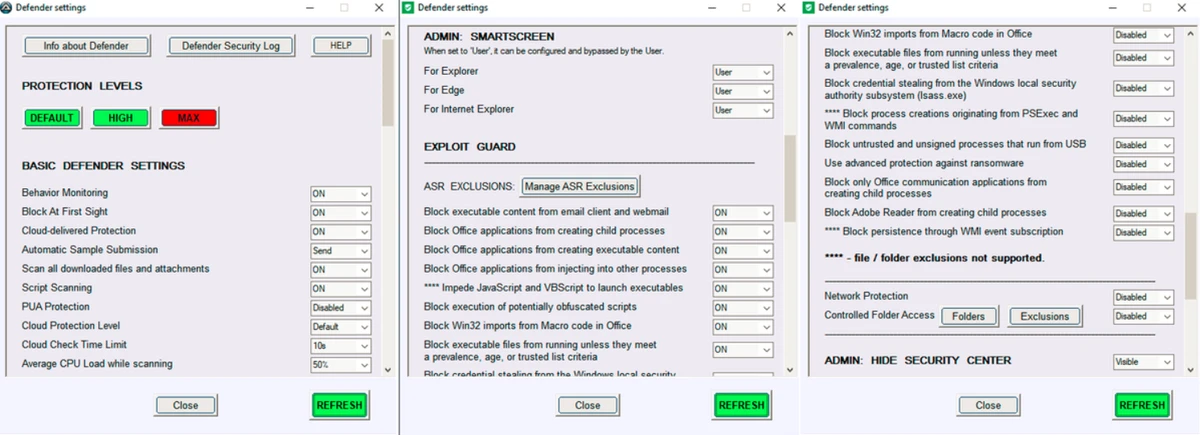
ConfigureDefender is a lightweight Windows utility designed to give users deeper control over Microsoft Defender settings. It allows fine-tuning of real-time protection, behavior monitoring, and other security features, making it especially useful for users who rely on Microsoft Defender as their primary antivirus solution.

Overview of ConfigureDefender

ConfigureDefender is a configuration tool for Microsoft Defender on Windows 10 and Windows 11. Instead of navigating through multiple system menus, it provides a centralized interface for adjusting key security settings. The tool includes preset security profiles for users who are unsure how to configure Defender manually, while still allowing full customization for advanced users. Although the interface is simple and not modern in design, it focuses on accessibility and direct control over security features.

Features of ConfigureDefender

  • Adjust Microsoft Defender settings from a single interface
  • Control real-time protection and behavior monitoring
  • Enable or disable download and script scanning
  • Configure Potentially Unwanted Application (PUA) protection
  • Includes preset security profiles for quick setup
  • Fully customizable advanced configuration options
  • Designed for Windows 10 and Windows 11
  • Lightweight utility with minimal system impact

User Experience

ConfigureDefender is functional rather than visually polished. The interface prioritizes clarity and direct access to security settings instead of modern UI design. Users can quickly switch between preset configurations or manually adjust specific protection features. This makes it especially helpful for users who want stronger security settings than the default Windows configuration without manually digging through system menus. It is most effective when used by users who already understand basic antivirus concepts or want more control over how Microsoft Defender behaves.

Who Should Use ConfigureDefender?

  • Users relying on Microsoft Defender as their main antivirus
  • Advanced Windows users who want fine-tuned security control
  • IT administrators managing security policies manually
  • Users who want stronger protection than default settings
  • People who prefer quick access to security configuration options

Conclusion

ConfigureDefender is a practical utility for users who want more control over Microsoft Defender without navigating deep system settings. While its interface is simple, its functionality is valuable for improving or customizing Windows security behavior.

Pros & Cons

Pros

  • Centralized control of Microsoft Defender settings
  • Includes useful preset security profiles
  • Lightweight and easy to use
  • Allows advanced customization of protection features
  • Helps improve Defender configuration without navigating Windows menus

Cons

  • Interface is basic and not modern
  • Requires understanding of security settings for best use
  • Limited to Microsoft Defender only
  • No broader antivirus or system protection features

Frequently Asked Questions

What is ConfigureDefender used for?

ConfigureDefender is used to adjust and optimize Microsoft Defender settings on Windows.

Does ConfigureDefender replace antivirus software?

No, it only configures Microsoft Defender; it does not replace it.

Is ConfigureDefender safe to use?

Yes, it works by adjusting built-in Windows security settings, but changes should be made carefully.

Can beginners use ConfigureDefender?

Yes, especially by using its preset security profiles instead of manual configuration.

Recommended apps [Freeware]:
  • PDFgear 2.1.16 PDFgear logo a free PDF editor for Windows that supports editing, conversion, OCR, merging, signing, and AI-assisted PDF workflows
  • Adobe DNG Converter 18.4 Adobe DNG Converter logo Convert camera-specific RAW files to Adobe DNG format for improved compatibility and flexible photo workflows
  • SoftPerfect RAM Disk 26.6 SoftPerfect RAM Disk logo creates high-speed virtual drives in memory to boost performance and reduce disk wear
  • Vektorrazor 2.2 Vektorrazor logo converts logos and image sources into clean, CAD-friendly vector contours for technical workflows
  • Disk Benchmark 1.0 Disk Benchmark logo measures SSD, HDD, NVMe, and USB drive performance with detailed speed, IOPS, and latency tests
  • MuPDF 1.28.0 MuPDF logo a lightweight, no-frills PDF and XPS viewer designed for fast document viewing with minimal system usage
Recommended apps [Shareware]:
  • Teorex FolderIco 9.3.0 Teorex FolderIco logo Change folder colors or icons in one click and organize your files visually, so you can find everything instantly
  • SQL Backup Master 8.5.1102.0 SQL Backup Master logo SQL Server backups with cloud storage, encryption, scheduling, and recovery features
  • Diffchecker 7.1.4 Diffchecker logo offline tool for comparing text, images, PDFs, spreadsheets, and folders securely on Windows
  • Capture One 16.8.2.3615 Capture One logo professional RAW photo editor with advanced color accuracy, tethered shooting, and studio workflow tools for photographers
  • Bandicam 8.3.1.2537 Bandicam logo Record your screen, gameplay, and streaming videos with Bandicam, a fast screen recorder for Windows with high-quality compression
  • DiskBoss 16.9.18 DiskBoss logo powerful Windows file management tool for disk analysis, duplicate cleanup, file synchronization, and data migration