Jailer logo

Jailer 17.2

  • User Rating:
    ★★★★★
    ★★★★★
    0.0 ★ 0Votes
  • Requirements:
    Windows
  • Version: 17.2
  • Latest updated: 1 month ago
  • License: Freeware  
  • Publisher: Jailer
  • Size: 87 MB
× app stores

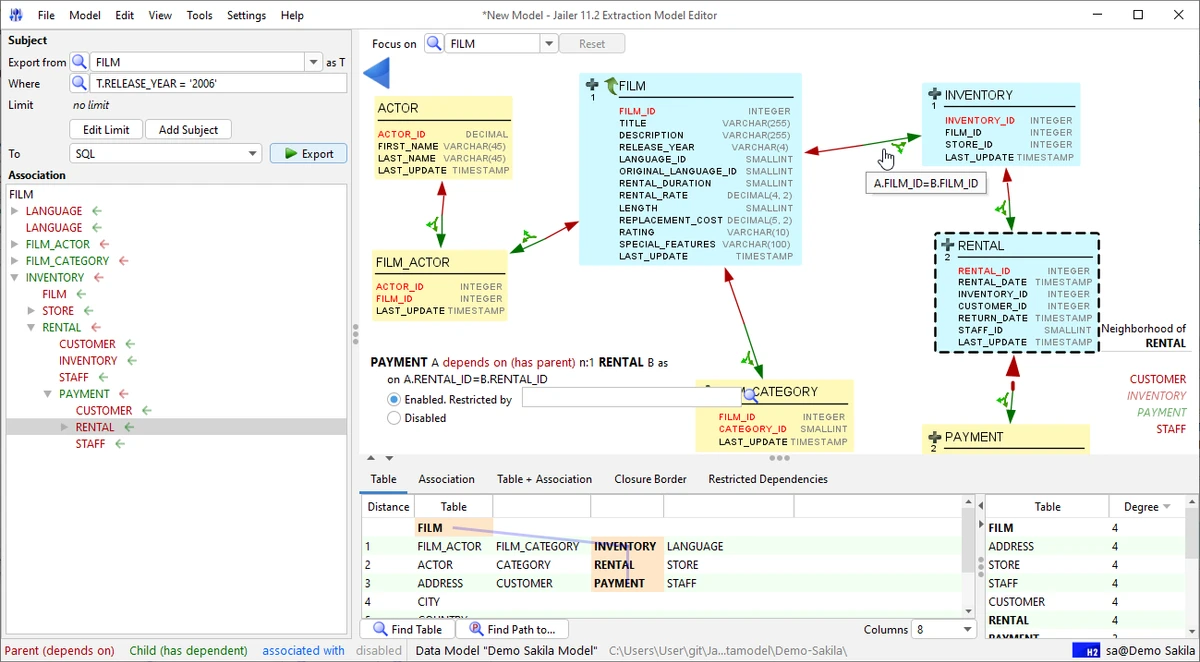
Jailer is a professional database subsetting and relational data browsing tool designed for developers and database administrators. It allows users to navigate relational databases through foreign-key relationships and extract consistent, referentially intact subsets of data. The tool is especially useful for creating development and testing datasets from production databases while preserving data integrity and relationships.

Key Features of Jailer

  • Exports consistent and referentially intact subsets of relational database data.
  • Supports bidirectional navigation through database relationships.
  • Navigates using:
    • Foreign-key relationships
    • User-defined relationships
  • Removes or archives data without violating referential integrity.
  • Generates structured outputs including:
    • Topologically sorted SQL-DML scripts
    • Hierarchical XML datasets
    • DbUnit datasets
  • SQL console with:
    • Code completion
    • Syntax highlighting
    • Database metadata visualization
  • Improves database performance through safe data cleanup and archiving.
  • API support for programmatic access to export/import functions.
  • Includes a demo database for quick setup and evaluation.

User Experience

Jailer is built for users who work closely with relational databases and need precise control over data extraction and navigation. The interface focuses on database structure exploration, allowing users to move through tables and relationships visually and logically. The ability to follow foreign-key relationships makes it easier to understand complex database schemas and extract meaningful subsets of data. This is especially useful for testing environments where only a portion of production data is required.

The included SQL console enhances usability by offering syntax highlighting, metadata awareness, and code completion, making it suitable for both exploration and execution of database queries. While it is a powerful tool, it is more technical in nature and is best suited for users with database knowledge.

Who Should Use Jailer?

  • Database administrators (DBAs).
  • Software developers working with relational databases.
  • QA engineers creating test datasets.
  • Teams migrating or analyzing database structures.
  • Users needing controlled data export from production systems.

Conclusion

Jailer is a powerful and precise database subsetting tool that simplifies working with complex relational datasets. It ensures data integrity while enabling flexible export, navigation, and transformation options.

Pros & Cons

✓

Pros

  • Ensures referential integrity in exported datasets.
  • Excellent for database subsetting and test data creation.
  • Strong relational navigation features.
  • Supports SQL, XML, and DbUnit formats.
  • Built-in SQL console with advanced features.
  • API support for automation and integration.
  • Includes demo database for quick testing
✕

Cons

  • Requires understanding of relational databases.
  • Not suitable for non-technical users.
  • Interface is functional rather than modern or visual-heavy.

Frequently Asked Questions

What is Jailer used for?

Jailer is used for extracting consistent subsets of relational database data while preserving relationships.

Does Jailer support SQL export?

Yes. It can generate topologically sorted SQL-DML scripts.

Can it browse database relationships?

Yes. It allows bidirectional navigation through foreign-key relationships.

Is it suitable for testing environments?

Yes. It is widely used to create test and development datasets from production databases.

Does Jailer have an API?

Yes. It provides API access for automation and integration purposes.

Recommended apps [Freeware]:
  • Glow 26.9 Glow logo advanced Windows system analysis tool offering deep hardware insights, diagnostics, benchmarks, and system optimization utilities
  • Sandboxie-Plus 1.18.0 Sandboxie-Plus logo a Windows sandboxing tool that isolates programs to prevent system changes and improve security.
  • PointerStick 7.17 PointerStick logo a virtual pointer to Windows desktops, helping presenters highlight mouse movements on large screens
  • Quick CPU 6.6.0 Quick CPU logo Monitor core parking, turbo boost, frequency scaling, and system power in real time
  • Total Commander Ultima Prime 9.4 Total Commander Ultima Prime logo enhanced file manager package with plugins and tools for advanced file and system management on Windows.
  • Shortcut Virus Removal Tool 2.2.0 Shortcut Virus Removal Tool logo Remove shortcut viruses from USB drives, recover hidden files, delete autorun threats, and repair Windows settings with one click.
Recommended apps [Shareware]:
  • Wondershare Filmora 15.3.20.18660 Wondershare Filmora logo a powerful, user-friendly video editor with effects, transitions, and 4K support.
  • DP Animation Maker 3.5.51 DP Animation Maker logo a simple Windows tool for creating animated images, GIFs, and videos with effects, objects, and music.
  • TweakNow Gallery 1.3.5 TweakNow Gallery logo a fast Windows photo viewer and organizer with slideshow and built-in image conversion tools
  • FoneTool 3.8.0 FoneTool logo back up, transfer, and manage iPhone data with convenient device management tools
  • PrintFab 3.0.7 PrintFab logo advanced printer drivers, RIP functionality, color management, and ink optimization for high-quality printing
  • Zoom Player MAX 22.5 Zoom Player MAX logo Play DVD, Blu-ray, HD videos, and music with a lightweight media player featuring fast startup, subtitle support, and advanced controls.