


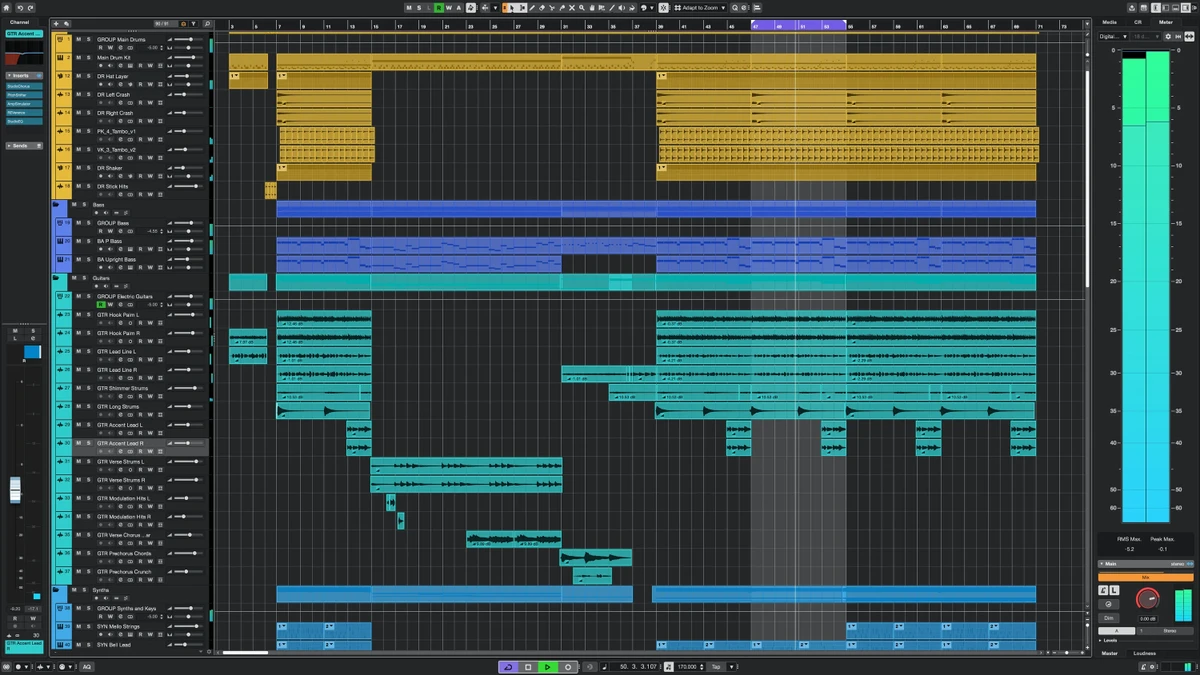

Cubase Pro is one of the industry's leading digital audio workstations (DAWs), trusted by professional composers, producers, recording engineers, and musicians worldwide. Designed to handle everything from songwriting and recording to mixing and mastering, it provides a comprehensive production environment suitable for nearly every music genre. Whether you're creating your first demo or producing commercial releases, Cubase Pro combines powerful recording tools, advanced MIDI editing, virtual instruments, and professional mixing capabilities into a streamlined workflow.
Overview
Cubase Pro is a professional music production application that enables users to record audio, compose music, edit MIDI, arrange songs, mix tracks, and produce complete recordings from start to finish. Its flexible workflow supports musicians, composers, vocalists, producers, and audio engineers, offering creative composition tools alongside studio-grade recording and mixing features. The software also includes high-quality virtual instruments, guitar amp simulations, drum production tools, and advanced audio editing capabilities. Although beginners can use Cubase, its extensive feature set is primarily aimed at users who want professional-level music production tools.
Features of Cubase Pro
Professional Recording
- Multi-track audio recording
- Vocal recording
- Instrument recording
- Studio-quality audio engine
Music Composition
- Chord Pads
- Arranger Track
- Automatic chord assistance
- Song arrangement tools
- Composition workflow enhancements
MIDI Production
- Advanced MIDI editing
- Step Sequencer
- Beat creation tools
- MPC-style drum sampler
- Rhythm programming
Built-in Virtual Instruments
- HALion Sonic SE
- Groove Agent SE
- Prologue synthesizer
- Acoustic and electronic drum sounds
- Sampled instruments
- Sound design tools
Guitar Production
- VST Amp Rack
- Virtual amplifiers
- Speaker cabinet simulations
- Guitar effects
- Microphone models
Audio Editing
- Precise editing tools
- Pitch correction
- Timing correction
- Vocal harmonization
- Choral arrangement support
Mixing
- Integrated MixConsole
- Professional channel strip
- Reverb effects
- Modulation effects
- Dynamics processing
- Mixing workflow tools
Workflow Features
- Fast and flexible production workflow
- Suitable for multiple music genres
- Integration with various DAW workflows
- Intuitive project organization
User Experience
Cubase Pro is built for serious music production and provides an impressive collection of professional tools within a well-organized interface. While the learning curve is steeper than that of entry-level audio software, users who invest time in learning the application are rewarded with a highly capable production environment. Recording instruments and vocals feels smooth thanks to the responsive workflow and integrated editing tools. The MixConsole offers professional-grade mixing capabilities, making it possible to handle complete productions without relying heavily on external software.
The composition tools stand out as one of Cubase's biggest strengths. Chord Pads and the Arranger Track simplify experimenting with musical ideas, helping users develop compositions more efficiently. Combined with the built-in virtual instruments, these features allow producers to sketch complete arrangements without immediately requiring third-party plugins.
Electronic music producers benefit from the drum sampler, beat creation tools, and synthesizers, while guitarists can make use of the VST Amp Rack to shape tones using virtual amplifiers and effects. Vocal production is equally well supported, with pitch correction, timing adjustment, and harmonization features that streamline vocal editing within the same project.
Because of its extensive functionality, Cubase Pro performs best on modern hardware, especially when working with larger sessions containing numerous virtual instruments and effects.
Who Should Use Cubase Pro?
- Professional music producers
- Recording studios
- Audio engineers
- Composers
- Singer-songwriters
- Bands
- Film and game composers
- Electronic music producers
- Guitarists
- Advanced home studio users
Conclusion
Cubase Pro remains one of the industry's premier digital audio workstations, offering an impressive balance of recording, composition, MIDI sequencing, virtual instruments, and professional mixing capabilities. Its comprehensive toolset supports nearly every stage of music production, from initial songwriting to the final mix. The inclusion of creative tools like Chord Pads, Arranger Track, HALion Sonic SE, Groove Agent SE, and VST Amp Rack makes it equally attractive for composers, producers, and performers working across a wide variety of genres.


