


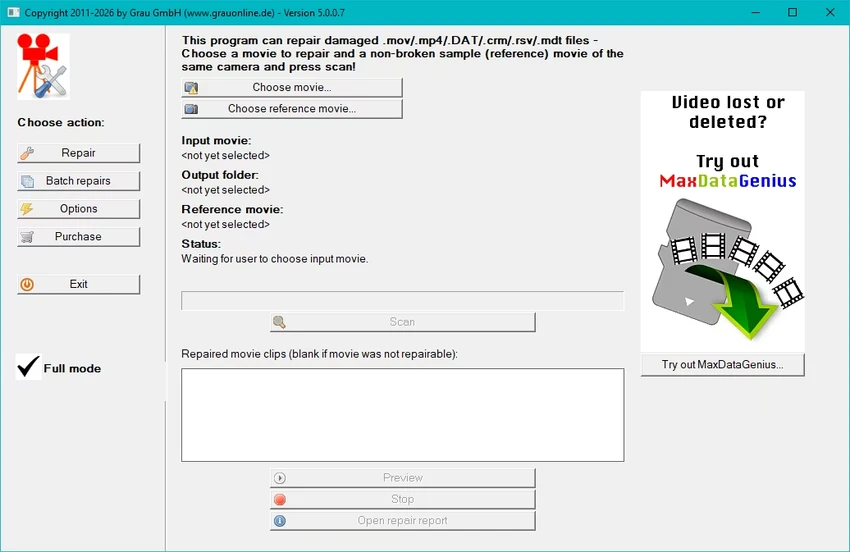

Video Repair Tool (VRT) is a dedicated utility designed to repair damaged or unplayable video files. It focuses on restoring corrupted footage caused by file structure errors, playback issues, or incomplete recordings. The software targets both casual users and professionals who need a straightforward way to recover important video content.
Overview
Video Repair Tool is built around a simple idea: making corrupted video files playable again without requiring technical expertise. When videos fail to play, freeze, or show delays due to structural damage, VRT aims to reconstruct or repair the file so it can be accessed normally. The software is positioned as a solution for a wide range of scenarios, from personal memories like family recordings to professional use cases such as marketing or production footage. It supports common camera types and file systems, focusing on usability rather than complex manual repair workflows. The tool is available in different versions (including VRT and VRT5), designed to match different repair needs and user scenarios.
Features of Video Repair Tool (VRT)
- Repairs corrupted or unplayable video files
- Fixes issues such as playback errors, freezing, and delays
- Designed for both beginners and advanced users
- Supports a wide range of camera types and file systems
- Available in multiple versions (VRT and VRT5) for different repair scenarios
- Step-by-step workflow for video repair cases
- Demo and full versions available for testing and purchase
- Documentation and quick-start guidance included
User Experience
In practical use, Video Repair Tool is structured to be accessible even for users with no technical background. The workflow is guided, helping users move from selecting a damaged file to attempting repair without needing to understand the underlying video structure. The emphasis on simplicity is noticeable, especially in the way repair scenarios are presented. Users are not required to configure complex parameters, which makes the tool approachable for personal recovery tasks such as restoring family videos or accidental file corruption.
However, the available information suggests that deeper technical control is limited, which may not fully satisfy advanced users looking for granular repair customization or forensic-level recovery options.
Who Should Use Video Repair Tool?
Video Repair Tool is best suited for users who have encountered corrupted or unplayable video files and need a simple recovery solution. This includes everyday users recovering personal footage, as well as professionals who rely on video content for business or creative work.
Conclusion
Video Repair Tool offers a focused and user-friendly approach to repairing damaged video files. Its strength lies in simplicity and accessibility, making it suitable for users who want to recover videos without technical complexity.


