


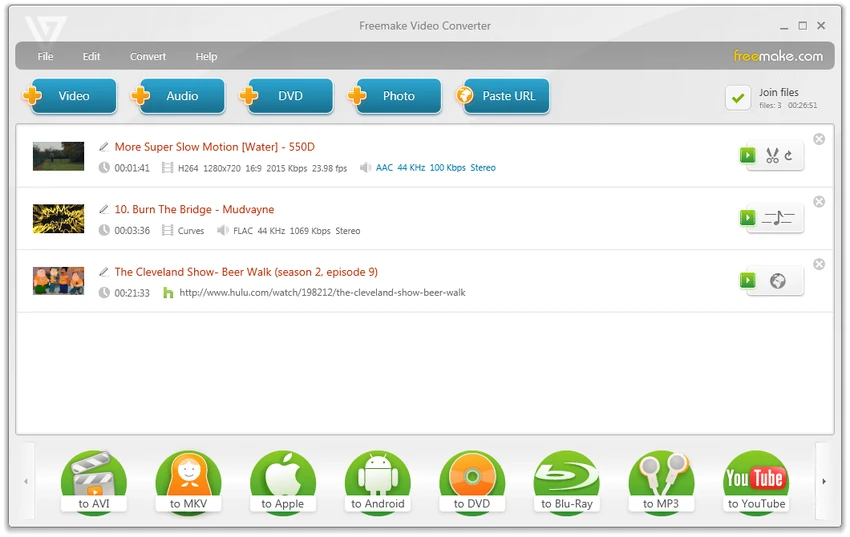

Freemake Video Converter is a multimedia conversion tool for Windows that supports hundreds of video, audio, and image formats. Designed for users who need to convert media between different devices and formats, it also includes a variety of editing and disc-authoring features such as DVD ripping, Blu-ray burning, subtitle support, slideshow creation, and basic video editing. The software supports over 200 input formats and exports media to popular formats including MP4, AVI, MKV, WMV, FLV, MP3, and HTML5-compatible video. It also provides device-specific conversion profiles for smartphones, tablets, gaming consoles, and media players, simplifying playback across a wide range of hardware.
In addition to format conversion, Freemake Video Converter offers practical tools for trimming, joining, rotating videos, and creating photo slideshows with music, making it a versatile solution for everyday multimedia tasks.
Features of Freemake Video Converter
- Supports over 200 video, audio, and image input formats.
- Convert videos to formats including:
- MP4
- AVI
- MKV
- WMV
- FLV
- 3GP
- MP3
- HTML5 video
- Convert videos for:
- iPhone
- iPad
- iPod
- Android devices
- Sony PSP
- PlayStation
- Xbox
- Apple TV
- BlackBerry
- Samsung
- Nokia
- Rip unprotected DVDs.
- Burn DVD and Blu-ray discs.
- Save DVD or Blu-ray projects as ISO images or folders.
- Extract audio from videos to MP3.
- Create photo slideshows with background music.
- Add external subtitles (SSA, SRT, ASS).
- Convert videos with embedded subtitles.
- Trim video clips.
- Join multiple videos into one file.
- Rotate and flip videos.
- Adjust aspect ratio.
- Customize output presets, codecs, and frame size.
- Upload supported media to YouTube.
- Hardware acceleration with CUDA and DXVA support.
Interface and Usability
Freemake Video Converter features a clean interface that organizes conversion tasks through large format and device icons, making it easy to select the desired output. Importing files is straightforward, and users can queue multiple videos for batch processing before applying conversion settings.
Basic editing tools such as trimming, joining, rotating, and subtitle management are integrated into the workflow, allowing users to make simple adjustments without opening a separate application. Preset profiles also help beginners convert media for popular devices without manually configuring codecs or resolution. Despite supporting numerous features, the interface remains approachable for users with limited video editing experience.
Who Should Use Freemake Video Converter?
- Users converting videos between formats.
- People preparing videos for mobile devices.
- Users creating DVDs or Blu-ray discs.
- Anyone extracting audio from videos.
- Users making photo slideshows with music.
- Home users needing basic video editing tools.
- Anyone working with multiple multimedia formats.
Conclusion
Freemake Video Converter is a versatile multimedia conversion application that goes beyond simple format conversion. Its combination of video conversion, DVD and Blu-ray authoring, slideshow creation, subtitle support, and basic editing tools makes it suitable for users who frequently work with different media formats.


