


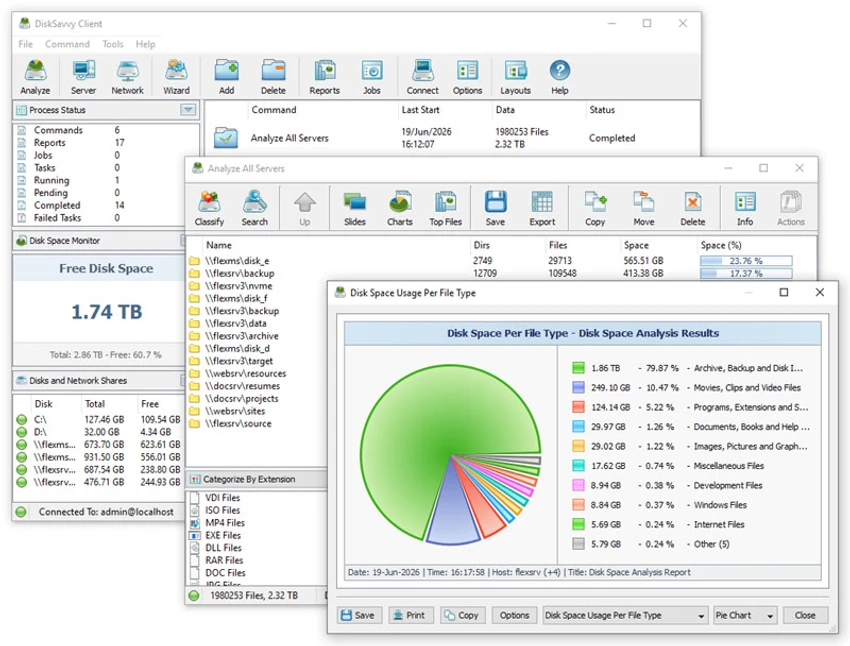

DiskSavvy is a powerful disk space usage analyzer designed to help users understand how storage is being consumed across local disks, network shares, NAS devices, and enterprise storage systems. It provides detailed analysis, file classification, and reporting tools that make it easier to identify large files, storage bottlenecks, and usage patterns.
The software is particularly useful for IT administrators and enterprise environments where storage monitoring across multiple systems is essential.
Overview
DiskSavvy focuses on deep storage visibility. It scans disks and network locations, then breaks down usage into understandable categories such as file types, directories, users, and time-based attributes. One of its key strengths is its ability to work not only with local drives but also with network servers and NAS devices. This makes it suitable for both individual system analysis and large-scale enterprise storage management. The software also includes reporting features, allowing users to export analysis results into multiple formats for documentation or further processing.
Key Features of DiskSavvy
- Disk space usage analysis for local drives and directories
- Network share and NAS storage device scanning
- Enterprise-level storage system analysis
- File classification across 3,000+ file types
- Breakdown of disk usage by file type, extension, user, and timestamps
- Visualization through pie charts and usage reports
- Export reports to HTML, PDF, Excel, CSV, XML, and text formats
- Disk usage history and trend analysis
- Network discovery of servers and NAS devices
- Batch analysis operations for multiple systems
- SQL database export for centralized reporting
- Command-line utility for automation and scripting
- Server-based version with scheduling and centralized management
User Experience
DiskSavvy is designed with IT professionals in mind. The interface is structured around scanning targets (disks, servers, or network shares) and then generating detailed breakdowns of storage usage. While basic analysis tasks are straightforward, advanced features such as batch processing, SQL export, and server management require technical familiarity. Once configured, however, the tool becomes highly efficient for ongoing storage monitoring. The inclusion of both GUI and command-line functionality adds flexibility for different types of workflows, especially in enterprise environments where automation is important.
System Requirements
- Windows XP, Vista, 7, 8, 10, 11
- Windows Server 2003 through Server 2025
Who Should Use DiskSavvy?
- IT administrators managing enterprise storage systems
- Network engineers monitoring NAS and shared storage
- System administrators tracking disk usage trends
- Organizations needing centralized storage reporting
- Advanced users who want deep insight into file storage usage
Conclusion
DiskSavvy is a comprehensive disk space analysis tool that goes beyond basic storage reporting. With support for network-wide scanning, detailed classification, and enterprise reporting features, it is a strong solution for organizations that need full visibility into how storage is being used.


