


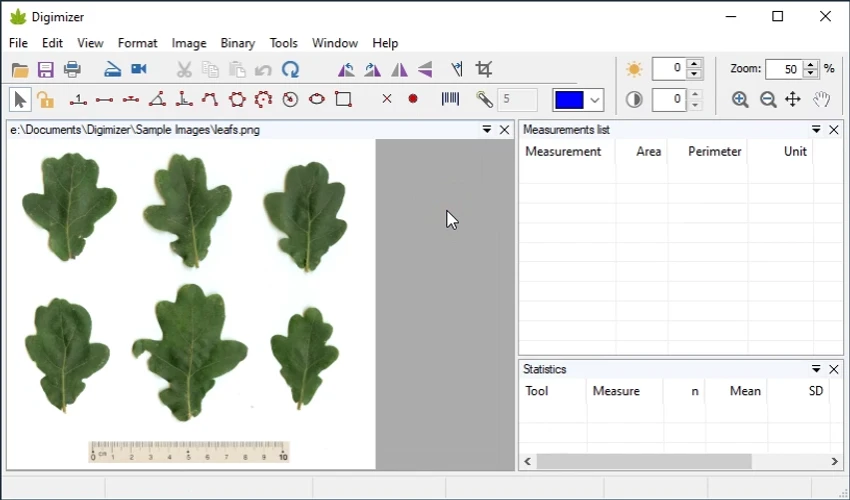

Digimizer is a flexible image analysis software designed for precise manual measurements and automatic object detection. It is commonly used for analyzing scientific and medical images such as X-rays and micrographs, but it also supports general image measurement tasks. During my experience with it, I found that it focuses strongly on accuracy, offering a wide range of tools for measuring distances, areas, and object characteristics within images.
Features of Digimizer
- Open, save, and print image files
- Acquire images from scanners or live video streams
- Supports multiple formats:
- JPG, GIF, TIFF, BMP, PNG
- WMF, EMF
- DICOM medical images
- Native DGZ format
- Image manipulation tools:
- Resize, crop, rotate, flip
- Adjust brightness and contrast
- Auto contrast correction
- Histogram stretching
- Background correction
- Convert between grayscale and color
- Sharpen and invert images
- Apply filters (median, mean, emboss, etc.)
- Manual measurement tools:
- Distance and length measurement
- Perimeter and area calculation
- Angle measurement
- Circle and rectangle analysis
- Object counting and marking
- Center and midpoint detection
- Intensity measurement
- Automatic object detection with measurement capabilities
- Barcode and QR code detection
- Flexible unit support:
- Metric, imperial, and microscopic units
- Pixel-level measurement
User Experience
After using Digimizer, I found it to be highly precise and well-suited for analytical work. The ability to define measurement units and apply them directly to images makes it especially useful in scientific and technical environments. The measurement tools are the core strength of the software. Drawing lines, measuring areas, and calculating object characteristics is straightforward once the scale is set correctly. I particularly appreciated the support for both manual and semi-automatic analysis, which allows users to balance control and efficiency depending on the task.
Image processing features such as contrast adjustment, filtering, and background correction help improve clarity before performing measurements. This is particularly useful when working with low-quality or noisy images. Support for DICOM files makes Digimizer suitable for medical imaging workflows, while general image formats ensure it can also be used for broader applications. The interface is functional rather than visually modern, but it prioritizes accuracy and utility over design aesthetics.
Who Should Use Digimizer?
- Medical professionals analyzing DICOM images
- Researchers working with microscopy or scientific images
- Engineers needing precise image measurements
- Quality control and inspection specialists
- Users requiring object detection and measurement tools
- Anyone performing technical image analysis
Conclusion
Digimizer is a powerful image analysis solution designed for precision and scientific accuracy. Its measurement tools, object detection capabilities, and support for medical and technical image formats make it a valuable tool in research, engineering, and healthcare environments. While it may not be suited for casual image editing, it excels in any scenario where exact measurements and analysis are required.


