Evernote logo

Evernote 11.22.4.22484

  • User Rating:
    ★★★★★
    ★★★★★
    0.0 0Votes
  • Requirements:
    Windows
  • Version: 11.22.4.22484
  • Latest updated: 5 days ago
  • License: Freeware  
  • Publisher: EverNote Corp
  • Size: 318 MB
× app stores

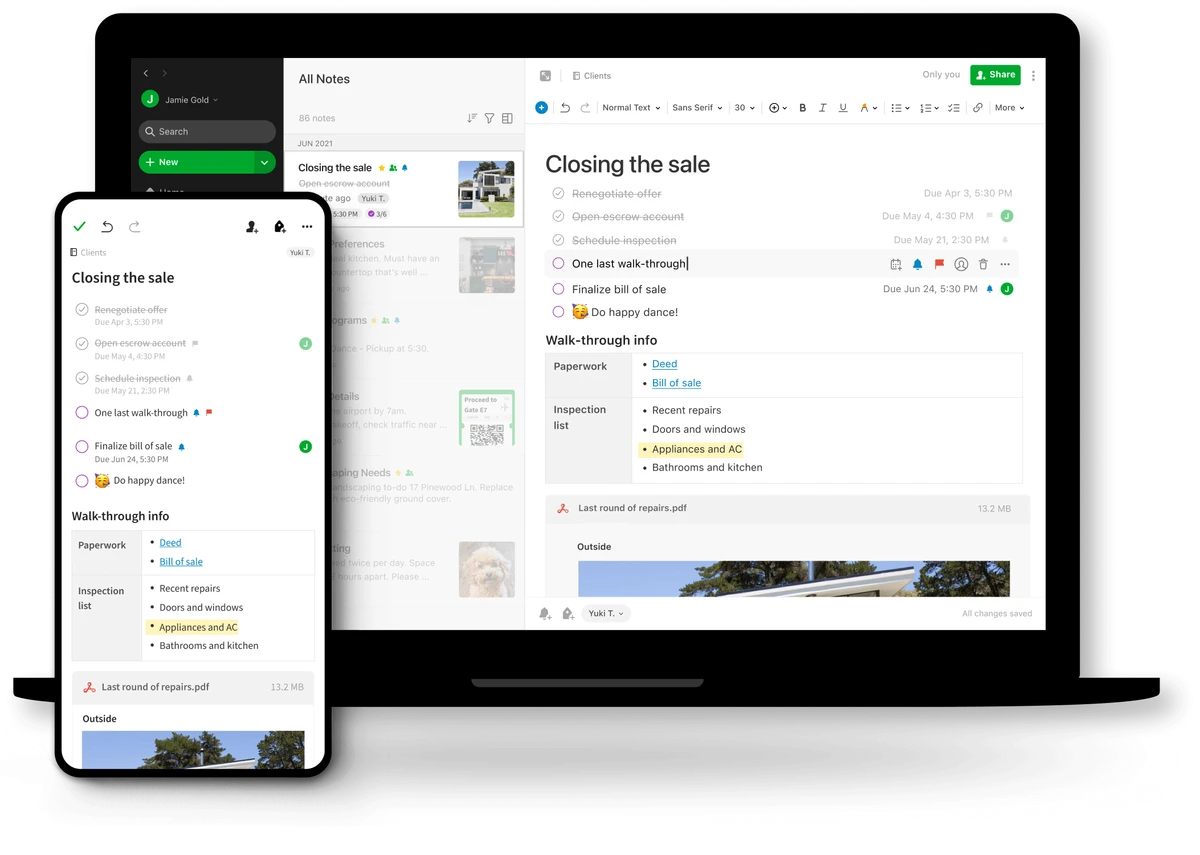
Evernote is a feature-rich note-taking and information management application designed to help users capture, organize, and access information from virtually anywhere. Whether you're collecting research, managing personal projects, saving web content, or keeping track of daily tasks, Evernote provides a centralized workspace that keeps everything synchronized across multiple devices.

It serves as a digital repository for notes, images, research materials, web pages, and other important information. The ability to synchronize content across devices makes it particularly useful for users who frequently switch between desktops, laptops, tablets, and smartphones. Its focus on organization and accessibility helps reduce the frustration of searching for scattered information across multiple apps and devices.

Available on Windows and other platforms, Evernote combines note-taking, content storage, and cloud synchronization into a single productivity solution.

Key Features of Evernote

  • Capture notes, ideas, and research instantly
  • Store text, images, and media content
  • Save web pages for future reference
  • Organize content using notes and tags
  • Create and manage tasks and to-do lists
  • Store snapshots, whiteboards, and business cards
  • Synchronize information across multiple devices
  • Access notes from various operating systems and platforms
  • Search and retrieve stored information quickly
  • Cloud-based synchronization for consistent access

User Experience

Using Evernote feels straightforward from the start. The interface focuses on capturing and organizing information rather than overwhelming users with complex settings. Creating notes is simple, and the tagging system makes it easier to categorize content for later retrieval. One of the biggest advantages is cross-device synchronization. Information added on one device becomes available on others after syncing, helping maintain continuity whether you're working from a desktop, laptop, or mobile device.

For research-heavy workflows, Evernote can act as a centralized archive where notes, web pages, images, and reference materials are stored together. This reduces the need to switch between multiple applications when gathering information. The application's flexibility also makes it suitable for both personal and professional use. From tracking daily tasks to storing project documentation, Evernote adapts well to different productivity styles.

Who Should Use Evernote?

  • Students organizing study materials and research
  • Professionals managing projects and reference documents
  • Writers collecting ideas and drafts
  • Researchers storing articles, notes, and web content
  • Small business users managing tasks and information
  • Anyone seeking a centralized digital notebook across devices

Conclusion

Evernote continues to be a versatile note-taking and information management platform for users who need more than a basic notebook app. Its ability to capture different types of content, organize information efficiently, and synchronize data across devices makes it a valuable productivity tool.

Pros & Cons

Pros

  • Easy note capture and organization
  • Cross-platform availability
  • Syncs information across devices
  • Supports various content types including images and web pages
  • Useful tagging system for organization
  • Suitable for personal and professional workflows
  • Helps centralize research and reference materials

Cons

  • Requires an internet connection for synchronization
  • Advanced functionality may be unnecessary for users seeking only basic note-taking
  • Feature availability may vary depending on account type

Frequently Asked Questions

What is Evernote used for?

Evernote is used for capturing, organizing, storing, and synchronizing notes, research materials, tasks, web pages, images, and other information across multiple devices.

Does Evernote sync across devices?

Yes. Evernote allows users to synchronize their content across supported devices, making information available wherever they sign in.

Can Evernote store images and web pages?

Yes. Evernote supports storing images, snapshots, web pages, and various forms of digital content alongside traditional notes.

Is Evernote suitable for students?

Yes. Students can use Evernote to organize lecture notes, research materials, assignments, and study resources in one location.

What operating systems does Evernote support?

Evernote works across multiple platforms, including Windows, macOS, and mobile devices, allowing users to access their information from different environments.

Recommended apps [Freeware]:
  • Simple IP Config 2.9.7 Simple IP Config logo a lightweight, portable tool for quickly changing Windows IP, DNS, and network settings
  • Stretchly 1.21.0 Stretchly logo reminds you to take breaks while working on your computer, promoting better health and productivity.
  • Awesome Miner 11.5.5 Awesome Miner logo manage Bitcoin, Litecoin and Ethereum mining, monitor rigs, switch pools, and optimize profitability
  • DefenderUI 2.10 DefenderUI logo enhances Microsoft Defender on Windows 10/11 with advanced security profiles and easier system protection control
  • Adobe Camera Raw 18.4 Adobe Camera Raw logo Edit, process, and convert RAW photos in Photoshop with Adobe Camera Raw's powerful image workflow tools
  • Wondershare Recoverit 14.0.29.10 Wondershare Recoverit logo Recover deleted, lost, formatted, or corrupted files from PCs, USB drives, SD cards, and more with Wondershare Recoverit
Recommended apps [Shareware]:
  • AVG Driver Updater 26.5.10990.0 AVG Driver Updater logo automatically scan and update outdated drivers to improve PC performance and stability on Windows.
  • Ant Download Manager 2.17.4.96212 Ant Download Manager logo a Windows tool that speeds up downloads, captures streaming media, supports torrents, and integrates with browsers
  • Wipe Professional 2026.07 Wipe Professional logo a Windows cleanup tool that removes junk files, cache, cookies, and browsing traces to improve privacy and performance
  • SyncBackPro 12.0.17 SyncBackPro logo advanced backup, restore, synchronization, encryption, FTP support, and automation tools
  • Advanced Installer 23.8 Advanced Installer logo Windows MSI packaging tool for developers to build, customize, and deploy reliable installers
  • App Builder 2026.15 App Builder logo a visual development environment for creating HTML5, mobile, desktop, and PWA applications