Avast Clear logo

Avast Clear 26.6.11052

  • User Rating:
    ★★★★★
    ★★★★★
    0.0 ★ 0Votes
  • Requirements:
    Windows
  • Version: 26.6.11052
  • Latest updated: 3 weeks ago
  • License: Freeware  
  • Publisher: Gen Digital Inc
  • Size: 55 MB
× app stores

Avast Clear is the official uninstall utility developed to completely remove Avast antivirus products and related software from a Windows computer. While uninstalling Avast through Windows may remove the main application, leftover files, folders, and registry entries can remain behind. These remnants may consume disk space or interfere with future Avast installations. Avast Clear is specifically designed to locate and remove these remaining components, helping ensure a clean uninstall. The utility is particularly useful when a standard uninstall fails or when you want to install a different version of Avast without conflicts caused by residual files.

For best results, Avast recommends running the utility in Windows Safe Mode, where antivirus services are less likely to be active.

Features of Avast Clear

  • Official utility for removing Avast products
  • Completely removes supported Avast antivirus software
  • Cleans leftover files and folders
  • Removes related Windows registry entries
  • Helps prevent installation conflicts caused by previous Avast installations
  • Simple and lightweight application
  • Easy-to-use interface
  • Recommended for use in Windows Safe Mode
  • Allows manual selection of the Avast installation folder when needed

Interface and Usability

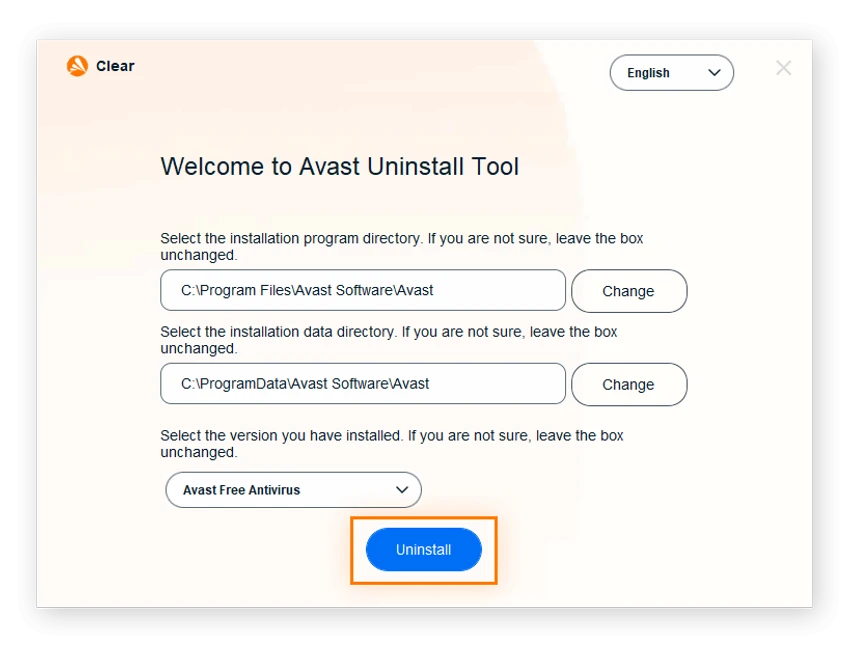
Avast Clear focuses on a single task: completely uninstalling Avast software. The interface is minimal and easy to understand, making the removal process straightforward even for users with limited technical experience. The utility guides you through selecting the installed Avast directory if it differs from the default location before beginning the removal process. Because the program permanently deletes the contents of the selected installation folder, it's important to verify the correct directory before proceeding. Although booting into Safe Mode adds an extra step, it helps ensure that all Avast services and protected files can be removed successfully.

Who Should Use Avast Clear?

  • Users experiencing problems uninstalling Avast
  • Anyone reinstalling Avast after a failed installation
  • Users switching from Avast to another antivirus solution
  • IT administrators maintaining Windows systems
  • Users who want to remove leftover Avast files completely

Conclusion

Avast Clear is a practical utility for anyone who needs to completely remove Avast antivirus software from a Windows PC. By deleting leftover files, folders, and registry entries that may remain after a standard uninstall, it helps ensure a cleaner system and reduces the chance of installation conflicts.

Pros & Cons

✓

Pros

  • Official tool developed for Avast products
  • Removes leftover files and registry entries
  • Helps resolve failed uninstall issues
  • Simple and lightweight
  • Easy to operate
  • Useful before reinstalling Avast
  • Helps prevent installation conflicts
✕

Cons

  • Designed only for Avast products
  • Recommended to run in Windows Safe Mode
  • Permanently removes files from the selected installation folder

Frequently Asked Questions

What is Avast Clear used for?

Avast Clear is an official uninstall utility that completely removes Avast antivirus products, including leftover files, folders, and registry entries that may remain after a standard uninstall.

Is Avast Clear free?

Yes. Avast Clear is provided free of charge for users who need to uninstall supported Avast products.

Why should I use Avast Clear instead of the Windows uninstaller?

The Windows uninstall process may leave behind residual files or registry entries. Avast Clear is specifically designed to remove these remaining components to help ensure a complete uninstall.

Should Avast Clear be run in Safe Mode?

Yes. Avast recommends running Avast Clear in Windows Safe Mode because it allows the utility to remove files and services that may otherwise be in use.

Can Avast Clear remove other antivirus programs?

No. Avast Clear is designed specifically to remove Avast products. It should not be used to uninstall antivirus software from other vendors.

What should I do before running Avast Clear?

Before starting, ensure you know the correct Avast installation directory, especially if it was installed in a custom location. The utility deletes the contents of the selected folder during the removal process, so selecting the correct directory is important.

Recommended apps [Freeware]:
  • Trillian 6.6 Build 16 Trillian logo all-in-one chat software designed to simplify online communication
  • UltraSearch 4.9.2.1208 UltraSearch logo locates files and folders on local NTFS drives in seconds without building an index. Fast, precise, and lightweight.
  • Don't Sleep 10.22 Don't Sleep logo prevent sleep, restart, or hibernation with a lightweight Windows power control utility
  • Kdenlive 26.04.3 Kdenlive logo Powerful open-source video editing solution with multi-track editing, advanced effects, broad format support, and flexible workflows.
  • Minimal Image Viewer 2.0.3 Minimal Image Viewer logo A lightweight Windows image viewer with fast startup, wide format support, GPU rendering, and portable privacy-focused design.
  • Waterfox 6.6.16.1 Waterfox logo Browse faster with a 64-bit Firefox-based browser optimized for performance, security, extensions, bookmarks, and downloads.
Recommended apps [Shareware]:
  • Fast Video Cataloger 10.0.4.0 Fast Video Cataloger logo Organize, search, browse, and manage large video collections with Fast Video Cataloger for Windows
  • VideoPad Video Editor 18.38 VideoPad Video Editor logo a Windows movie maker for editing videos, adding effects, transitions, audio, and exporting to social platforms
  • HTTP Debugger Pro 10.5 HTTP Debugger Pro logo captures and analyzes HTTP and HTTPS traffic from browsers and apps, helping developers debug web requests in real time
  • MixPad 14.19 MixPad logo Record, mix, and edit unlimited audio tracks with MixPad, an intuitive multitrack audio production software
  • Atlantis Word Processor 5.0.5.3 Atlantis Word Processor logo Create documents with Atlantis Word Processor, a fast and lightweight word processor featuring spell check, formatting, and eBook export
  • Actual Window Rollup 8.15.4 Actual Window Rollup logo adds a roll-up button to Windows, letting you collapse windows into title bars for faster workspace management