UniGetUI logo

UniGetUI 2026.2.2

  • User Rating:
    ★★★★★
    ★★★★★
    0.0 0Votes
  • Requirements:
    Windows
  • Version: 2026.2.2
  • Latest updated: 4 days ago
  • License: Open Source  
  • Publisher: Devolutions
  • Size: 58 MB
× app stores

UniGetUI (formerly known as WingetUI) is a Windows application designed to simplify software management by providing a graphical user interface (GUI) for popular command-line package managers such as Winget, Scoop, and Chocolatey. Instead of relying on command-line commands, UniGetUI allows users to install, update, and uninstall software through a modern and easy-to-use interface. It is particularly useful for users who want the power of package managers without needing to interact with terminal commands.

The application brings together multiple software repositories into one unified catalog, making it easier to search for and manage thousands of applications from a single place.

Key Features of UniGetUI

  • Graphical interface for Winget, Scoop, and Chocolatey
  • Install, update, and uninstall software easily
  • Access to over 10,000 software packages across repositories
  • Bulk software installation and management
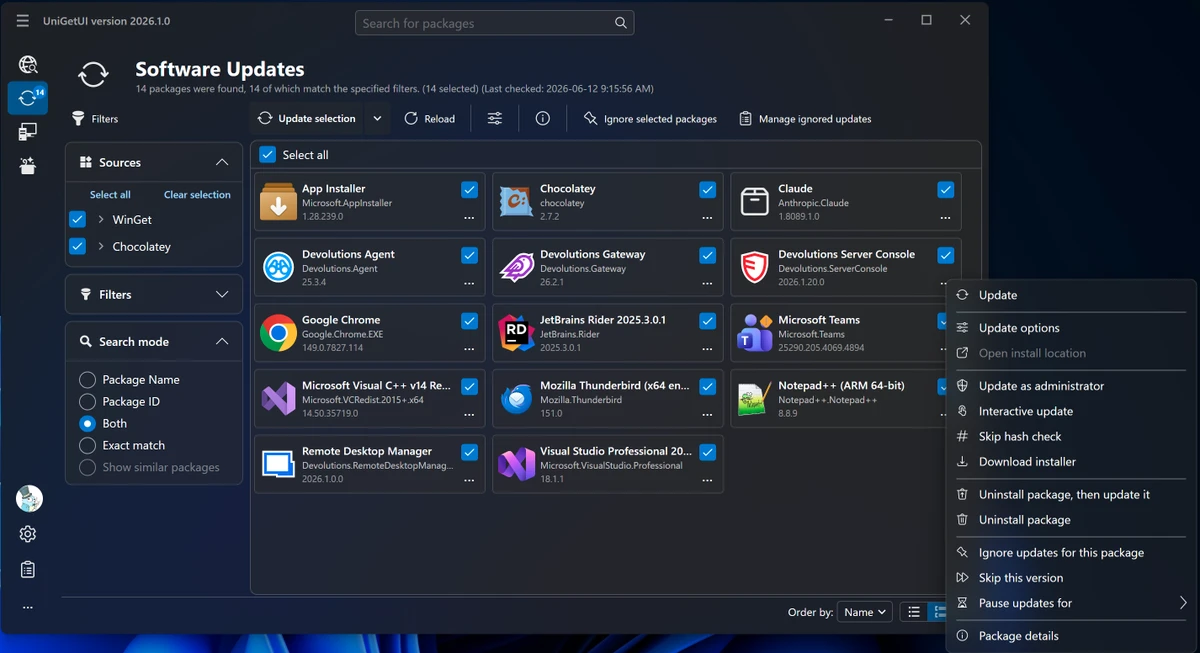
  • Built-in software update checker for installed applications
  • Batch update support for multiple programs
  • Interactive installation mode for guided setup
  • Option to skip hash checks for faster downloads
  • Unified package catalog search across sources
  • Modern and user-friendly interface design
  • Support for viewing and managing installed packages

User Experience

After using UniGetUI, the most immediate advantage is the simplicity it brings to package management on Windows. Instead of typing commands or remembering package names, users can simply search, select, and install software through a visual interface.

The integration of multiple package managers into one platform is especially useful. Winget, Scoop, and Chocolatey each have different strengths, and UniGetUI combines them into a single searchable catalog, making software discovery much easier. The update management feature is another strong point. The tool can scan installed applications and present available updates in a centralized list, allowing users to update multiple programs at once without manually checking each one.

Installation is also more accessible thanks to interactive mode, which guides users through the process when needed. For advanced users, optional settings such as skipping hash checks provide additional flexibility. Overall, UniGetUI significantly lowers the barrier to entry for package management on Windows while still offering powerful batch and automation features for advanced users.

Who Should Use UniGetUI?

  • Windows users who avoid command-line tools
  • IT administrators managing multiple applications
  • Developers using Winget, Scoop, or Chocolatey
  • Users who frequently install and update software
  • Beginners looking for an easy software manager

Conclusion

UniGetUI is a powerful yet user-friendly interface that brings modern usability to Windows package management. By combining Winget, Scoop, and Chocolatey into a single GUI, it simplifies software installation, updates, and removal for all types of users.

Pros & Cons

Pros

  • Easy-to-use GUI for command-line package managers
  • Supports Winget, Scoop, and Chocolatey
  • Large software catalog (10,000+ packages)
  • Simplifies installation, updates, and uninstalling
  • Batch update and installation support
  • Modern and intuitive interface
  • Great for both beginners and advanced users

Cons

  • Depends on underlying package managers for full functionality
  • Some advanced CLI features are not directly exposed
  • Requires internet access for package retrieval

Frequently Asked Questions

What is UniGetUI used for?

UniGetUI is used to install, update, and uninstall software on Windows using a graphical interface for package managers.

Does UniGetUI support Winget?

Yes. It fully supports Winget along with Scoop and Chocolatey.

Can I update all my apps at once?

Yes. UniGetUI supports batch updates for installed software.

Is UniGetUI beginner-friendly?

Yes. It is designed to make package management easy for users who do not use command-line tools.

How many apps are available in UniGetUI?

It provides access to over 10,000 software packages across multiple repositories.

Does UniGetUI require internet access?

Yes. It needs internet access to fetch and manage software packages.

Recommended apps [Freeware]:
  • CalendarTask 3.30.290.9088 CalendarTask logo lightweight desktop calendar with note-taking, cloud sync, reminders, and desktop scheduling tools
  • CrossFTP 2.00.1 CrossFTP logo a multi-protocol FTP client for Windows supporting SFTP, WebDAV, S3, Azure, and secure file transfers
  • Futuremark SystemInfo 5.92.1497 Futuremark SystemInfo logo scans your PC hardware and system components, generating detailed diagnostic reports.
  • TreeSheets 3223 TreeSheets logo combines spreadsheets, outlines, notes, and mind mapping into a lightweight data organization tool
  • Revo Registry Cleaner 2.2.1 Revo Registry Cleaner logo Clean, monitor, tune, and back up the Windows Registry with Revo Registry Cleaner for improved system maintenance
  • Google Chrome 149.0.7827.201 Google Chrome logo fast, secure, and stable web browser with sandboxing, tab isolation, and a minimal interface for modern web applications
Recommended apps [Shareware]:
  • Typing Instructor Platinum 21.1 Typing Instructor Platinum logo improve typing speed and accuracy through interactive lessons, games, and 10-finger typing practice.
  • Kettler World Tours 3.0.4.20 Kettler World Tours logo Train indoors with real-world routes, GPS integration, and online racing using Kettler World Tours
  • Remo Recover Windows 6.0.0.260 Remo Recover Windows logo Recover deleted, formatted, and lost files with Remo Recover Windows, a comprehensive data recovery solution
  • PowerDirector 2026 v24.6 PowerDirector logo AI-powered video editor offering templates, effects, and tools for fast, professional video creation
  • MobiKin Assistant for Android 5.1.47 MobiKin Assistant for Android logo back up, restore, and manage Android data, contacts, apps, and files from a PC
  • Dolphin Emulator 2606 Dolphin Emulator logo play Nintendo GameCube and Wii games on PC with improved graphics and performance options