Visual Subst logo

Visual Subst 6.0

  • User Rating:
    ★★★★★
    ★★★★★
    0.0 ★ 0Votes
  • Requirements:
    Windows
  • Version: 6.0
  • Latest updated: 3 weeks ago
  • License: Freemium  
  • Publisher: NTWind Software
  • Size: 3 MB
× app stores

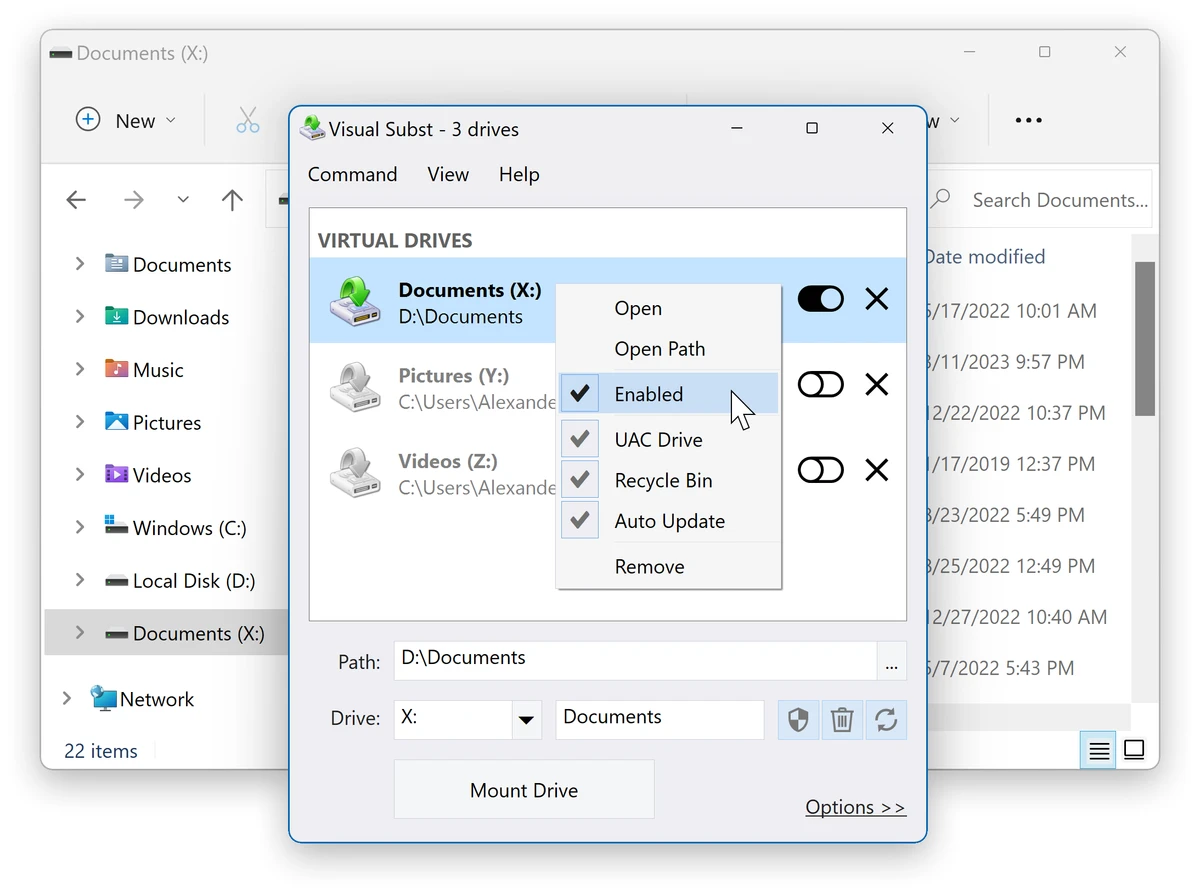
Visual Subst is a lightweight Windows utility that simplifies the process of creating virtual drives from frequently used folders. It provides a graphical interface for the built-in Windows subst command, allowing users to map directories to drive letters for faster and more convenient access. Unlike the native command-line method, Visual Subst solves several limitations by enabling persistent virtual drives, supporting elevated applications, and allowing users to assign custom drive labels. This makes it especially useful for users who frequently work with deep directory structures or complex project folders.

By turning commonly used directories into virtual drives, Visual Subst helps streamline file navigation and improve workflow efficiency in both personal and professional environments.

Features of Visual Subst

  • Create virtual drives from local folders.
  • Easy-to-use graphical interface for drive mapping.
  • Replace complex directory paths with simple drive letters.
  • Supports elevated applications (UAC compatibility).
  • Persistent virtual drives after system reboot.
  • Option to automatically restore drives on startup.
  • Custom drive labels for better identification.
  • Create, edit, and remove virtual drives easily.
  • Improves usability over the built-in Windows subst command.
  • Works with Windows Explorer and other file managers.

Interface and Usability

Visual Subst focuses on simplicity and usability. The interface is minimal and straightforward, allowing users to quickly assign a folder to a drive letter without dealing with command-line syntax. Creating a virtual drive typically requires only selecting a folder, choosing a drive letter, and optionally assigning a label. Once configured, drives can be set to automatically restore on system startup, making them persistent across sessions. This simplicity makes the tool accessible even for non-technical users, while still being useful for advanced users who want faster access to frequently used directories.

Who Should Use Visual Subst?

  • Developers working with deep project directories.
  • IT professionals managing complex file structures.
  • Users who frequently access the same folders.
  • People who prefer drive-letter navigation over long paths.
  • Anyone looking to simplify file access in Windows Explorer.
  • Users who want a GUI alternative to the subst command.

Conclusion

Visual Subst is a practical Windows utility for users who want faster access to frequently used folders by mapping them to virtual drives. It improves upon the built-in Windows subst command by adding persistence, better compatibility with elevated applications, and an easy graphical interface.

Pros & Cons

✓

Pros

  • Simple and intuitive interface.
  • Creates virtual drives from folders easily.
  • Persistent drives after reboot.
  • Supports elevated applications (UAC compatible).
  • Allows custom drive labels.
  • Improves workflow efficiency.
  • Lightweight Windows utility.
✕

Cons

  • Limited functionality beyond virtual drive mapping.
  • Windows-only tool.
  • May be unnecessary for users comfortable with folder shortcuts.

Frequently Asked Questions

What is Visual Subst used for?

Visual Subst is used to create virtual drives that map directly to specific folders, making it easier to access frequently used directories.

How is Visual Subst different from the Windows subst command?

Unlike the built-in subst command, Visual Subst supports a graphical interface, persistent drives after reboot, custom labels, and compatibility with elevated applications.

Do virtual drives persist after restarting Windows?

Yes. Visual Subst can automatically restore virtual drives on system startup if the persistence option is enabled.

Can Visual Subst be used with administrator applications?

Yes. It is designed to work correctly with elevated applications, solving a common limitation of the standard Windows subst command.

Is Visual Subst difficult to use?

No. The tool is designed to be simple and user-friendly, requiring only a few clicks to create and manage virtual drives.

Which Windows versions are supported?

According to the provided information, Visual Subst supports Windows 11, 10, 8, 7, and Vista in both 32-bit and 64-bit versions.

Recommended apps [Freeware]:
  • NirLauncher Package 1.30.24 NirLauncher Package logo a portable Windows utility suite with 180+ NirSoft tools for system, network, and recovery tasks
  • GOM Player 2.3.120 Build 5390 GOM Player logo a free Windows media player supporting many formats, subtitles, VR videos, and damaged file playback
  • AVG Clear 26.6.11050 AVG Clear logo completely removes AVG antivirus products, files, settings, and registry entries from Windows systems
  • Dropbox 260.4.2926 Dropbox logo cloud storage service for syncing files, backup, and sharing documents across Windows, mobile, and web devices
  • SQLite 3.53.3 SQLite logo compact, reliable embedded SQL database engine with zero configuration and serverless design
  • Wise Disk Cleaner 11.3.6.856 Wise Disk Cleaner logo Free up storage, remove junk files, and optimize your PC with Wise Disk Cleaner for faster Windows performance
Recommended apps [Shareware]:
  • GetFLV 32.2606.25 GetFLV logo combines video downloading, conversion, audio extraction, and basic editing tools in one Windows application
  • reaConverter Pro 8.0.231 reaConverter Pro logo batch image converter and editor supporting 700+ formats with automation and advanced processing tools
  • Centurion Setup 51.0 Centurion Setup logo Windows installer builder that creates compressed, self-contained executables with multilingual support
  • IObit Uninstaller 15.5.0.11 IObit Uninstaller logo Windows tool for removing programs, browser extensions, leftovers, and unwanted apps
  • Argente Malware Cleaner 3.0.8.4 Argente Malware Cleaner logo Detect and remove malware with flexible scan modes, restore point creation, and an easy-to-use on-demand security scanner.
  • iTop Data Recovery 6.3.0.955 iTop Data Recovery logo Recover deleted files from drives, SSDs, USB devices, and memory cards with a simple Windows data recovery tool.