


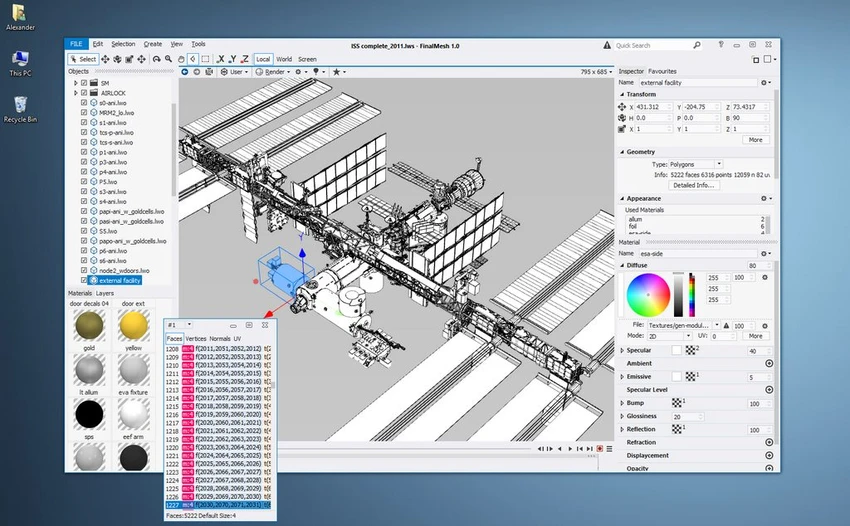

FinalMesh is a versatile 3D visualization and conversion tool designed for viewing, converting, and publishing 3D models. It simplifies the process of transforming 3D assets into interactive PDF documents or WebGL applications, allowing users to share complex models without requiring specialized software. Beyond publishing, FinalMesh functions as a capable 3D viewer and converter with support for numerous formats, geometry inspection, rendering, and measurement tools. Its modern interface and integrated workflow make it suitable for engineers, designers, and professionals working with technical 3D content.
Features of FinalMesh
- View and browse 3D models with thumbnail previews
- Convert between multiple 3D file formats
- Export models as interactive 3D PDF documents
- Publish models as WebGL HTML applications
- Create boot-ready WebGL packages with generated HTML, JavaScript, and textures
- Convert models to STL for 3D printing
- Render 3D models to images using the built-in ray tracer
- Batch processing support
3D Viewing & Editing
- Display textured models and complex materials
- Inspect model topology
- Apply or modify materials
- Support for multiple viewports with independent settings
PDF Publishing
- Export interactive 3D content to PDF
- Configure initial view, lighting, and rendering mode
- Support PDF encryption
- Multiple viewport layouts within a PDF document
Geometry Engine
- Geometry instancing
- Memory-compressed meshes for large models
- Procedural primitives, including:
- Cubes
- Spheres
- Splines
- Text objects
- Geometry modifiers including:
- Boolean operations
- Subdivision
- Mirror
- Extrude
- Arrays
Measurement & Annotation Tools
- Callouts and notes
- Point coordinate display
- Linear dimensions
- Radius and diameter measurements
- Angle measurements
Professional Features
- Ambient Occlusion
- UV Unwrapping
User Experience
FinalMesh delivers a streamlined workflow for users who frequently work with 3D assets. Its interface is clean and responsive, making common operations such as viewing, converting, and exporting models straightforward despite the application's extensive feature set. One of its standout capabilities is the ability to publish interactive 3D content with minimal effort. Exporting a model as a WebGL application or interactive PDF is integrated directly into the save process, allowing users to create shareable presentations without complicated configuration.
The viewing tools provide detailed inspection of model geometry, materials, and topology, making the application useful for reviewing technical assets before publishing or conversion. Support for multiple viewports and customizable rendering options further enhances presentation quality.
The built-in conversion features also add flexibility by allowing models to be exported into formats suitable for workflows such as 3D printing. Batch processing simplifies repetitive conversion tasks, making the software practical for users managing multiple files. While the interface is approachable, some advanced geometry editing and publishing options may require familiarity with 3D workflows to take full advantage of the application's capabilities.
Who Should Use FinalMesh?
- Engineers and technical professionals
- CAD and product visualization users
- 3D printing enthusiasts
- Designers sharing interactive 3D models
- Users converting between 3D formats
- Anyone needing to publish 3D content as PDF or WebGL
Conclusion
FinalMesh offers a comprehensive solution for viewing, converting, and publishing 3D models without requiring a complex production pipeline. Its support for interactive PDF documents, WebGL export, geometry inspection, and measurement tools makes it particularly valuable for technical presentations and engineering workflows.


