Aeon Timeline logo

Aeon Timeline 3.5.107

  • User Rating:
    ★★★★★
    ★★★★★
    0.0 ★ 0Votes
  • Requirements:
    Windows
  • Version: 3.5.107
  • Latest updated: 4 months ago
  • License: Free Trial  
  • Publisher: Aeon Timeline
  • Size: 148 MB
× ❮ app stores ❯

Aeon Timeline is a structured timeline creation tool designed to help users organize complex projects visually. It is widely used across creative writing, legal case preparation, research, education, and project planning, offering a data-rich way to understand events, relationships, and timelines in a single workspace.

Overview

Aeon Timeline focuses on helping users build clear and meaningful timelines that go beyond simple scheduling. It allows the creation of detailed chronological structures where events, tasks, and relationships can be connected and visualized in a unified way. The software is particularly useful for users who need to manage complex information over time, such as writers developing story arcs, legal professionals building case chronologies, or researchers mapping historical events. Its emphasis is on clarity, structure, and the ability to explore connections between different timeline elements.

Features of Aeon Timeline

  • Create detailed, data-rich timelines for multiple project types
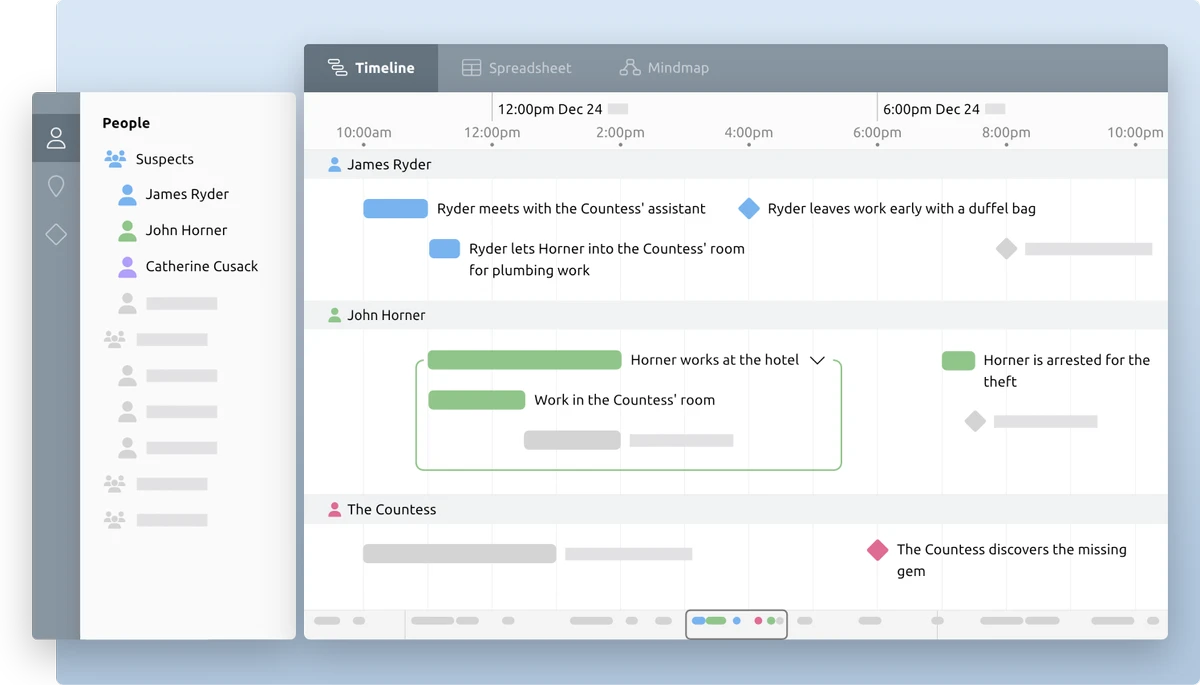
  • Visual comparison of timelines for different people, events, or concepts
  • Centralized view of all project data in one place
  • Multiple views to support brainstorming, planning, and execution
  • Story timeline creation for fiction writing and character development
  • Litigation chronology tools for legal case structuring
  • Project timelines for scheduling and workload organization
  • Historical timelines for research and education purposes
  • Ability to connect events, theories, and movements with supporting data
  • Advanced time handling, including precise timestamps down to seconds
  • Support for tentative or flexible date structures
  • Dependency linking between tasks or events

User Experience

Using Aeon Timeline feels structured and analytical, especially when dealing with large amounts of time-based information. The interface is designed to help users move from early-stage brainstorming to more refined planning by gradually building a structured timeline. The visual approach makes it easier to understand relationships between events, which is especially useful in storytelling or case preparation. Instead of working with scattered notes, everything is organized into a single timeline view that can be expanded with detailed data. Its strength lies in handling complexity rather than simple task management, making it more suitable for users who need deep structural organization rather than lightweight scheduling.

Who Should Use Aeon Timeline?

Aeon Timeline is best suited for writers, legal professionals, researchers, educators, and project planners who need to organize complex information over time. It is especially useful for users working on narrative structures, case chronologies, or research-based projects where relationships between events matter as much as the events themselves.

Conclusion

Aeon Timeline is a powerful tool for anyone who needs to manage complex timelines with depth and structure. Its ability to connect events, visualize relationships, and handle flexible date data makes it a strong choice for professional and academic use cases.

Pros & Cons

✓

Pros

  • Strong support for complex timeline structures
  • Useful across writing, legal, and research workflows
  • Visual comparison of events and relationships
  • Flexible date handling, including tentative timelines
  • Centralized and structured project organization
✕

Cons

  • May feel complex for simple task management needs
  • No pricing or rating information provided in the data
  • Learning curve likely for new users managing advanced timelines

Frequently Asked Questions

What is Aeon Timeline used for?

Aeon Timeline is used to create structured timelines for writing, legal cases, research, education, and project planning.

Can Aeon Timeline handle complex projects?

Yes, it is designed to manage detailed and data-rich timelines with multiple relationships between events.

Is Aeon Timeline suitable for writers?

Yes, it is widely used for story development, character backstories, and narrative planning.

Does Aeon Timeline support flexible dates?

Yes, it supports precise timestamps as well as tentative or flexible date entries.

Can Aeon Timeline be used for legal cases?

Yes, it includes features designed for building litigation chronologies and case timelines.

Recommended apps [Freeware]:
  • TimVer 0.12.0 TimVer logo open-source Windows system information tool that provides detailed OS version, build, compatibility, and system data beyond standard Winver
  • FanControl v271 FanControl logo manages CPU and GPU fans with custom curves, temperature sensors, profiles, and advanced cooling controls
  • MediaCoder 0.8.68 MediaCoder logo Convert audio and video files with a versatile transcoder supporting multiple formats, advanced controls, and high-performance processing.
  • Mumble 1.5.901 Mumble logo A low-latency encrypted voice communication app with positional audio, noise suppression, and gaming-focused features.
  • NoMachine 9.8.2 NoMachine logo Access and control remote computers securely with a fast desktop sharing tool for working, accessing files, and remote management.
  • Imagine 2.6.3 Imagine logo View, manage, and convert images quickly with support for many formats, EXIF details, animations, screenshots, and batch processing.
Recommended apps [Shareware]:
  • ExamDiff Pro 17.0.1.5 ExamDiff Pro logo a Windows file comparison tool for code review, folder sync, and document diffing with merge support.
  • Araxis Merge 2026.0 Araxis Merge logo a powerful file comparison and merging tool for developers, legal teams, and professionals handling version control
  • CyberLink PhotoDirector 2026 v17.6.1826.0 CyberLink PhotoDirector logo Edit, retouch, and enhance photos with CyberLink PhotoDirector, featuring AI tools, layer editing, and professional effects
  • Geometric Glovius 6.7.0.324 Geometric Glovius logo View, measure, compare, and export 3D CAD models with Geometric Glovius for Windows, supporting major CAD formats
  • SmartGit 26.1.045 SmartGit logo Manage Git repositories easily with visual history, merging tools, platform integrations, and customizable workflows.
  • Cisdem Duplicate Finder 5.0.0 Cisdem Duplicate Finder logo Find duplicate files and similar images with high accuracy, organize scan results, and safely remove unnecessary files to free up storage.