


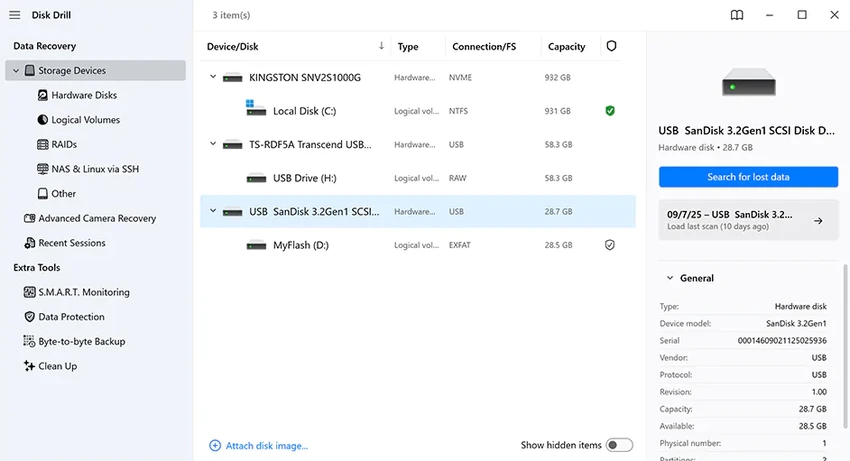

Disk Drill is a data recovery software designed to help users restore lost or deleted files from a wide range of storage devices. Whether files were accidentally deleted, lost due to formatting, or affected by system errors, Disk Drill focuses on scanning storage media deeply to recover accessible data quickly and efficiently.
Overview
Disk Drill is positioned as a comprehensive data recovery and disk scanning utility for Windows users. It supports multiple file systems and storage types, including internal drives, external disks, USB flash drives, and memory cards. The software uses multiple scanning methods to locate recoverable data, ranging from quick scans for recently deleted files to deeper scans for more complex data loss situations. It also includes optional data protection features that help track deleted files for easier recovery in the future.
Disk Drill is powered by multiple data recovery algorithms that read NTFS, FAT32, EXT, HFS+ and many other file systems. Even obscure file types are accessible using our software. Recover your lost data on system disks and external devices, including all types of memory cards and USB drives. If you can connect it to your computer, Disk Drill can find your lost data. Disk Drill tells you if your files can be recovered for free. Just a few files deleted? 500MB of free data recovery on us!
Features of Disk Drill
- Recover deleted files from internal and external storage devices
- Supports USB drives, memory cards, external HDDs, and system disks
- Compatible with multiple file systems (NTFS, FAT32, EXT, HFS+, and others)
- Quick Scan for recently deleted files
- Deep Scan for complex data loss scenarios
- Pause and resume scan sessions at any time
- Recovery Vault feature for pre-loss file tracking and recovery
- Partition recovery for damaged or lost partitions
- Backup recovery results as ISO or DMG images
- Free recovery limit up to 500MB (as stated in the provided data)
- Automatic detection and recovery suggestions during scans
User Experience
Using Disk Drill feels straightforward, especially for users dealing with urgent data loss. The workflow is simple: select a drive, start a scan, and review recoverable files. The interface focuses on guiding users through recovery steps without requiring technical expertise. In real-world use, the Quick Scan option is useful for recently deleted files, while Deep Scan is more time-consuming but necessary for formatted or corrupted drives. The ability to pause and resume scans is particularly helpful when working with large storage devices, as users do not need to restart the process if interrupted. The Recovery Vault feature adds a preventive layer, quietly tracking deleted files so recovery becomes easier if enabled beforehand.
Who Should Use Disk Drill?
- Users who accidentally deleted important files
- Professionals working with critical documents or media files
- Students recovering lost assignments or projects
- IT users handling damaged or formatted storage drives
- Anyone needing USB, SD card, or external drive recovery
Conclusion
Disk Drill is a reliable and accessible data recovery tool for Windows users who need to restore lost files from various storage devices. Its combination of Quick Scan, Deep Scan, and partition recovery makes it versatile for both simple and complex recovery situations.


