Light Image Resizer logo

Light Image Resizer 7.6.4.173

  • User Rating:
    ★★★★★
    ★★★★★
    0.0 ★ 0Votes
  • Requirements:
    Windows
  • Version: 7.6.4.173
  • Latest updated: 2 weeks ago
  • License: Free Trial  
  • Publisher: ObviousIdea
  • Size: 46 MB
× app stores

Light Image Resizer is an image processing utility designed to help users resize, compress, convert, and organize digital photos quickly. Formerly known as VSO Image Resizer, the software provides a simple way to prepare images for different purposes, including email sharing, web publishing, storage optimization, and digital photo management.

The application supports batch processing, allowing users to resize multiple images at once instead of editing files individually. Its multi-core resizing technology helps speed up image processing while maintaining high-quality results. Users can choose output resolutions, convert image formats, create copies of original files, and organize processed images into selected folders.

Light Image Resizer also includes additional tools for managing and protecting images. Users can add watermarks, apply visual effects such as sepia or borders, create PDF files from images, and use predefined profiles for common devices and resolutions. The software integrates directly with Windows Explorer, allowing users to right-click images or folders and quickly access resizing options. With support for various image formats, RAW files, and large-scale batch operations, Light Image Resizer is designed for both casual users and professionals who need an efficient way to manage large collections of digital images.

Features of Light Image Resizer

  • Resize images quickly and accurately
  • Batch image resizing and processing
  • Compress images to reduce file size
  • Convert images between different formats
  • Maintain image quality with multi-core processing technology
  • Support for RAW image formats
  • Add watermarks with transparency and HTML-style formatting
  • Apply effects such as sepia and borders
  • Preview results before processing
  • Rename and organize image files
  • Process files, folders, and subfolders
  • Create PDF files from images
  • Convert JPEG images to PDF
  • Email publishing support with size optimization
  • Predefined profiles for common resolutions and devices
  • Windows Explorer shell integration
  • Digital Picture Frame optimization tools

Interface and Usability

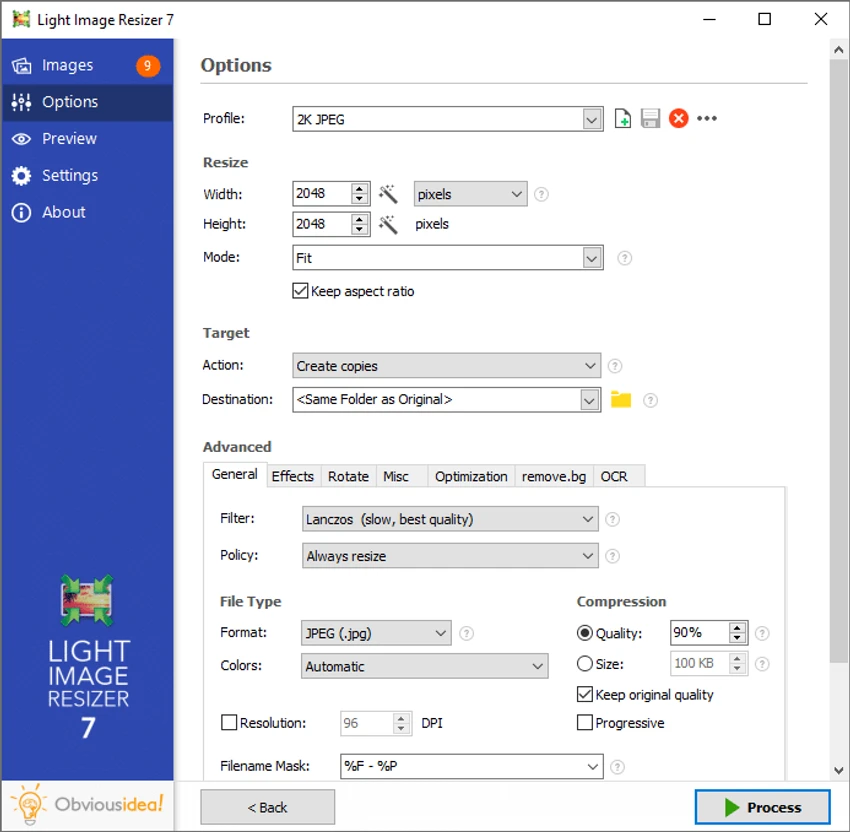
After using Light Image Resizer, I found the application focused on making image management simple and efficient. The interface provides a guided workflow where users select images, choose output settings, and process files without needing advanced image editing knowledge.

The Windows Explorer integration is one of the most convenient features, allowing quick access by right-clicking images or folders. Batch processing also makes the software practical for users handling large photo collections.

The available profiles help speed up common resizing tasks, while the preview function allows users to check the expected result before processing. Although the application offers many advanced options, the basic resizing workflow remains accessible for everyday users.

Who Should Use Light Image Resizer?

  • Users managing large photo collections
  • Photographers organizing digital images
  • People who need smaller images for email or web uploads
  • Users converting images into different formats
  • Anyone needing batch image resizing tools
  • Users creating image-based PDF files

Conclusion

Light Image Resizer is a practical tool for users who need a fast and reliable way to manage digital images. Its combination of resizing, compression, conversion, watermarking, and batch processing features makes it useful for preparing photos for storage, sharing, and online publishing.

Pros & Cons

✓

Pros

  • Fast batch image processing
  • Supports resizing, compression, and conversion
  • Maintains image quality during resizing
  • Includes watermark and organization tools
  • Supports RAW formats
  • Convenient Windows Explorer integration
  • Creates PDFs from images
  • Offers useful predefined profiles
✕

Cons

  • Primarily focused on image management rather than advanced photo editing
  • Large number of options may require exploration for new users

Frequently Asked Questions

What is Light Image Resizer used for?

Light Image Resizer is used to resize, compress, convert, organize, and process digital images. It helps users prepare photos for sharing, storage, and publishing.

Can Light Image Resizer resize multiple images at once?

Yes. Light Image Resizer supports batch processing, allowing users to resize and modify multiple images simultaneously.

Does Light Image Resizer reduce image quality?

The software is designed to maintain high-quality results while resizing images using image processing technologies such as Lanczos and bicubic filtering.

Can Light Image Resizer add watermarks?

Yes. Light Image Resizer allows users to add customizable watermarks with transparency support to help protect images.

Can Light Image Resizer convert images to PDF?

Yes. The software can create PDF files from individual images or multiple images.

Does Light Image Resizer work from Windows Explorer?

Yes. Light Image Resizer integrates with Windows Explorer, allowing users to start image processing by right-clicking images or folders.

Recommended apps [Freeware]:
  • LAV Filters 0.82 LAV Filters logo a free DirectShow codec package that enables broad audio and video format support on Windows
  • Ventoy 1.1.16 + LiveCD Ventoy logo create bootable USB drives and boot directly from ISO files without extraction or reformatting
  • SoundVolumeView 2.53 SoundVolumeView logo displays, manages, saves, and restores Windows audio settings with powerful profile and command-line support
  • Shutter Encoder 20.2 Shutter Encoder logo free multimedia tool for converting, editing, compressing, and processing video, audio, and image files with advanced batch features
  • HWiNFO 8.50 HWiNFO logo Analyze hardware components, monitor system sensors, generate detailed reports, and evaluate PC performance with a free diagnostic tool.
  • VUPlayer 4.24 VUPlayer logo Play music with a lightweight audio player supporting multiple formats, playlists, customization, and enhanced listening controls.
Recommended apps [Shareware]:
  • Okdo Pdf to All Converter Professional 6.0 Okdo Pdf to All Converter Professional logo Convert PDF files to Word, Excel, PowerPoint, images, HTML, text, and more with batch processing support
  • Copy Protect 3.0.2 Copy Protect logo converts media files into secured executables to prevent copying, duplication, and unauthorized distribution on Windows.
  • CoolUtils PDF Combine 8.1.0.76/13 CoolUtils PDF Combine logo Windows tool for merging multiple PDF files into one, with bookmarks, encryption, and batch processing
  • Comfort Keys Pro 9.6.2.0 Comfort Keys Pro logo Boost productivity with Comfort Keys Pro. Automate typing, manage hotkeys, clipboard history, macros, and text templates.
  • Rapid CSS 2025 v18.7.0.277 Rapid CSS logo Fast CSS editor with code completion, browser preview, validation tools, and FTP support for modern web development.
  • LastPass Password Manager 5.4.4 LastPass Password Manager logo Securely store passwords, generate strong credentials, autofill logins, and manage your accounts across multiple devices from one vault.