


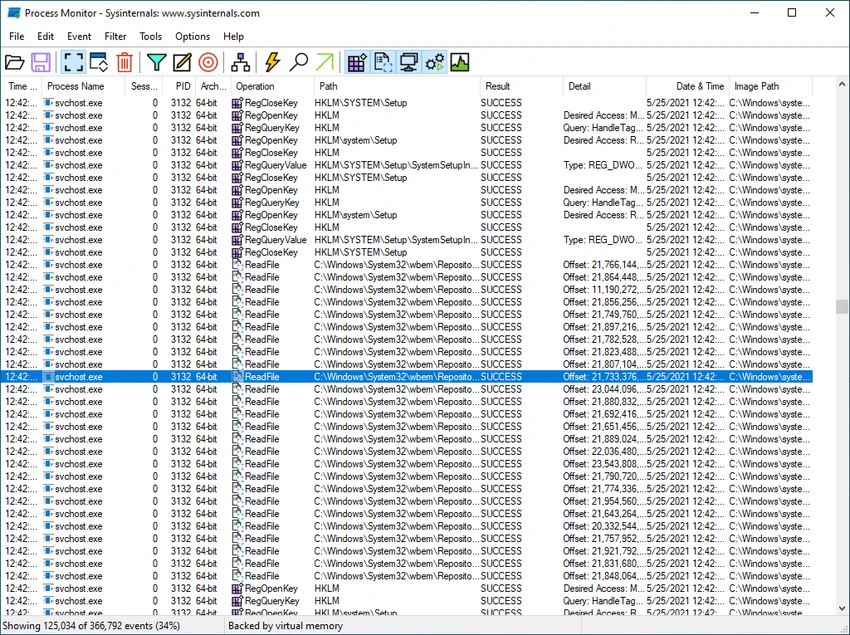

Process Monitor is a powerful Windows diagnostic utility that provides real-time visibility into file system activity, registry changes, and process/thread behavior. It is designed for deep system troubleshooting, performance analysis, and security investigation, offering detailed event-level insights that go far beyond standard monitoring tools.
Overview
Process Monitor is part of the Sysinternals Suite developed by Microsoft and is widely used by system administrators, developers, and cybersecurity professionals. It combines two older tools—Filemon and Regmon—into a single unified application. This allows users to monitor file system operations, registry modifications, and process/thread activity in real time. Each event is logged with detailed metadata such as process identity, user context, session ID, and full execution stacks.
Unlike basic system monitors, Process Monitor is designed for forensic-level inspection of Windows activity, making it especially valuable for diagnosing complex system issues and investigating suspicious behavior.
Features of Process Monitor
- Real-time monitoring of file system, registry, and process/thread activity
- Detailed event capture with input/output parameters
- Non-destructive filtering to refine data without losing logs
- Full thread stack tracing with symbol support for root-cause analysis
- Captures process details including image path, command line, and user/session ID
- Advanced filtering across all event fields
- High-performance logging capable of handling millions of events
- Process tree visualization for relationship tracking between processes
- Native log format for reuse in different sessions
- Boot-time logging for system startup analysis
- Searchable event data with cancelable search functionality
- Tooltips for quick access to detailed process and event information
User Experience
Process Monitor is a highly technical tool built for users who need precise insight into what Windows is doing behind the scenes. The interface presents a continuous stream of system events, which can initially feel overwhelming due to the volume of data. However, its filtering system is one of its strongest features. Users can narrow down activity by process, operation type, or registry path, making it possible to isolate specific system behaviors.
Once configured properly, Process Monitor becomes an essential troubleshooting tool. It is especially useful for diagnosing application errors, tracking system slowdowns, and analyzing unknown or suspicious system activity. The ability to capture boot-time activity also provides insights that are not available through standard Windows tools.
Who Should Use Process Monitor?
Process Monitor is best suited for advanced Windows users, IT professionals, developers, and cybersecurity analysts who need deep visibility into system operations. It is particularly useful for debugging software issues, investigating malware behavior, and analyzing system performance problems at a granular level.
Conclusion
Process Monitor is one of the most powerful real-time monitoring tools available for Windows. Its ability to capture and analyze file, registry, and process activity in detail makes it essential for advanced troubleshooting and security investigations.


