WonderPen logo

WonderPen 3.2.0.8457

  • User Rating:
    ★★★★★
    ★★★★★
    0.0 0Votes
  • Requirements:
    Windows
  • Version: 3.2.0.8457
  • Latest updated: 3 days ago
  • License: Freeware  
  • Publisher: TominLab
  • Size: 119 MB
× app stores

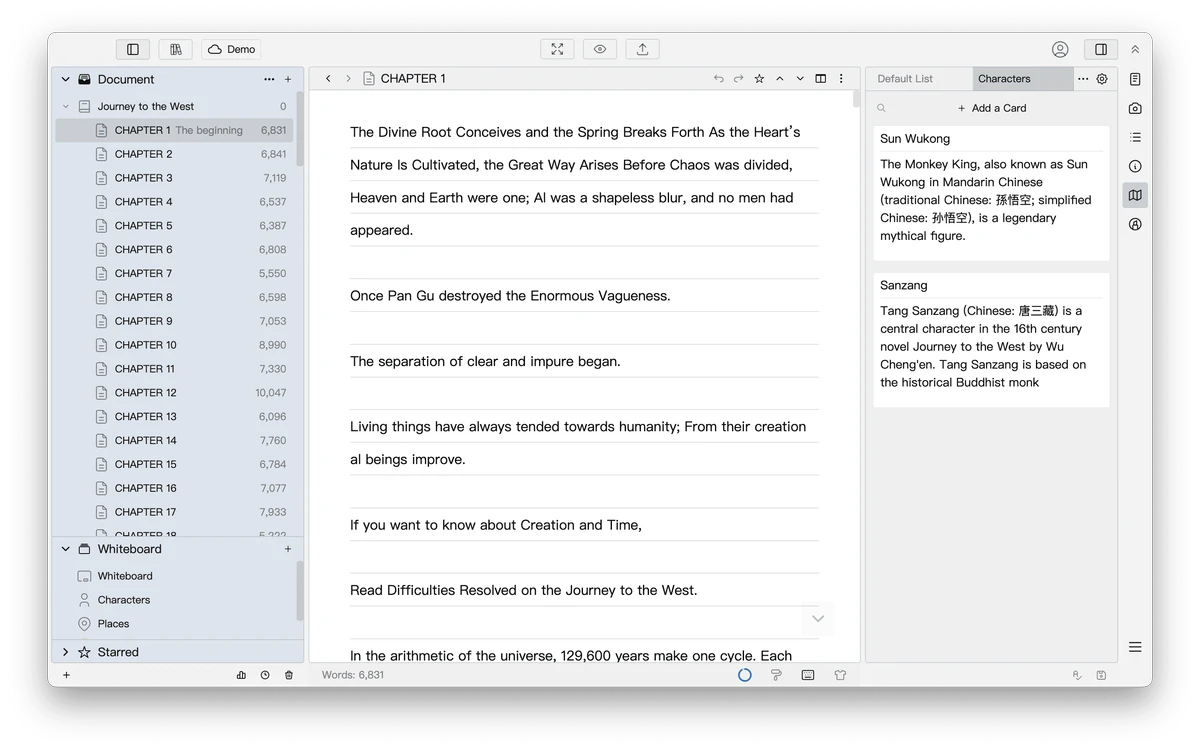
WonderPen is a writing application designed for both professional and amateur writers who want a structured and distraction-free environment for creating long-form content. It combines a tree-based document system with a clean text editor, making it suitable for organizing complex writing projects such as books, articles, or research notes. With support for Markdown, export options, and flexible organization tools, WonderPen aims to provide a balance between simplicity and productivity for writers who need both structure and focus.

Features of WonderPen

  • Tree-style document structure for organizing writing projects.
  • Drag-and-drop support for reordering documents.
  • Built-in Markdown text editor.
  • Full-screen writing mode for distraction-free focus.
  • Export documents as:
    • Image
    • PDF
    • Word
    • HTML
  • Whiteboard mode for adding:
    • Notes
    • Tables
    • Kanban boards
    • Other planning elements
  • Auto-save functionality during editing.
  • Backup and restore all documents as a single file.
  • Add individual memos to each document.
  • Focus mode for working on a single document node.
  • Search across all documents.
  • Dark mode support.
  • Automatic backup options.
  • Import and export support for project portability.

User Experience

WonderPen provides a calm and organized writing environment that is especially useful for structured content creation. The tree view system makes it easy to break down large writing projects into smaller sections, which helps maintain clarity when working on books or multi-part documents. The Markdown editor is simple and responsive, making it easy to format text without distraction. Switching to full-screen mode enhances focus by removing unnecessary UI elements, which is helpful during long writing sessions.

One of the more useful features is the whiteboard mode. It allows users to add supporting materials such as notes, tables, and Kanban-style task boards, which can help with planning and structuring ideas before writing. Auto-save and backup features add a layer of security, ensuring that work is preserved without manual intervention. The ability to export documents into multiple formats also makes it flexible for publishing or sharing content across different platforms.

Overall, WonderPen feels designed for writers who value structure, clarity, and a distraction-free workflow.

Who Should Use WonderPen?

WonderPen is ideal for writers, bloggers, students, researchers, and authors who need a structured writing environment. It is especially useful for users working on long-form projects such as novels, academic papers, or content planning where organization and focus are important.

Conclusion

WonderPen is a thoughtful writing application designed to help users stay organized and focused while working on long-form content. With features like tree-based project management, Markdown editing, and flexible export options, it offers a reliable environment for structured writing.

Pros & Cons

Pros

  • Clean and distraction-free writing environment.
  • Tree structure helps organize complex projects.
  • Markdown support for flexible formatting.
  • Multiple export formats (PDF, Word, HTML, Image).
  • Whiteboard mode for planning and brainstorming.
  • Auto-save and backup features improve data safety.
  • Full-screen mode enhances focus.
  • Easy document search and navigation.

Cons

  • Limited information on advanced collaboration features.
  • Tree-based structure may feel different for users used to linear editors.

Frequently Asked Questions

What is WonderPen?

WonderPen is a writing app that helps users create and organize documents using a tree structure and Markdown editor.

Does WonderPen support Markdown?

Yes. WonderPen includes a built-in Markdown editor for flexible text formatting.

Can I export documents from WonderPen?

Yes. Documents can be exported as PDF, Word, HTML, or image files.

Does WonderPen have a distraction-free mode?

Yes. It includes full-screen mode for focused writing without distractions.

Is WonderPen suitable for book writing?

Yes. Its tree structure and organization tools make it well-suited for long-form writing such as books or research projects.

Recommended apps [Freeware]:
  • UltraSearch 4.9.2.1208 UltraSearch logo locates files and folders on local NTFS drives in seconds without building an index. Fast, precise, and lightweight.
  • OCCT 16.1.11.99 OCCT logo hardware monitoring and stress testing tool for CPU, GPU, memory, and power supply performance analysis.
  • PilotEdit 21.0.0 PilotEdit logo a powerful text and hex editor for large files with FTP support, scripting, encryption, and search tools
  • TeamViewer 15.79.4 TeamViewer logo a secure remote desktop tool for PC control, file transfer, and remote support worldwide
  • Jubler Subtitle Εditor 9.0.1 / 10.0.0 Jubler Subtitle Εditor logo edit, sync, translate, and correct subtitles with real-time video preview
  • Avast Free Antivirus 26.6.11050 Avast Free Antivirus logo real-time malware protection, phishing defense, and scam detection with minimal impact on Windows performance
Recommended apps [Shareware]:
  • Mountain Duck 5.3.0.29446 Mountain Duck logo mounts cloud storage and servers as local drives with smart sync, offline access, and seamless file integration
  • TweakNow WinSecret Plus 9.5.4 TweakNow WinSecret Plus logo Windows optimization, hidden tweaks, PDF tools, image conversion, and system utilities
  • VovSoft PDF to Text Converter 1.5 VovSoft PDF to Text Converter logo convert PDF files to editable TXT documents offline with batch processing
  • Adobe Audition 2026 v26.3 Adobe Audition logo professional audio editor for recording, mixing, restoration, podcasting, and sound design
  • XnView MP 1.11.5 XnView MP logo a powerful image viewer, editor, and batch converter supporting 500+ image formats on Windows
  • Start11 2.72 Start11 logo Windows customization tool that restores classic Start Menu styles and enhances taskbar functionality on Windows 10 and 11