FluentTweaker logo

FluentTweaker 26.06.02

  • User Rating:
    ★★★★★
    ★★★★★
    0.0 0Votes
  • Requirements:
    Windows
  • Version: 26.06.02
  • Latest updated: 1 day ago
  • License: Freeware  
  • Publisher: builtbybel
  • Size: 43 MB
×

FluentTweaker is a lightweight Windows utility designed to give users deeper control over system behavior, interface settings, privacy options, and performance-related configurations. Instead of relying on hidden scripts or one-click optimization tools, it focuses on transparency and user understanding. Built as a sibling project to FluentCleaner, it shifts the focus from file cleanup to system-level customization, helping users adjust Windows behavior in a structured and reversible way.

Overview

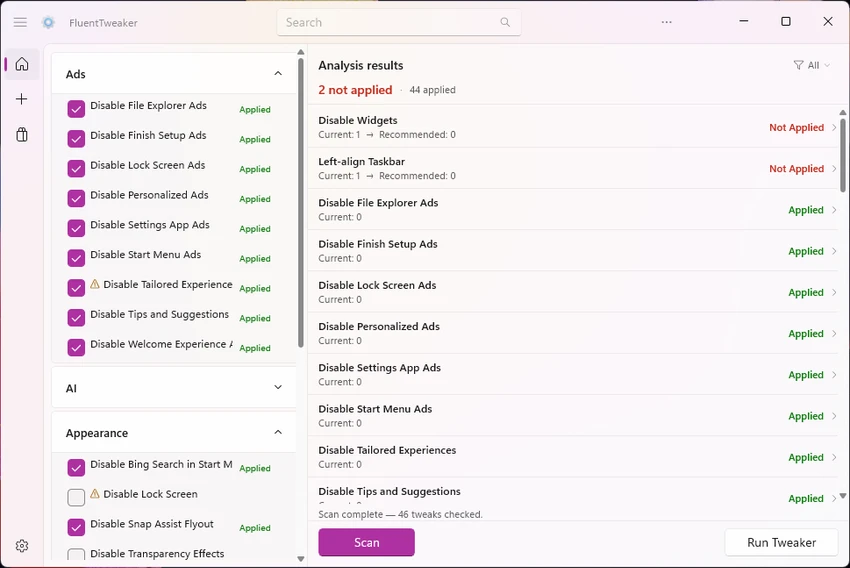
FluentTweaker is built for users who want to fine-tune Windows without manually editing registry keys or navigating complex Group Policy settings. It centralizes system tweaks into a categorized interface covering UI behavior, privacy controls, gaming-related settings, File Explorer behavior, and performance adjustments. Unlike traditional “optimizer” tools that apply bulk changes silently, FluentTweaker emphasizes visibility. Every modification is presented clearly, allowing users to inspect, understand, and reverse changes at any time. This makes it particularly appealing for users who want control without risking system instability.

The application is developed using WinUI 3, focusing on a modern Windows-native experience and consistent interface design.

Features of FluentTweaker

  • Centralized Windows system tweaking interface
  • UI customization options (taskbar, system interface behavior)
  • Privacy-related system controls
  • File Explorer behavior adjustments
  • Gaming and performance-related tweaks
  • Access to hidden Windows policies and system settings
  • Reversible tweaks with clear visibility of changes
  • Categorized and inspectable configuration system
  • Avoids bulk or “one-click optimization” changes
  • Built using WinUI 3 for modern Windows UI experience
  • Focus on transparency and user understanding of each tweak

User Experience

Using FluentTweaker feels structured and deliberate rather than aggressive or automated. Instead of applying hidden system changes, it presents each tweak as an individual, understandable option. This approach reduces uncertainty, especially for users who have previously relied on registry edits or third-party “optimizer” tools. The categorized layout makes it easier to navigate between system areas like UI, privacy, and performance without needing prior technical knowledge of where each setting is located in Windows.

System Requirements:

  • Windows 11, Windows 10

Conclusion

FluentTweaker is a thoughtful system customization tool for Windows users who want control without the unpredictability of traditional tweak utilities. Its emphasis on clarity, reversibility, and structured settings makes it a strong option for users who prefer understanding exactly what changes are being applied.

Pros & Cons

Pros

    • Transparent and inspectable system tweaks
    • Reversible changes reduce risk of system issues
    • Covers UI, privacy, performance, and Explorer behavior
    • Modern WinUI 3 interface design
    • Avoids unsafe or hidden “one-click optimization” scripts

Cons

    • Requires some understanding of Windows system behavior
    • No official rating or user feedback provided in the data
    • Focuses on advanced users rather than beginners

Frequently Asked Questions

What is FluentTweaker used for?

FluentTweaker is used to customize and adjust Windows system behavior, including UI, privacy, and performance settings.

Does it apply hidden system changes automatically?

No, it focuses on transparency and shows each tweak individually before it is applied.

Is it safe to use?

It is designed to be reversible and inspectable, reducing the risk of permanent or unclear system changes.

Does it replace registry editing?

It simplifies many tasks that would otherwise require manual registry or Group Policy edits.

Recommended apps [Freeware]:
  • IObit Driver Booster 13.4.0.234 IObit Driver Booster logo updates outdated drivers automatically to boost system stability and gaming performance.
  • EarthView 7.16.4 EarthView logo dynamic wallpapers and screensavers with day, night, and weather effects
  • WinScan2PDF 9.77 WinScan2PDF logo scan documents and save them as PDFs or JPEGs with minimal setup and low CPU usage.
  • Winhance 26.06.12 Winhance logo Windows optimization tool to debloat apps, tweak settings, and customize Windows 10/11
  • CS Easy Unlocker 1.1.5.0 CS Easy Unlocker logo unlock restricted folders and fix “Access Denied” errors with a simple one-click tool.
  • Valentina Studio 17.5 Valentina Studio logo manage SQL and NoSQL databases with schema design, queries, reports, and cross-platform support.
Recommended apps [Shareware]:
  • Send Anywhere 24.6.0 Send Anywhere logo free cross-platform file-sharing tool that transfers files of any size without registration.
  • Remote Desktop Manager 2026.2.9.0 Remote Desktop Manager logo manage RDP, SSH, VNC, and virtual machines from one secure centralized platform
  • Any video Converter 9.2.3 Any video Converter logo video conversion tool that supports multiple formats, editing features, and device-ready output profiles
  • GiliSoft Exe Lock 12.0.0 GiliSoft Exe Lock logo Protect Windows applications with passwords and prevent unauthorized access using GiliSoft Exe Lock
  • Sequence Generator Pro 4.5.0.1649 Sequence Generator Pro logo a Windows astrophotography capture suite for automating imaging, focus, and sequencing.
  • ExamDiff Pro 17.0.1.2 ExamDiff Pro logo a Windows file comparison tool for code review, folder sync, and document diffing with merge support.