


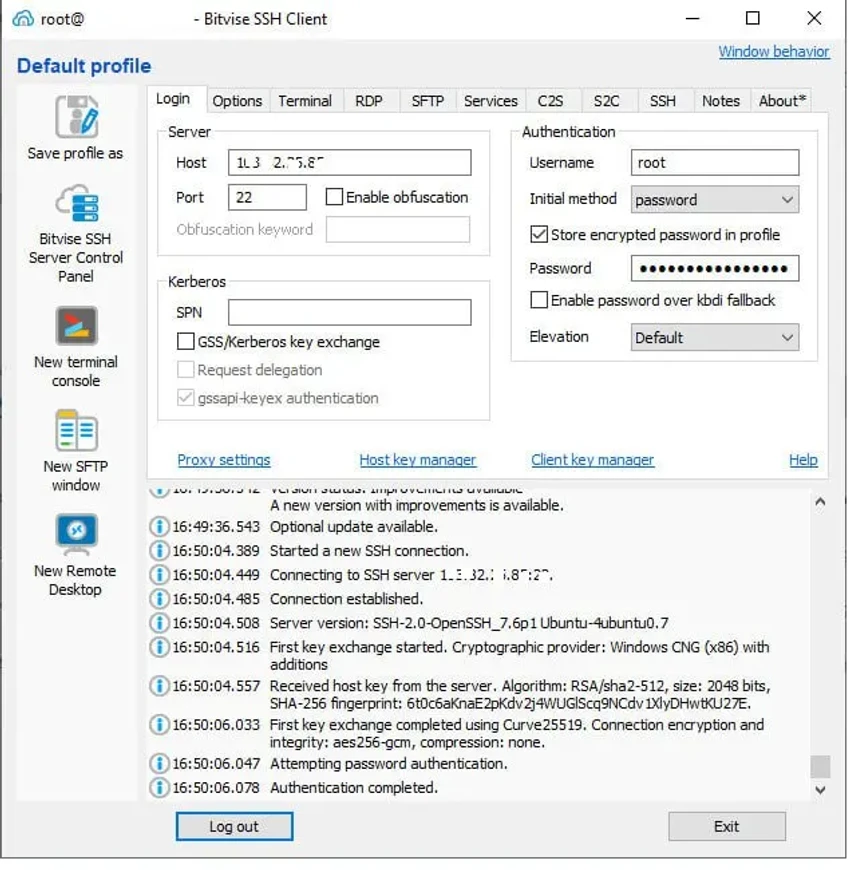

Bitvise SSH Client is a free SSH and SFTP client for Windows designed to provide secure remote access, encrypted file transfers, and advanced SSH tunneling capabilities. Built for both IT professionals and advanced users, it combines a graphical interface with powerful command-line tools, making it suitable for everything from routine server administration to automated remote management tasks.
The software supports secure SSH connections for accessing remote servers while protecting data in transit through encryption. In addition to terminal access, Bitvise SSH Client offers one of the more comprehensive graphical SFTP implementations available, allowing users to transfer files securely between local and remote systems. It also includes SCP support, advanced terminal emulation, and an FTP-to-SFTP bridge that helps maintain compatibility with legacy FTP workflows.
Beyond basic remote access, Bitvise SSH Client includes a robust set of networking features such as SSH tunneling, dynamic port forwarding through integrated SOCKS and HTTP CONNECT proxies, and remote administration support for Bitvise SSH Server. Authentication options include Kerberos, NTLM SSPI (GSSAPI), and public key authentication using ECDSA, RSA, and DSA keys. Compatible with both desktop and server editions of Windows, Bitvise SSH Client is well suited for administrators, developers, and technical users who require a flexible and secure SSH solution with both graphical and scripting capabilities.
Features of Bitvise SSH Client
- Free SSH and SFTP client for Windows.
- Secure encrypted SSH connections.
- Advanced graphical SFTP file transfer.
- Command-line SFTP client (sftpc).
- SCP support for secure file transfers.
- Terminal emulation supporting bvterm, xterm, and VT100 protocols.
- SSH tunneling and TCP/IP port forwarding.
- Dynamic port forwarding with integrated SOCKS and HTTP CONNECT proxy support.
- FTP-to-SFTP bridge for legacy FTP applications.
- One-click remote desktop forwarding.
- Remote administration support for Bitvise SSH Server.
- Automatic reconnect capabilities.
- Kerberos 5 and NTLM SSPI (GSSAPI) authentication.
- Public key authentication with ECDSA, RSA, and DSA.
- Advanced encryption suitable for security-focused environments.
- Optional SSH obfuscation support.
- Powerful command-line parameters for automation.
- Command-line remote execution client (sexec).
- Command-line terminal client (stermc).
- Command-line tunneling client (stnlc).
- Includes the FlowSshNet .NET SSH library with PowerShell examples.
Interface and Usability
Bitvise SSH Client provides a polished interface that balances accessibility with professional functionality. During use, establishing SSH connections is straightforward, while the integrated graphical SFTP client makes transferring files between local and remote systems simple and efficient.
The terminal emulator is responsive and supports multiple terminal protocols, allowing compatibility with a wide range of SSH servers. Users who prefer graphical workflows can manage connections through the main interface, while administrators and developers can take advantage of the extensive command-line tools for scripting and automation.
Advanced networking features such as SSH tunneling, proxy support, and port forwarding are organized within dedicated configuration sections. Although these options may appear complex to beginners, experienced users will appreciate the level of control available. Overall, Bitvise SSH Client offers an interface that scales well from everyday remote access tasks to advanced system administration.
Who Should Use Bitvise SSH Client?
- System administrators managing Windows or Linux servers.
- IT professionals requiring secure remote access.
- Developers working with SSH-based environments.
- Users transferring files securely using SFTP or SCP.
- Network administrators configuring SSH tunnels and port forwarding.
- Advanced users who need both graphical and command-line SSH tools.
Conclusion
Bitvise SSH Client is a feature-rich SSH solution that goes far beyond basic remote terminal access. By combining secure SSH connectivity, an advanced graphical SFTP client, flexible authentication methods, powerful tunneling capabilities, and extensive command-line tools, it delivers a comprehensive toolkit for professional remote administration.
Its support for modern security standards, automation, and advanced networking makes it particularly attractive to system administrators, developers, and IT professionals who rely on secure remote access every day. While beginners may need some time to become familiar with its advanced configuration options, the software remains approachable for standard SSH and file transfer tasks.


