UniFab logo

UniFab 4.1.7.0

  • User Rating:
    ★★★★★
    ★★★★★
    0.0 0Votes
  • Requirements:
    Windows
  • Version: 4.1.7.0
  • Latest updated: 1 week ago
  • License: Free Trial  
  • Publisher: UniFab.ai
  • Size: 9 MB
× app stores

UniFab is a premium AI-powered media enhancement suite for Windows and macOS that combines video restoration, audio enhancement, format conversion, and AI-powered processing into a single application. Developed by the team behind DVDFab, UniFab is designed for content creators, video enthusiasts, and anyone looking to improve the quality of older or low-resolution media without mastering professional editing software.

Instead of requiring several separate utilities, UniFab brings together tools for video upscaling, denoising, frame interpolation, HDR conversion, facial enhancement, and format conversion within one organized workspace. The application performs AI processing locally on compatible hardware, helping users avoid per-project processing fees for many of its features. While UniFab offers an impressive feature set and polished interface, it is positioned as a premium solution. A 30-day free trial is available with full feature access (subject to module trial limits), allowing users to evaluate the software before purchasing.

Features of UniFab

  • AI-powered video enhancement
  • AI-powered audio enhancement
  • Video upscaling for low-resolution footage
  • AI noise reduction
  • Compression artifact removal
  • Frame interpolation for smoother motion
  • Facial detail enhancement
  • SDR to HDR conversion
  • Video format conversion
  • Audio enhancement tools
  • Multiple specialized AI models for different content types
  • AI model optimized for anime content
  • Local AI processing on supported hardware
  • GPU acceleration
  • Unified interface for multiple AI tools
  • Supports a wide range of video formats
  • Suitable for restoring old videos and DVD collections
  • 30-day free trial
  • Lifetime license available
  • Some cloud-based AI features require processing credits (such as Video Translator AI, Subtitle Generator AI, Video Reframer AI, and the online Video Enhancer)

Interface and Usability

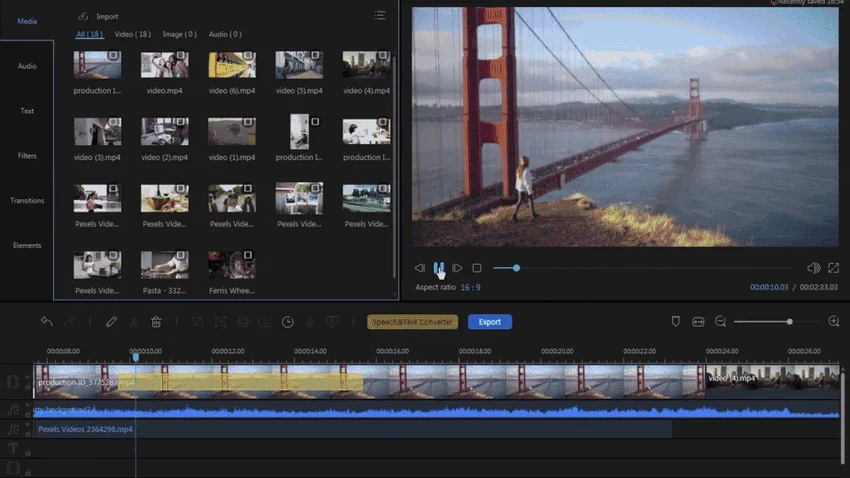
One of UniFab's strongest qualities is its interface. Despite offering a large collection of AI-powered tools, the application remains clean, organized, and surprisingly approachable. During use, navigating between enhancement modules feels intuitive. Instead of switching between multiple specialized applications, everything is available from a single dashboard with logically grouped tools. This makes common workflows—such as upscaling, denoising, and format conversion—much easier to manage.

The software is also designed to automate much of the technical work. Rather than manually adjusting numerous enhancement parameters, users can rely on specialized AI models to analyze footage and apply improvements automatically. This significantly reduces the learning curve compared to professional video editing software.

Performance

On modern hardware, UniFab performs very well. GPU acceleration substantially reduces processing times, making demanding AI enhancement tasks much more practical. In testing on a system equipped with an NVIDIA GeForce RTX 5060, short video clips were upscaled in only a few minutes with hardware acceleration enabled. Actual performance will vary depending on video resolution, selected AI model, project complexity, and your system specifications.

Because AI processing is performed locally, users should expect the best experience on systems with a modern graphics card and sufficient storage space. Older hardware may experience noticeably longer processing times.

Who Should Use UniFab?

  • Content creators
  • YouTubers
  • Video editors
  • Digital archivists
  • Home users restoring family videos
  • DVD collectors preserving older media
  • Social media creators
  • Anime enthusiasts seeking specialized AI upscaling
  • Professionals working with AI-enhanced video workflows

Conclusion

UniFab stands out by bringing numerous AI-powered video and audio enhancement tools together in one cohesive application. Rather than forcing users to learn multiple programs, it offers an accessible workflow for tasks such as upscaling, denoising, frame interpolation, HDR conversion, and media conversion.

Pros & Cons

Pros

  • Comprehensive AI video enhancement suite
  • Excellent, beginner-friendly interface
  • AI video upscaling
  • Noise and compression artifact removal
  • Frame interpolation
  • HDR conversion
  • Facial enhancement
  • Specialized AI models for different content types
  • Local AI processing for many features
  • GPU acceleration
  • Supports numerous video formats

Cons

  • Premium pricing
  • Requires capable hardware for optimal performance
  • AI models can consume significant storage space
  • Some cloud-based AI features require additional processing credits
  • Occasional users may find lower-cost alternatives sufficient

Frequently Asked Questions

What is UniFab used for?

UniFab is an AI-powered media enhancement suite used to upscale videos, reduce noise, improve facial details, increase frame rates, convert SDR to HDR, enhance audio, and convert media into different formats.

Does UniFab use AI to improve video quality?

Yes. UniFab uses specialized AI models to analyze and enhance video content automatically, helping improve resolution, clarity, motion, and overall image quality.

Does UniFab support GPU acceleration?

Yes. UniFab supports GPU acceleration, allowing compatible graphics cards to significantly speed up AI processing tasks.

Is UniFab suitable for restoring old videos?

Yes. UniFab is well suited for restoring older or low-resolution footage by applying AI-powered upscaling, noise reduction, and facial enhancement techniques.

Is there a free trial of UniFab?

Yes. UniFab offers a 30-day free trial that provides access to all features without watermarks, with up to three trial uses per module.

Do all UniFab features work locally?

No. Many AI enhancement features process locally on your computer, but some Fab Cloud features—including Video Translator AI, Subtitle Generator AI, Video Reframer AI, and the online Video Enhancer—require cloud processing credits even with a paid license.

Recommended apps [Freeware]:
  • DriversCloud 12.1.6 DriversCloud logo scan system hardware, update drivers, monitor performance, and analyze blue screen errors (BSODs) on Windows.
  • Tixati 3.43 Tixati logo a fast, ad-free BitTorrent client offering advanced peer control, bandwidth management, and detailed swarm analysis
  • WinBin2Iso 6.77 WinBin2Iso logo a free, portable utility that quickly converts BIN CD and DVD image files to ISO format on Windows.
  • PDFsam -PDF Split and Merge 6.0.4 PDFsam -PDF Split and Merge logo Split, merge, extract, rotate, and reorganize PDF files with a free tool designed for efficient document management.
  • Win11Debloat 2026.07.11 Win11Debloat logo Remove unwanted apps, reduce telemetry, and customize Windows settings with a lightweight PowerShell script for system cleanup.
  • DuckDuckGo 0.164.1 DuckDuckGo logo Browse privately with tracker blocking, ad protection, private search, cookie controls, and secure browsing tools built in.
Recommended apps [Shareware]:
  • DSLR Remote Pro 3.31.5 DSLR Remote Pro logo Windows software for Canon DSLR control, photo booth creation, live view, HDR capture via USB connection
  • Classroom Spy Pro 5.6.6 Classroom Spy Pro logo Monitor, control, and manage student computers remotely with Classroom Spy Pro for Windows classrooms
  • priPrinter Professional 7.0.1.2625 priPrinter Professional logo virtual printer driver that lets you preview, edit, and optimize print jobs before sending them to a physical printer
  • Beyond Compare 5.2.3.32296 Beyond Compare logo compare, merge, and sync files easily with Beyond Compare, a powerful cross-platform tool
  • S3 Browser 13.3.5 S3 Browser logo Manage Amazon S3 storage and CloudFront distributions with S3 Browser for fast uploads, secure transfers, and bucket control
  • GiliSoft Audio Editor 3.2.0 GiliSoft Audio Editor logo Quickly trim, merge, batch-process, and convert audio files with a simple, beginner-friendly editor for everyday audio tasks