PDF Architect logo

PDF Architect 9.1.133.23134

  • User Rating:
    ★★★★★
    ★★★★★
    0.0 ★ 0Votes
  • Requirements:
    Windows
  • Version: 9.1.133.23134
  • Latest updated: 3 weeks ago
  • License: Freemium  
  • Publisher: Pdfforge
  • Size: 1 MB
× app stores

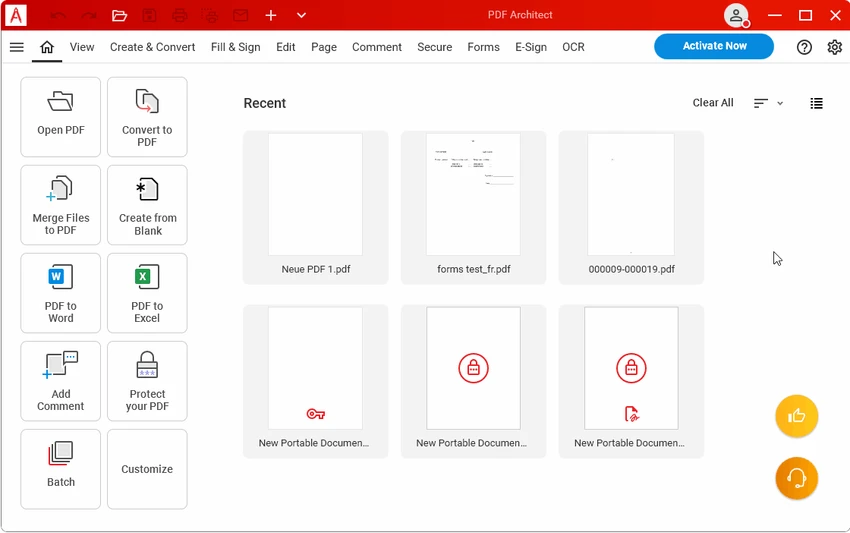
PDF Architect is a comprehensive PDF solution designed for users who need more than just a basic PDF viewer. It allows you to create, view, edit, and manage PDF documents in a flexible and modular environment. The software is built to adapt to different workflows, enabling users to modify text, images, and pages directly within PDF files without converting them to other formats first. It also supports converting PDFs into common file types such as Word, Excel, HTML, and image formats.

Beyond editing, PDF Architect includes tools for organizing documents, creating fillable forms, adding comments for collaboration, and securing files with passwords and digital signatures. It also integrates OCR technology to extract text from scanned documents, making it useful for digitizing printed content. Designed for Windows systems, it targets users who require an all-in-one document management workflow.

Features of PDF Architect

  • Create PDF files from documents containing sensitive or important information
  • Edit text, images, and pages directly within PDF documents
  • Merge and organize multiple files into a single PDF
  • Convert PDF files to Word, Excel, HTML, text, and image formats
  • Add comments, annotations, and compare documents for review
  • Create and fill out customizable PDF forms
  • Secure documents with passwords, permissions, and digital signatures
  • OCR (Optical Character Recognition) for scanned document text extraction
  • Batch recognition support for multiple files

Interface and Usability

PDF Architect follows a modular design, where features are structured into different tools that can be used based on user needs. The interface is focused on productivity, allowing users to switch between editing, converting, and reviewing workflows. While it may take a short time to get familiar with its modular structure, the layout is generally straightforward for users accustomed to document editing software. The Windows-based performance ensures stable handling of standard PDF tasks, including editing and conversion operations.

Who Should Use PDF Architect?

PDF Architect is suitable for professionals, students, and office users who regularly work with PDF documents. It is particularly useful for users who need advanced editing capabilities, document conversion tools, or OCR functionality for scanned files. Businesses handling forms, reports, or collaborative document workflows may also benefit from its feature set.

Conclusion

PDF Architect offers a structured and feature-rich approach to PDF management, combining editing, conversion, OCR, and security tools in one Windows application. Its modular design makes it adaptable for different types of users, from casual document editing to more advanced office workflows. While it may require some time to explore all features, it remains a capable choice for those seeking an all-in-one PDF solution.

Pros & Cons

✓

Pros

  • Wide range of PDF editing and conversion tools
  • Includes OCR for scanned documents
  • Supports secure document handling with encryption and signatures
  • Modular design allows flexible feature use
  • Supports multiple export formats (Word, Excel, images, HTML)
✕

Cons

  • Requires Microsoft Office for some conversion and plugin features
  • Modular structure may feel complex for beginners

Frequently Asked Questions

What is PDF Architect used for?

PDF Architect is used to create, view, edit, convert, and manage PDF documents. It also supports reviewing, securing, and organizing files in a single workflow.

Can I edit text inside a PDF with PDF Architect?

Yes. The software allows you to modify text, images, and page elements directly within a PDF file without needing to convert it into another format first.

Does PDF Architect support converting PDFs to Word or Excel?

Yes. It can convert PDF files into multiple formats, including Microsoft Word, Excel, HTML, plain text, and image formats such as PNG and JPEG.

Does PDF Architect include OCR features?

Yes. It includes Optical Character Recognition (OCR), which helps extract editable text from scanned documents and supports batch processing for multiple files.

Can I protect PDF files with PDF Architect?

Yes. The software provides security options such as password protection, permission controls, and digital signature support to help secure sensitive documents.

Is PDF Architect suitable for professional or office use?

Yes. It is designed for both individual and business use, especially for users who need editing, form creation, document conversion, and secure PDF management.

Recommended apps [Freeware]:
  • Process Monitor 4.04 Process Monitor logo a Windows tool that tracks real-time file, registry, and process activity for system troubleshooting and malware analysis
  • Vektorrazor 2.2 Vektorrazor logo converts logos and image sources into clean, CAD-friendly vector contours for technical workflows
  • Evernote 11.24.3.43761 Evernote logo Capture, organize, sync, and access notes, tasks, web content, and research across all your devices
  • RunAsTool 1.6 RunAsTool logo Run Windows programs with administrator rights without passwords using RunAsTool, a portable privilege management utility
  • Resolume Arena 7.27.0 rev 14395 Resolume Arena logo Professional software for live video mixing, projection mapping, edge blending, and synchronized audiovisual performances.
  • MemoryCleaner 2.0.1 MemoryCleaner logo Free utility that helps clean physical and standby memory with one click or automatic scheduling to improve memory management.
Recommended apps [Shareware]:
  • Text Edit Plus 16.5 Text Edit Plus logo a lightweight text editor with text analysis, word frequency statistics, and document editing tools
  • BackUp Maker 8.406 BackUp Maker logo Protect important files with BackUp Maker using scheduled backups, AES encryption, ZIP archives, and cloud or FTP storage
  • Process Lasso 18.2.2.10 Process Lasso logo Optimize process behavior, manage CPU priorities, monitor system responsiveness, and control background tasks with advanced tools.
  • Software Ideas Modeler 15.50 Software Ideas Modeler logo Design UML, ERD, BPMN, SysML, and 110+ diagram types with an intuitive modeling tool built for software analysis and planning.
  • HTMLPad 2025 v18.7.0.277 HTMLPad logo Fast HTML editor with CSS and JavaScript tools, code completion, FTP support, validation, and browser preview for Windows.
  • CrawlRhino SEO Crawler 1.1.36.0 CrawlRhino SEO Crawler logo Analyze website structure, detect SEO issues, audit backlinks, and generate detailed reports with a comprehensive website crawler.