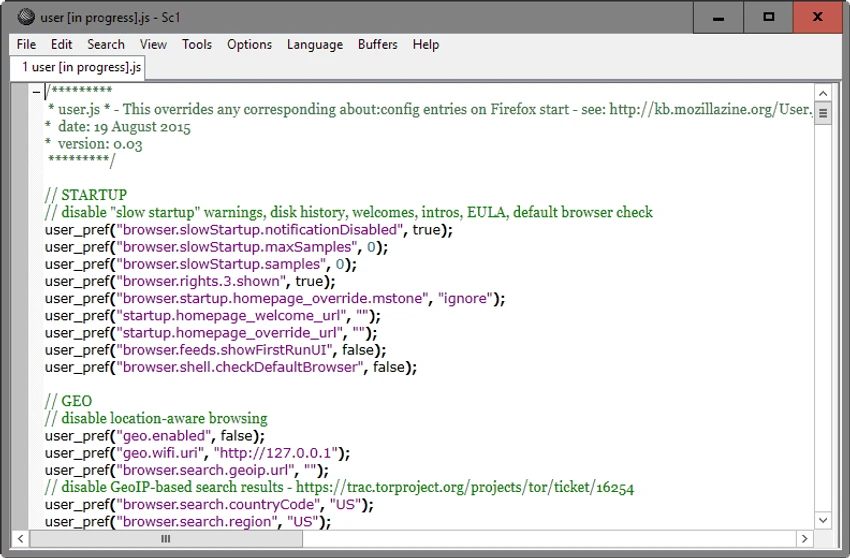
SciTE (SCIntilla) logo

SciTE (SCIntilla) 5.6.4

  • User Rating:
    ★★★★★
    ★★★★★
    0.0 ★ 0Votes
  • Requirements:
    Windows
  • Version: 5.6.4
  • Latest updated: 3 weeks ago
  • License: Freeware  
  • Publisher: Neil Hodgson
  • Size: 4 MB
× app stores

SciTE is a lightweight text editor built on the Scintilla editing component and designed to provide essential tools for writing, editing, and running programs. It offers a familiar Windows-style text editing experience while adding developer-focused features such as automatic syntax styling and programming language support. The software can manage multiple files in memory at the same time, while displaying only one file at a time to maintain a clean workspace.

SciTE supports a wide range of programming languages, including Java, JavaScript, Pascal, MATLAB, Perl, and PHP, with syntax highlighting options that make code easier to read. It also includes useful editing tools such as incremental search, find and replace, configurable parameters, whitespace management, full-screen and read-only modes, text wrapping, and line-ending customization. Its simple design makes it a practical choice for users who need a fast and straightforward coding editor.

Features of SciTE

  • Scintilla-based text editing designed for programming and general text editing.
  • Syntax highlighting support for multiple programming languages.
  • Automatic syntax styling to improve code readability.
  • Multi-file support with multiple files stored in memory simultaneously.
  • Find and replace tools for efficient text editing.
  • Incremental search functionality for quickly locating content.
  • Configurable editing options including parameters, whitespace settings, and line endings.
  • Full-screen and read-only modes for different editing situations.
  • Support for programming languages such as Java, JavaScript, Pascal, MATLAB, Perl, and PHP.

Interface and Usability

SciTE provides a simple and familiar text editing environment similar to traditional Windows editors. The interface focuses on functionality rather than visual complexity, making it easy for users who prefer a lightweight coding workspace. The software keeps multiple files available in memory while showing only one active document at a time, helping maintain an organized editing experience. Features such as syntax highlighting, search tools, text wrapping, and configurable display options make everyday coding and text editing more convenient.

Because SciTE is designed around essential editing and programming tools, it may feel more minimal compared with full-featured development environments. However, this simplicity can be an advantage for users who want a fast editor without unnecessary complexity.

Who Should Use SciTE?

SciTE is suitable for programmers, developers, and technical users who need a lightweight text editor with programming features. It is a good option for users who want syntax highlighting, multi-language support, and essential editing tools without using a larger integrated development environment. It can also be useful for students, script writers, and developers working with smaller projects who prefer a simple and responsive coding editor.

Conclusion

SciTE is a practical lightweight code editor that focuses on essential programming and text editing tasks. Built on Scintilla, it combines a familiar editing experience with useful developer features such as syntax highlighting, search tools, and support for multiple programming languages.

Pros & Cons

✓

Pros

  • Lightweight and fast text editing experience.
  • Supports syntax highlighting for multiple programming languages.
  • Includes useful programming-oriented editing tools.
  • Supports multiple files in memory.
  • Offers customizable editing options.
✕

Cons

  • Does not provide the full feature set of larger development environments.
  • The minimal interface may not suit users looking for advanced IDE features.

Frequently Asked Questions

What is SciTE?

SciTE is a lightweight text editor based on the Scintilla editing component. It is designed for writing and editing text files while providing additional programming features such as syntax highlighting and language-specific formatting.

Is SciTE a code editor?

Yes. SciTE is designed to support programming tasks and includes features commonly found in code editors, including syntax styling and support for multiple programming languages.

Which programming languages does SciTE support?

SciTE supports syntax highlighting for various programming languages, including Java, JavaScript, Pascal, MATLAB, Perl, and PHP.

Can SciTE edit multiple files at the same time?

SciTE can keep multiple files in memory simultaneously. However, only one file is displayed at a time to keep the editing workspace organized.

Does SciTE include search and editing tools?

Yes. SciTE includes incremental search, find and replace functions, text wrapping, whitespace controls, read-only mode, full-screen mode, and line-ending configuration options.

Is SciTE suitable as a replacement for a full IDE?

SciTE is designed as a lightweight text editor with programming features rather than a complete IDE. It is suitable for users who need essential coding tools but do not require the larger feature sets provided by full development environments.

Recommended apps [Freeware]:
  • DefenderUI 2.10 DefenderUI logo enhances Microsoft Defender on Windows 10/11 with advanced security profiles and easier system protection control
  • Training Manager 2026 v4.10.4002 Training Manager logo Track employee training, compliance, certifications, and class schedules with centralized training management tools
  • WinScript 2.21.0 WinScript logo customize Windows with debloat, privacy, performance tweaks, and one-click app installation scripts
  • Claude Desktop 1.21459.0 Claude Desktop logo Anthropic's AI assistant to Windows and macOS for writing, coding, research, and file analysis
  • Kali Linux 2026.2 Kali Linux logo a powerful penetration testing OS with tools for cybersecurity, digital forensics, and ethical hacking
  • TinyWall 3.5.1 TinyWall logo a lightweight Windows firewall manager offering simple controls, blocking rules, and zero ads
Recommended apps [Shareware]:
  • JProfiler 16.1.1 JProfiler logo a powerful Java profiler for analyzing performance, memory usage, and database activity
  • ESET Internet Security 19.2.7.0 ESET Internet Security logo Protect your PC with ESET Internet Security, offering antivirus, firewall, anti-phishing, and online security tools
  • CyberLink PhotoDirector 2026 v17.6.1826.0 CyberLink PhotoDirector logo Edit, retouch, and enhance photos with CyberLink PhotoDirector, featuring AI tools, layer editing, and professional effects
  • Universal Maps Downloader 10.256 Universal Maps Downloader logo download offline map tiles from Google, Bing, OpenStreetMap, and 500+ map types for Windows
  • NTFS Permissions Reporter 5.5.701 NTFS Permissions Reporter logo Audit Windows file permissions with detailed reports, scheduling, filtering, exports, and security analysis tools for administrators.
  • LastPass Password Manager 5.4.4 LastPass Password Manager logo Securely store passwords, generate strong credentials, autofill logins, and manage your accounts across multiple devices from one vault.