LastPass Password Manager logo

LastPass Password Manager 5.4.4

  • User Rating:
    ★★★★★
    ★★★★★
    0.0 ★ 0Votes
  • Requirements:
    Windows
  • Version: 5.4.4
  • Latest updated: 1 week ago
  • License: Freemium  
  • Publisher: LastPass
  • Size: 162 MB
× app stores

LastPass Password Manager is a cross-platform password management solution that helps users securely store website credentials in a single encrypted password vault. Instead of remembering dozens of usernames and passwords, users only need to remember one master password to unlock their stored login information. By centralizing password management, LastPass simplifies everyday browsing while encouraging the use of stronger, more secure passwords.

The software automatically captures login credentials when users sign in to supported websites and can autofill saved usernames and passwords during future visits. In addition to website logins, LastPass allows users to create form-fill profiles that automatically complete online forms with personal information such as names, email addresses, and shipping details, reducing repetitive data entry.

LastPass also includes a built-in password generator for creating strong, unique passwords for every account. Users can securely share selected login credentials with trusted contacts and synchronize their password vault across multiple devices for convenient access. The Windows installer supports major browsers, including Internet Explorer, Firefox, Chrome, Safari, and Opera, while also providing tools to create a LastPass account and import existing passwords from other sources.

Features of LastPass Password Manager

  • Secure password vault for storing website credentials
  • Remember only one master password
  • Generate strong and unique passwords
  • One-click login to supported websites
  • Automatically save new login credentials
  • Autofill usernames and passwords
  • Create profiles for automatic form filling
  • Synchronize passwords across multiple devices
  • Securely share login credentials with others
  • Import existing passwords
  • Cross-platform password management
  • Windows installer supports Internet Explorer, Firefox, Chrome, Safari, and Opera

Interface and Usability

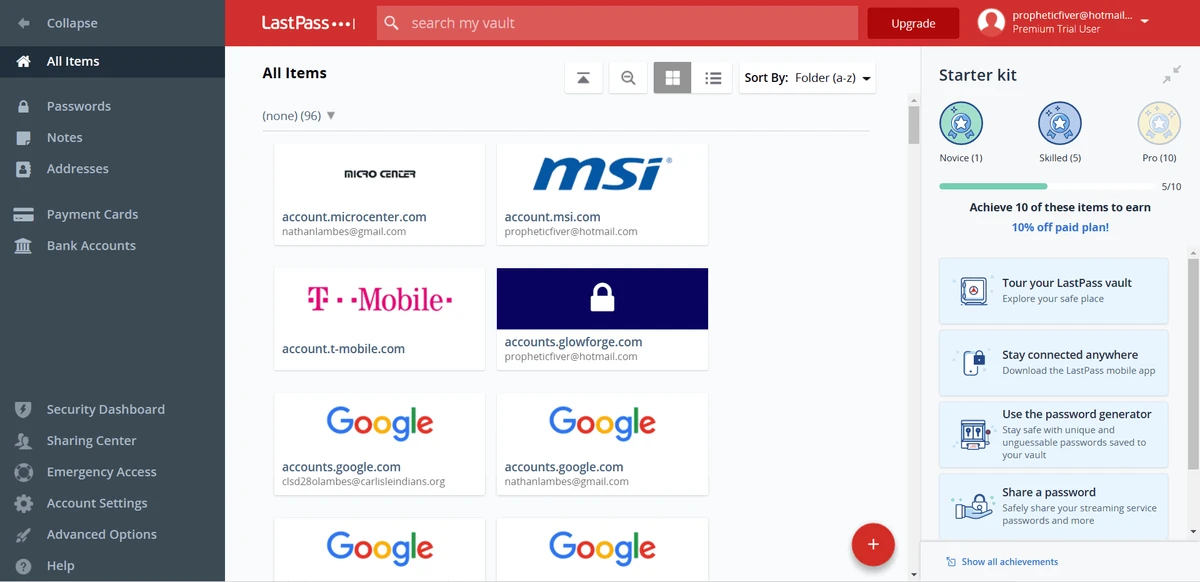
LastPass provides a user-friendly interface designed to make password management straightforward. After creating a master password, users can quickly begin saving login credentials, organizing stored accounts, and accessing them directly from supported browsers. The password vault keeps information centralized, reducing the need to remember multiple passwords.

The autofill feature simplifies everyday browsing by automatically completing login forms and personal information where appropriate. Password generation and credential sharing are integrated into the workflow, allowing users to strengthen account security without adding unnecessary complexity. Importing existing passwords also helps users transition from other password storage methods with minimal effort

Who Should Use LastPass Password Manager?

  • Users managing multiple online accounts
  • Individuals who want stronger password security
  • Professionals accessing accounts across several devices
  • Families or teams sharing selected login credentials
  • Users who frequently complete online forms
  • Anyone looking to reduce password-related frustration

Conclusion

LastPass Password Manager offers a practical way to improve both convenience and password security by replacing dozens of individual passwords with a single master password. Its password generation, autofill capabilities, secure credential storage, and cross-platform synchronization help streamline daily browsing while encouraging stronger account protection. Features such as password sharing and automatic form filling further enhance its usefulness for both personal and professional users.

Pros & Cons

✓

Pros

  • Stores passwords in a centralized vault
  • Generates strong passwords
  • One-click login and autofill support
  • Cross-platform synchronization
  • Supports secure password sharing
  • Automatically captures new login credentials
  • Simplifies online form completion
  • Easy password import process
✕

Cons

  • Requires remembering a master password
  • Browser support list includes some legacy browsers

Frequently Asked Questions

What is LastPass Password Manager used for?

LastPass Password Manager stores website usernames and passwords in a secure password vault, allowing users to access their accounts without remembering every individual password.

Does LastPass generate secure passwords?

Yes. LastPass includes a password generator that helps create strong, unique passwords for online accounts.

Can LastPass automatically fill in login forms?

Yes. The software can automatically autofill saved usernames and passwords on supported websites, making sign-in faster and more convenient.

Can I access my passwords on multiple devices?

Yes. LastPass is designed to synchronize your password vault across multiple supported devices, allowing you to access your credentials wherever you sign in.

Does LastPass support sharing passwords?

Yes. Users can securely share selected login credentials with trusted individuals without manually sending passwords through less secure methods.

Can LastPass save information for online forms?

Yes. In addition to login credentials, LastPass can store personal information such as names, email addresses, and shipping details to automatically fill online forms.

Recommended apps [Freeware]:
  • Awesome Miner 11.5.5 Awesome Miner logo manage Bitcoin, Litecoin and Ethereum mining, monitor rigs, switch pools, and optimize profitability
  • Far Manager 3.0 Build 6699 Far Manager logo Manage files efficiently with Far Manager's fast text-based interface, plugins, and archive support
  • Futuremark SystemInfo 5.92.1497 Futuremark SystemInfo logo scans your PC hardware and system components, generating detailed diagnostic reports.
  • Quick Clipboard Editor 3.4.1.0 Quick Clipboard Editor logo edit, format, and manage clipboard text with powerful tools for productivity and automation
  • GLview 7.4.6 GLview logo displays detailed OpenGL, Vulkan, DirectX, and GPU information, helping users analyze graphics hardware and driver capabilities
  • Qalculate! 5.12.0 Qalculate! logo Advanced calculator with symbolic math, unit conversion, currency tools, plotting, and natural expression input for everyday and scientific use.
Recommended apps [Shareware]:
  • EF Duplicate MP3 Finder 26.05 EF Duplicate MP3 Finder logo Find and remove duplicate MP3, FLAC, WMA, and OGG audio files using tag-based and similarity analysis
  • SysTools SQL Backup Recovery 12.0.0 SysTools SQL Backup Recovery logo Repair and recover corrupt SQL Server BAK files, restore database objects, and export recovered data with ease.
  • KeyShot 2026.2 KeyShot logo real-time 3D rendering and animation software for photorealistic visuals, materials, and product design
  • CloudMounter 3.7.2137 CloudMounter logo mounts cloud storage and remote servers like local drives for easy file access and management on Windows
  • Cubase Pro 15.0.30 Cubase Pro logo a professional DAW for recording, composing, editing, mixing, and music production
  • YoloX 1.11 YoloX logo a lightweight crosshair overlay tool for Windows featuring custom designs, animations, audio reactions, and game profiles