MusicBee logo

MusicBee 3.6.9668

  • User Rating:
    ★★★★★
    ★★★★★
    0.0 0Votes
  • Requirements:
    Windows
  • Version: 3.6.9668
  • Latest updated: 1 week ago
  • License: Freeware  
  • Publisher: Musicbee
  • Size: 10 MB
× app stores

MusicBee is a free music player and music library management application designed to help users organize, discover, and enjoy their music collections. Combining playback capabilities with powerful tagging, metadata management, playlist creation, and library organization tools, MusicBee offers much more than a standard audio player. Whether you have a small music collection or thousands of tracks spread across multiple devices, MusicBee provides an efficient way to manage and access your music from a single interface.

Features of MusicBee

  • Free music player and library manager
  • Organize music as libraries, playlists, or folder structures
  • Browse and play music from local storage and portable devices
  • Manage small and large music collections
  • Powerful music tagging and metadata editing tools
  • Custom tag editing support
  • Automatic folder monitoring for new music
  • Inbox workflow for tagging files before library import
  • Automatic album art lookup
  • Automatic lyrics retrieval
  • Metadata lookup from online sources
  • Digital sound signature track identification
  • Playlist management
  • Podcast subscription management
  • Built-in podcast playback
  • Internet radio support
  • Support for Shoutcast radio stations
  • Support for Jamendo radio stations
  • Support for Last.fm stations
  • Portable version available

User Experience

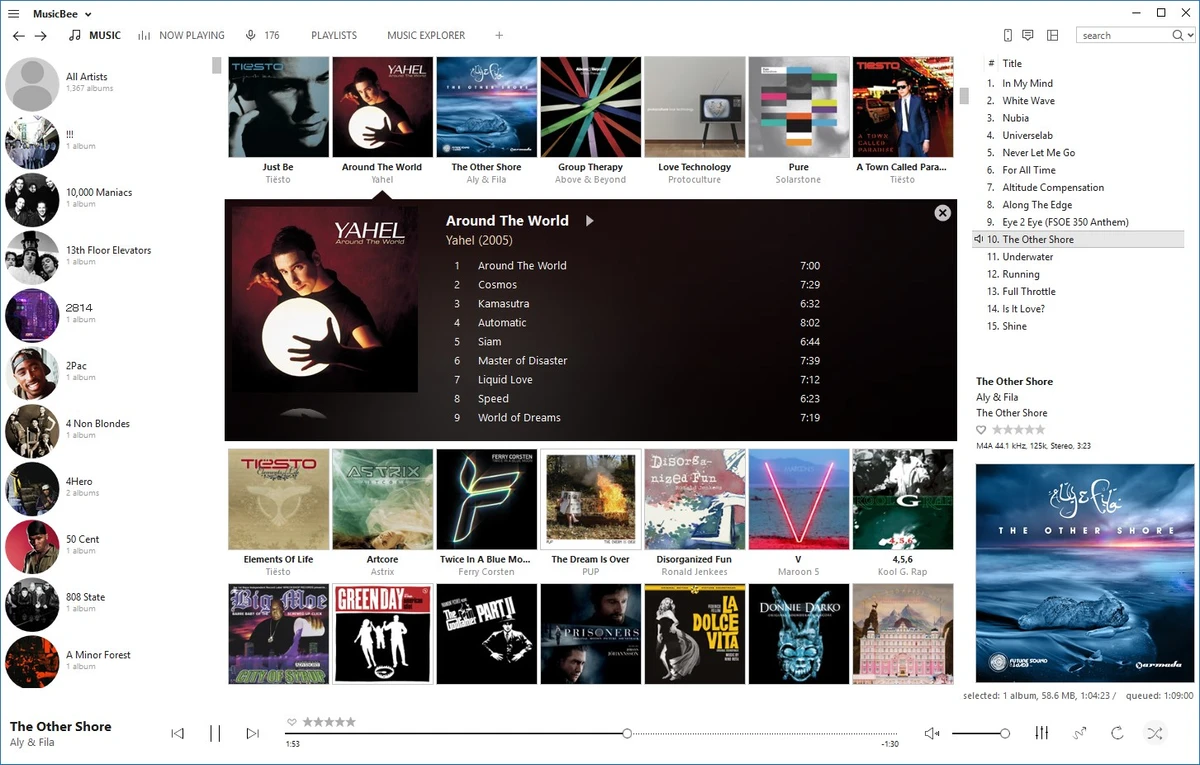
MusicBee strikes an excellent balance between ease of use and advanced music management capabilities. From the moment a music collection is imported, the software provides a clean and organized way to browse artists, albums, genres, playlists, and folders. One of its biggest strengths is library management. Users can organize music according to their preferred workflow, whether through traditional folders, curated playlists, or a centralized music library. The software remains responsive even when managing large collections, making it suitable for serious music enthusiasts.

The tagging system is particularly useful. Editing metadata, updating album information, and organizing tracks can be done efficiently through an intuitive interface. The ability to automatically retrieve album artwork, lyrics, and other metadata helps maintain a polished and complete music library with minimal manual effort. MusicBee also simplifies music discovery and access by supporting podcasts and internet radio stations. Having podcasts, local music, and online radio available within a single application creates a convenient all-in-one listening experience.

Another practical feature is automatic folder monitoring, which detects new tracks and adds them to the library. This helps keep collections up to date without requiring constant manual imports. Overall, MusicBee feels like a music management platform first and a media player second—a combination that will appeal to users who value organization as much as playback quality.

Who Should Use MusicBee?

  • Music enthusiasts with large collections
  • Audiophiles who want detailed music organization
  • Users managing local music libraries
  • Podcast listeners
  • Users who enjoy internet radio
  • Collectors who want accurate tagging and metadata
  • Anyone seeking a more advanced alternative to basic music players

Conclusion

MusicBee successfully combines music playback, collection management, metadata editing, podcast handling, and internet radio support into a single free application. Its comprehensive feature set makes it far more than a standard audio player and positions it as a complete music management solution.

Pros & Cons

Pros

  • Completely free to use
  • Excellent music library management tools
  • Powerful tagging and metadata editing features
  • Automatic album art and lyrics retrieval
  • Supports large music collections
  • Podcast management and playback
  • Internet radio integration
  • Flexible organization options
  • Automatic monitoring of music folders
  • Portable version available

Cons

  • Primarily focused on audio management rather than broader media formats
  • Advanced tagging features may require some learning for new users
  • Interface may feel feature-heavy for users seeking a simple music player

Frequently Asked Questions

What is MusicBee?

MusicBee is a free music player and music library management application designed to organize, play, and manage digital music collections.

Is MusicBee free?

Yes. MusicBee is freeware and can be used without cost.

Can MusicBee manage large music collections?

Yes. The software is designed to handle both small and extensive music libraries efficiently.

Does MusicBee support podcast subscriptions?

Yes. Users can subscribe to, manage, and listen to podcasts directly within the application.

Can MusicBee automatically download album artwork?

Yes. MusicBee can automatically retrieve album artwork, lyrics, and other metadata from online sources.

Does MusicBee support internet radio?

Yes. The software supports online radio services including Shoutcast, Jamendo, and Last.fm stations.

Can MusicBee edit music tags?

Yes. It includes advanced metadata editing tools and supports custom tag management for music files.

Recommended apps [Freeware]:
  • VidCoder 12.20 VidCoder logo Convert, encode, and rip DVDs and Blu-rays with VidCoder, a powerful open-source video transcoding tool for Windows
  • 3D Youtube Downloader 1.26.6 3D Youtube Downloader logo download videos, playlists, and subtitles from YouTube and other sites
  • NanaZip 6.5.1750.0 NanaZip logo a modern file compression and extraction tool based on 7-Zip, offering strong encryption and wide format support
  • AVG Clear 26.6.11050 AVG Clear logo completely removes AVG antivirus products, files, settings, and registry entries from Windows systems
  • TeamViewer 15.79.4 TeamViewer logo a secure remote desktop tool for PC control, file transfer, and remote support worldwide
  • Donemax Video Downloader 3.0 Donemax Video Downloader logo download videos and audio from 1,200+ websites for offline viewing and playback
Recommended apps [Shareware]:
  • Secret Disk 2026 v323 Secret Disk logo create hidden, password-protected virtual drives to securely store private files on Windows
  • Bulk Image Downloader 6.64 Bulk Image Downloader logo Download full-size images and videos from galleries, forums, and image hosts with Bulk Image Downloader
  • Duplicate Photos Fixer Pro 1.3.1086.1158 Duplicate Photos Fixer Pro logo finds and removes duplicate and similar photos to organize your library and save space
  • DP Animation Maker 3.5.51 DP Animation Maker logo a simple Windows tool for creating animated images, GIFs, and videos with effects, objects, and music.
  • Pdf995 26.1 Pdf995 logo Create high-quality PDF files from any application with Pdf995 Printer Driver using a lightweight virtual printer
  • R-Wipe & Clean 20.0 Build 2567 R-Wipe & Clean logo a privacy and disk cleanup tool with secure file wiping, scheduling, and SSD support