


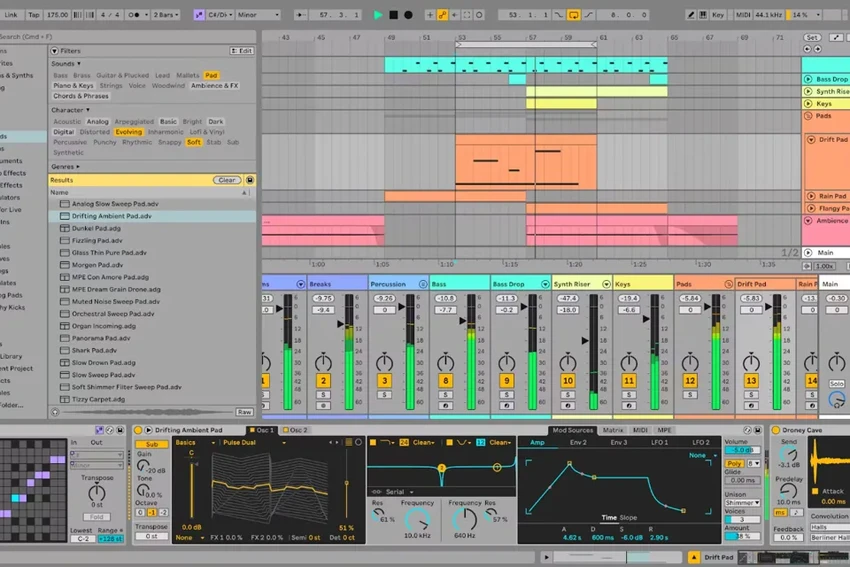

Ableton Live is one of the industry's most respected digital audio workstations (DAWs), designed for music production, recording, sound design, and live performance. Unlike traditional recording software, it combines a linear timeline with its unique Session View, allowing musicians and producers to experiment with ideas freely without interrupting their creative flow. Version 12 introduces major improvements to MIDI editing, sound design, workflow customization, browser organization, and accessibility, making an already powerful production environment even more versatile.
Overview
Ableton Live is professional music creation software that combines recording, arranging, MIDI sequencing, sound design, and live performance into a single application. Users can compose music traditionally in Arrangement View or improvise using Session View, where musical clips can be launched and rearranged in real time. Live 12 expands creative possibilities with new MIDI generators, advanced editing tools, improved browser functionality, new instruments and effects, customizable themes, and enhanced workflow features designed to speed up music production. Whether creating electronic music, recording instruments, or performing live on stage, Ableton Live provides a flexible environment for every stage of music creation.
Features of Ableton Live
Dual Workflow
- Traditional Arrangement View
- Non-linear Session View
- Seamlessly switch between composition and live performance
Advanced MIDI Editing
- MIDI Transformations
- MIDI Generators for melodies, chords, and rhythms
- Stretch, split, chop, and join notes
- Velocity shaping
- Scale-aware editing
- Chromatic and key-based transposition
- Expanded probability controls
- Max for Live MIDI tools
Sound Design
- Meld bi-timbral MPE instrument
- Granulator III with MPE support
- Roar saturation and coloring effect
- Extensive modulation capabilities
- Real-time audio manipulation
Creative Tools
- Support for alternative tuning systems
- MPE-compatible workflow
- Live modulation editing
- Sound Similarity Search powered by a neural network
- Browser tagging system
- Custom browser categories
- Browser history
Workflow Improvements
- Stacked Detail Views
- Mixer available in Arrangement View
- Improved Mixer interface
- Cleaner visual design
- Multiple interface themes
- High contrast mode
Included Sound Packs
- Lost and Found Pack
- Performance Pack
Accessibility
- Screen reader support
- Expanded keyboard navigation
- Improved accessibility throughout the interface
User Experience
Ableton Live continues to stand out because of its flexible workflow. Unlike many traditional DAWs that rely solely on a timeline-based approach, Live allows users to move effortlessly between structured arrangements and spontaneous experimentation through Session View. The new MIDI editing tools significantly improve the creative process. Features like MIDI Transformations and MIDI Generators make it easier to explore melodic and rhythmic ideas without interrupting production, while scale-aware editing helps maintain musical consistency.
Sound designers will appreciate the addition of Meld, Granulator III, and Roar, each expanding the range of available textures and processing options. These tools integrate naturally into Live's workflow and offer extensive control without feeling overly complicated. The redesigned browser is another welcome improvement. Tags, custom categories, search history, and Sound Similarity Search make locating samples, instruments, and presets considerably faster, especially in larger music libraries.
Workflow refinements such as Stacked Detail Views and the Arrangement View mixer reduce unnecessary switching between panels, allowing users to focus more on creating music and less on navigating the interface. Despite its depth, the interface remains clean and organized, making it suitable for beginners while still providing the advanced functionality expected by experienced producers and performers.
Who Should Use Ableton Live?
- Music producers
- Electronic musicians
- DJs
- Recording artists
- Sound designers
- Film and game composers
- Live performers
- Home studio enthusiasts
- Professional recording studios
Conclusion
Ableton Live remains one of the most capable digital audio workstations available. Its combination of linear recording, non-linear performance tools, advanced MIDI editing, innovative instruments, and efficient workflow improvements makes it suitable for everything from songwriting to professional live performances.
Version 12 builds on an already mature platform by introducing meaningful enhancements that improve creativity without disrupting existing workflows. Features such as MIDI Generators, Sound Similarity Search, Roar, and improved browser organization help streamline production while opening new creative possibilities.


