Soda PDF logo

Soda PDF 15.0.12.24792

  • User Rating:
    ★★★★★
    ★★★★★
    0.0 ★ 0Votes
  • Requirements:
    Windows
  • Version: 15.0.12.24792
  • Latest updated: 3 weeks ago
  • License: Free Trial  
  • Publisher: LULU Software
  • Size: 1 MB
× app stores

Soda PDF is a Windows-based PDF solution designed to simplify everyday document tasks. It brings together editing, conversion, compression, and security tools in one platform, helping users handle PDFs without switching between multiple apps. The software allows users to modify text, merge different file formats into PDFs, and convert documents between Microsoft Office formats and PDFs. It also supports OCR for extracting text from scanned images, making documents searchable and editable. With additional features like password protection, redaction, and batch processing, Soda PDF aims to streamline both personal and professional document workflows efficiently.

Features of Soda PDF

  • Edit PDF content including text, highlights, stamps, and drawings
  • Merge Word, Excel, and PowerPoint files into PDFs
  • Compress PDF files while maintaining quality
  • Create PDFs from documents, scans, or URLs
  • OCR for recognizing text in images and scanned files
  • Batch processing for multiple file conversion tasks
  • Secure PDFs with password encryption and permissions
  • Redact or whiteout sensitive information
  • Fill and create PDF forms
  • Rotate, reorder, add, or remove pages

Interface and Usability

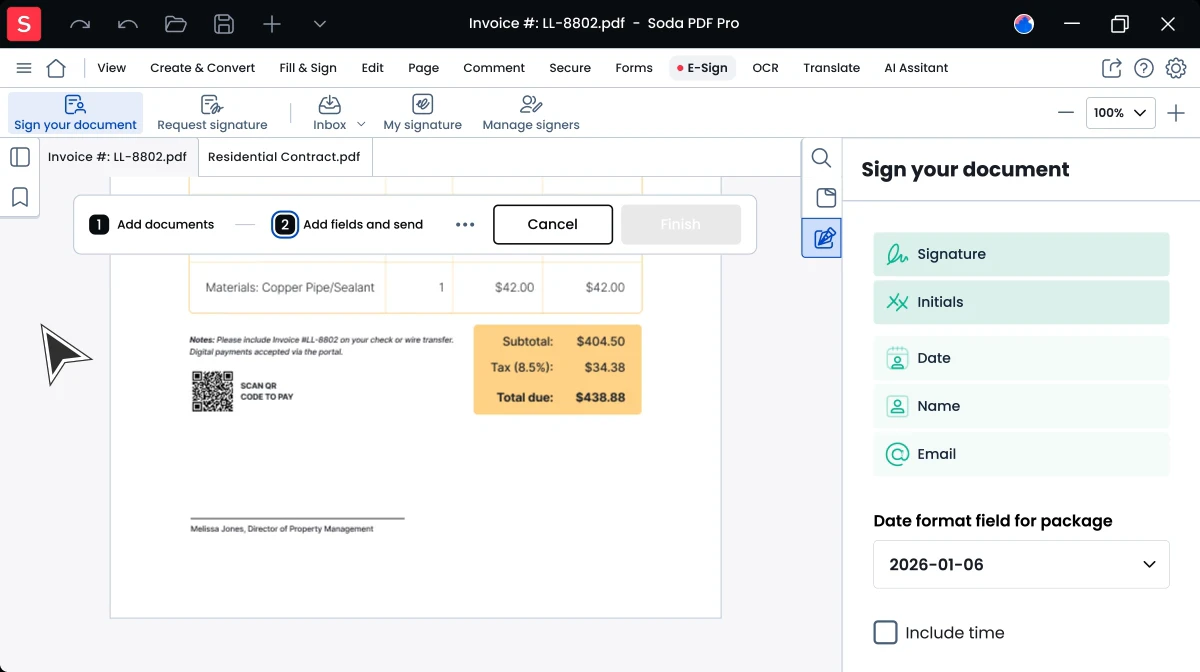
Soda PDF is designed with simplicity in mind, focusing on accessibility for users who may not be familiar with advanced document tools. The layout organizes tools into clear categories such as Edit, Convert, Secure, and Page management, making navigation straightforward. Most functions are accessible within a few clicks, which helps reduce time spent on routine document tasks. The interface prioritizes practicality over complexity, making it suitable for both basic and intermediate PDF editing needs.

Who Should Use Soda PDF?

Soda PDF is suitable for students, office workers, and professionals who regularly work with PDF documents. It is especially useful for users who need to edit, convert, or secure files without relying on multiple separate tools. Businesses handling document workflows or batch file processing may also benefit from its integrated feature set.

Conclusion

Soda PDF is a practical all-in-one solution for users who need to handle a wide range of PDF tasks without relying on multiple tools. From editing and converting to OCR, compression, and document security, it covers most everyday PDF workflows in a single platform. The inclusion of batch processing and form handling also makes it useful for more structured office environments.

Pros & Cons

✓

Pros

  • Wide range of PDF editing and conversion tools
  • Built-in OCR for scanned documents
  • Batch processing improves productivity
  • Strong document security options
✕

Cons

  • Requires Microsoft Office for some conversion features

Frequently Asked Questions

What is Soda PDF used for?

Soda PDF is used for editing, converting, compressing, and securing PDF documents in a single software package.

Does Soda PDF support OCR?

Yes, it includes OCR functionality to recognize and extract text from images and scanned documents.

Can I convert PDFs to Word or Excel?

Yes, the software supports conversion between PDF and Microsoft Office formats, depending on system requirements.

Is Soda PDF suitable for batch processing?

Yes, it offers batch tools that allow users to convert or create multiple files at once.

Can I protect my PDF files with Soda PDF?

Yes, users can apply password encryption, set permissions, and redact sensitive information.

What operating systems support Soda PDF?

It supports Windows 11, 10, 8/8.1, and 7 (64-bit versions).

Recommended apps [Freeware]:
  • EarthTime 6.33.7 EarthTime logo displays world clocks, weather, and local times for 120,000+ cities with customizable alarms and maps.
  • Training Manager 2026 v4.10.4002 Training Manager logo Track employee training, compliance, certifications, and class schedules with centralized training management tools
  • Q-Dir 12.71 Q-Dir logo a lightweight quad-pane file manager for Windows, offering fast navigation, drag-and-drop, and portable access
  • Dropbox 260.4.2926 Dropbox logo cloud storage service for syncing files, backup, and sharing documents across Windows, mobile, and web devices
  • ImTranslator 20.1 ImTranslator logo Translate text, web pages, and phrases in over 90 languages with multiple translation providers, dictionary support, and text-to-speech.
  • LibreWolf 152.0.6-1 LibreWolf logo Browse privately with a Firefox-based browser focused on blocking tracking, removing telemetry, and improving online security.
Recommended apps [Shareware]:
  • ViewCompanion Pro 17.10.0.1204 ViewCompanion Pro logo View, convert, annotate, and compare PDF, DWF, CAD, and technical drawing files with powerful batch tools
  • Driver Easy 7.1.3.5200 Driver Easy logo Windows utility for scanning, updating, and managing hardware drivers with offline support
  • Elcomsoft Distributed Password Recovery 5.0.1788 Elcomsoft Distributed Password Recovery logo GPU-accelerated enterprise tool for recovering passwords and encryption keys across networked systems
  • ButterScroll 1.5.5 ButterScroll logo Improve Windows scrolling with ButterScroll. Enjoy smooth animations, customizable speed, and precise mouse scrolling.
  • Chris-PC CPU Booster 3.26.0706 Chris-PC CPU Booster logo optimizes CPU usage, prioritizes applications, and helps improve performance for demanding software
  • FileSearchEX 1.1.0.9 FileSearchEX logo Quickly locate files, folders, and document content with a lightweight Windows search tool supporting network shares and PDF searches.