PC Timer logo

PC Timer 19.7

  • User Rating:
    ★★★★★
    ★★★★★
    0.0 0Votes
  • Requirements:
    Windows
  • Version: 19.7
  • Latest updated: 1 week ago
  • License: Freeware  
  • Publisher: OMID SOFT
  • Size: 3 MB
× app stores

PC Timer is a straightforward Windows utility designed to automate basic system actions such as shutdown, restart, log off, or locking the computer. It offers both countdown-based and scheduled execution options, making it a practical tool for users who want simple automation without command-line usage.

Overview

PC Timer is built for users who need an easy way to schedule system power actions without using Windows Task Scheduler or command-line commands. It provides a clear interface where users can set a countdown timer or choose a specific date and time for an action. The tool focuses on simplicity and accessibility, allowing users to quickly configure shutdown-related tasks. It is especially useful for managing long downloads, unattended work sessions, or automatic shutdowns after a set period. While it does not include advanced power management features like hibernation scheduling, it covers the most commonly needed system actions.

Features of PC Timer

  • Countdown timer for automatic system actions
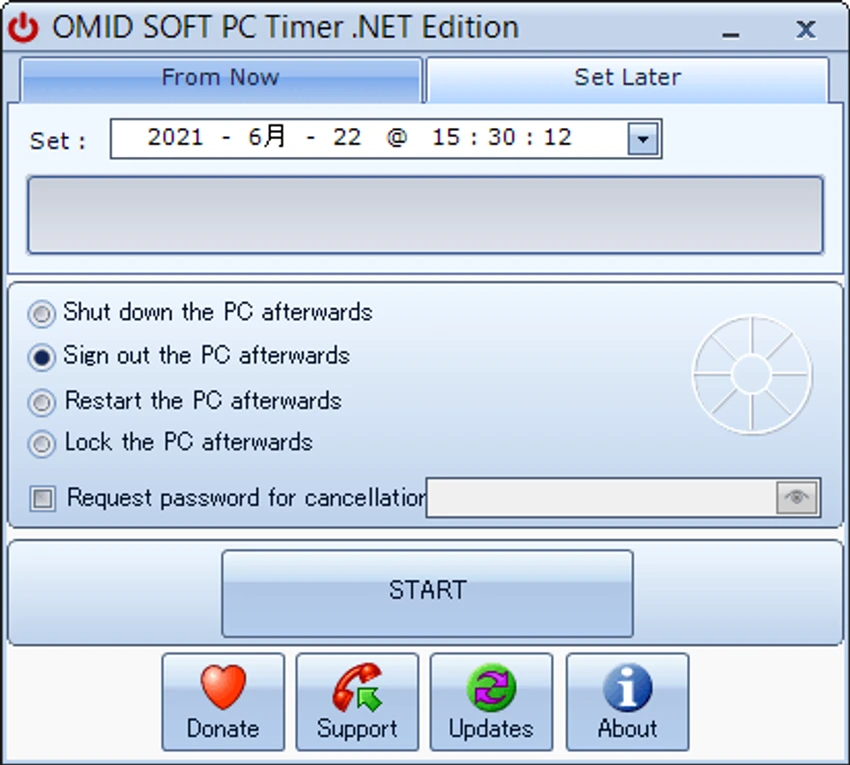
  • Scheduled execution using calendar and time selector
  • Supports shutdown, restart, log off, and system lock
  • Simple and lightweight interface
  • Password protection to prevent cancellation of scheduled tasks
  • No installation required (portable tool)
  • Progress bar display during active countdown
  • Easy-to-use GUI instead of command-line configuration

User Experience

PC Timer is designed with simplicity in mind. The interface is minimal and functional, allowing users to set a timer or schedule an action within seconds. The countdown setup is intuitive, with clear fields for hours, minutes, and seconds. For scheduled tasks, the calendar and time selector make it easy to choose a specific execution moment.

The option to protect tasks with a password adds a layer of control, especially in shared environments where accidental cancellation could interrupt important operations. However, the tool remains basic in scope, and users looking for advanced automation or integration features may find it limited.

Who Should Use PC Timer?

PC Timer is best suited for everyday Windows users who need a simple way to automate shutdown or restart actions. It is particularly useful for managing timed tasks such as downloads, updates, or scheduled breaks. It is less suitable for advanced users who require complex automation workflows or system-level task scheduling.

Conclusion

PC Timer is a lightweight and easy-to-use scheduling tool that simplifies basic system automation tasks. Its strength lies in its straightforward interface and quick setup process.

Pros & Cons

Pros

  • Very simple and beginner-friendly interface
  • Supports both countdown and scheduled tasks
  • Portable (no installation required)
  • Includes password protection for tasks
  • Lightweight and fast

Cons

  • Limited to basic power actions only
  • No advanced automation or scripting features
  • Does not support hibernation scheduling

Frequently Asked Questions

What is PC Timer used for?

It is used to schedule automatic shutdown, restart, log off, or lock actions on a Windows PC.

Does PC Timer require installation?

No, it is a portable tool that runs without installation.

Can PC Timer schedule tasks for a specific time?

Yes, it supports both countdown timers and calendar-based scheduling.

Does PC Timer support hibernation?

No, hibernation scheduling is not supported.

Recommended apps [Freeware]:
  • CalendarTask 3.30.290.9088 CalendarTask logo lightweight desktop calendar with note-taking, cloud sync, reminders, and desktop scheduling tools
  • Far Manager 3.0 Build 6699 Far Manager logo Manage files efficiently with Far Manager's fast text-based interface, plugins, and archive support
  • Personal Backup 6.4.11.0 Personal Backup logo Schedule and automate file backups to local drives, networks, or FTP servers with Personal Backup for Windows
  • OcenAudio 3.19.5 OcenAudio logo a fast and easy-to-use audio editor with real-time effects, spectrogram analysis, and VST plugin support
  • WinScript 2.20.1 WinScript logo customize Windows with debloat, privacy, performance tweaks, and one-click app installation scripts
  • Media Player Codec Pack 5.1.2.625 Media Player Codec Pack logo enables smooth playback of audio and video formats on Windows by adding essential codecs and filters.
Recommended apps [Shareware]:
  • DSLR Remote Pro 3.31.5 DSLR Remote Pro logo Windows software for Canon DSLR control, photo booth creation, live view, HDR capture via USB connection
  • GiliSoft Exe Lock 12.0.0 GiliSoft Exe Lock logo Protect Windows applications with passwords and prevent unauthorized access using GiliSoft Exe Lock
  • ThunderSoft Watermark Remover 6.3.0 ThunderSoft Watermark Remover logo removes watermarks, logos, and unwanted objects with easy selection and photo editing tools
  • O&O SafeErase 21.3.26142 O&O SafeErase logo securely deletes files, drives, and internet traces using certified methods to prevent data recovery on Windows
  • DivX 11.15.0 DivX logo powerful video player and converter that supports 4K playback, HD video conversion, and DLNA media streaming
  • Bandicam 8.3.1.2537 Bandicam logo Record your screen, gameplay, and streaming videos with Bandicam, a fast screen recorder for Windows with high-quality compression