


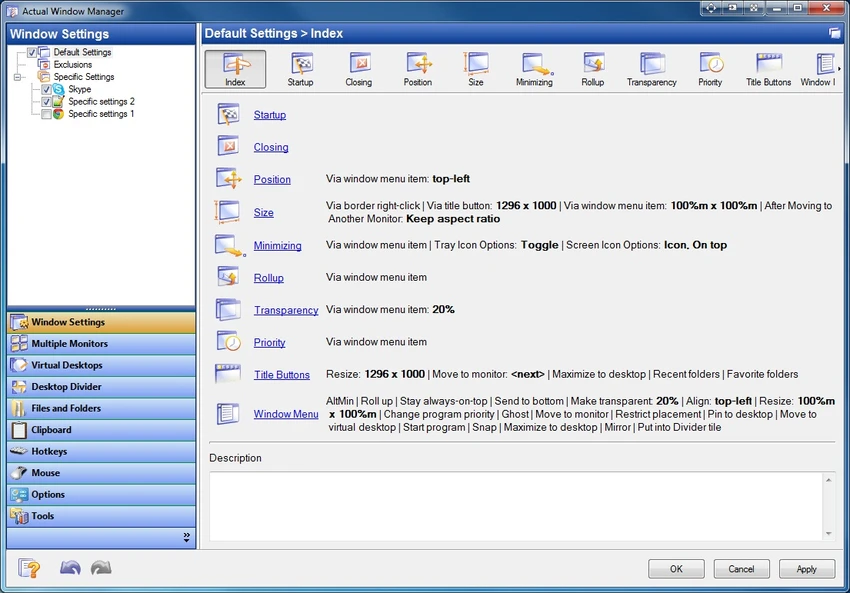

Actual Window Manager is a Windows productivity and desktop management tool designed to enhance how users interact with multiple open windows. Instead of relying solely on standard Windows controls, it adds an extended layer of functionality that helps users organize, resize, automate, and manage windows more efficiently.
The software integrates deeply with the operating system and introduces additional controls directly into each window’s title bar. These enhancements aim to reduce desktop clutter and improve workflow efficiency, especially for users who frequently work with many applications at once. It is particularly useful for multitasking-heavy environments where screen space management becomes critical.
Features of Actual Window Manager
- Adds advanced control buttons to window title bars
- Roll up windows to show only the title bar
- Resize windows to custom dimensions
- Make windows transparent with adjustable opacity levels
- Enable “ghost mode” to interact with content behind windows
- Pin windows to stay always on top
- Minimize windows to system tray
- Create and manage multiple virtual desktops
- Organize windows into categorized desktop spaces
- Assign custom behaviors to window controls per application
- Automate window positioning and sizing rules
- Automatically place windows in predefined screen areas
- Minimize or close inactive windows automatically
- Supports over 50 window management tools and functions
- Runs in the background with automated window handling
Interface and Usability
Actual Window Manager does not replace the standard Windows interface but enhances it. Once installed, new controls appear directly in each window’s title bar, making advanced functions easily accessible without additional menus or complex navigation. Users can define rules for specific applications, allowing the software to automatically manage window behavior. For example, certain programs can always open in a fixed position or with specific transparency settings. Although the range of features is extensive, the software remains relatively intuitive once users become familiar with the added controls. However, due to its depth, it may take some time for new users to fully configure and optimize its behavior.
Who Should Use Actual Window Manager?
- Power users who multitask across many applications
- Office workers managing multiple documents and tools
- Developers working with several windows simultaneously
- Designers and content creators needing organized workspace layouts
- Users with large or multi-monitor setups
- Anyone looking to improve desktop productivity and organization
Conclusion
Actual Window Manager is a highly capable desktop enhancement tool that transforms how users interact with windows on Windows systems. Its advanced features such as virtual desktops, automated window behavior, and enhanced title bar controls provide a significant boost in productivity.


