


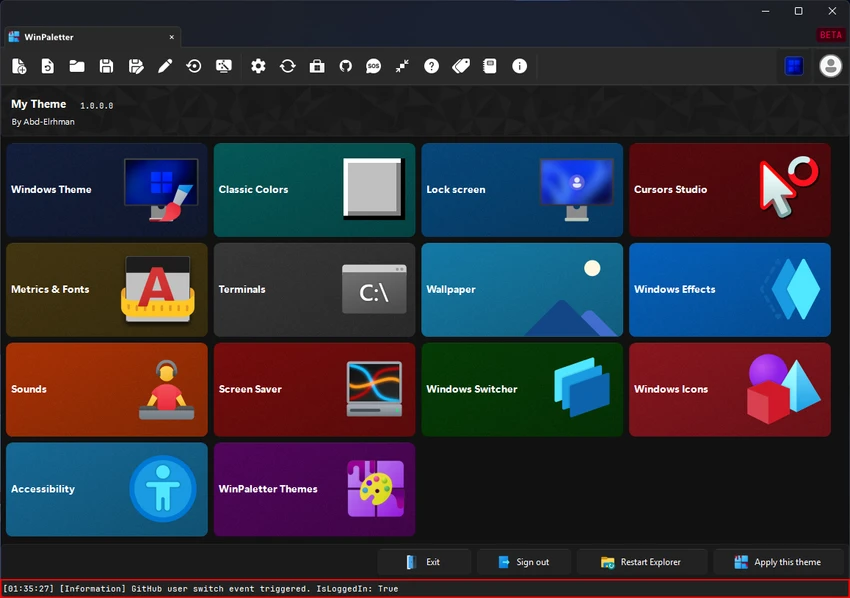

Personalizing Windows often requires multiple utilities to modify themes, colors, icons, cursors, and other visual elements. WinPaletter brings many of these customization options together in a single portable application, making it easier to create a desktop that matches your personal style. Designed for both casual users and enthusiasts, WinPaletter provides an intuitive interface for managing Windows appearance settings while allowing users to import, export, and preview themes before applying them.
Overview
WinPaletter is a portable Windows customization utility that enables users to personalize numerous aspects of the operating system without installation. It offers centralized control over Windows colors, visual styles, icons, cursors, fonts, wallpapers, sounds, screen savers, and additional interface settings. The software also supports importing and exporting themes, making it easy to share custom desktop designs or apply themes created by other users.
Features of WinPaletter
- Portable application with no installation required
- User-friendly interface
- Customize Windows color schemes
- Modify visual styles
- Customize classic Windows colors
- Personalize the Windows lock screen (LogonUI)
- Change mouse cursors
- Adjust system metrics and fonts
- Customize Windows Terminal and console appearance
- Change wallpapers
- Configure system sounds
- Manage screen savers
- Customize Windows effects and visual tweaks
- Personalize Windows icons
- Import custom themes
- Export themes for backup or sharing
- Access community-created themes through the WinPaletter Store
- Real-time preview before applying changes
User Experience
WinPaletter is designed to simplify Windows customization by placing a wide range of personalization options within a single interface. The layout is easy to navigate, allowing users to quickly locate the appearance settings they want to modify.
One of the application's most useful features is the real-time preview, which lets users see the impact of their color selections before making permanent changes. This makes experimenting with different themes much more convenient than relying on trial and error. The ability to import and export themes also adds flexibility. Users can create personalized desktop styles, save them for future use, or install themes shared by the community through the WinPaletter Store.
Because the application is portable, it can be launched directly without installation, making it suitable for users who frequently customize multiple Windows computers or prefer utilities that leave minimal system footprint.
Who Should Use WinPaletter?
- Windows customization enthusiasts
- Designers
- Developers
- Users who enjoy personalized desktop environments
- IT professionals managing custom Windows themes
- Anyone looking for a portable Windows personalization tool
Conclusion
WinPaletter is a versatile Windows customization utility that combines a wide variety of personalization options into one portable application. From colors and visual styles to icons, fonts, wallpapers, and system effects, it offers users a convenient way to create a unique desktop experience. Its intuitive interface, real-time preview, and theme import/export capabilities make it suitable for both casual users and enthusiasts who enjoy customizing Windows without juggling multiple utilities. If you're looking for an all-in-one Windows personalization tool, WinPaletter is well worth considering.


