Xlideit Image Viewer logo

Xlideit Image Viewer 1.0.260712

  • User Rating:
    ★★★★★
    ★★★★★
    0.0 0Votes
  • Requirements:
    Windows
  • Version: 1.0.260712
  • Latest updated: 2 weeks ago
  • License: Freeware  
  • Publisher: Xlideit
  • Size: 1 MB
× app stores

Xlideit Image Viewer is a lightweight Windows application designed for viewing images while providing a selection of basic image processing tools. It focuses on simplicity and speed, allowing users to browse photos, manage images within folders, and perform common adjustments without using a more complex editing application.

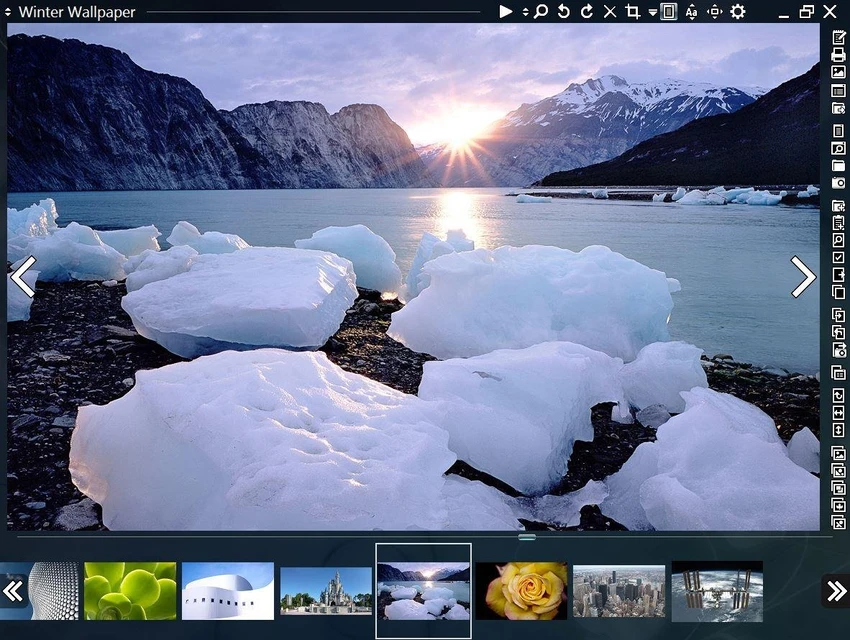
The software displays images with a practical browsing interface that includes a thumbnail bar at the bottom of the window. This allows users to quickly view other images in the same folder and switch between files more efficiently. The current image name and main toolbar are displayed at the top, providing quick access to frequently used functions.

Xlideit Image Viewer includes basic image operations such as zoom adjustment, rotation, cropping, resizing, and deletion. Users can also create slideshows, sort image lists, and access program settings directly from the toolbar. Navigation between images is designed to be simple, with side arrows appearing when the mouse pointer is moved near the edges of the window.

The application starts in full-screen mode by default, providing a distraction-free viewing experience. Users can switch to windowed mode and use keyboard shortcuts for common actions, including starting slideshows, showing or hiding toolbars, and exiting the application. With its lightweight design and straightforward controls, Xlideit Image Viewer is suitable for users who need a simple photo viewer with convenient browsing and basic editing capabilities.

Features of Xlideit Image Viewer

  • Lightweight image viewing application
  • Thumbnail bar for browsing images in the current folder
  • Full-screen viewing mode by default
  • Windowed mode support
  • Image slideshow functionality
  • Zoom adjustment tools
  • Rotate images
  • Crop and resize images
  • Delete images directly from the viewer
  • Sort image lists
  • Access program settings from the toolbar
  • Simple mouse-based image navigation
  • Keyboard shortcuts for faster control

Interface and Usability

Xlideit Image Viewer provides a clean and practical interface focused on quick image browsing. The thumbnail bar at the bottom makes it easy to move through images in a folder, while the toolbar at the top provides access to the main viewing and editing options.

The application is designed to reduce unnecessary steps when managing photos. Users can quickly switch between images, adjust the view, start a slideshow, or apply simple edits directly from the interface. Helpful descriptions appear when hovering over buttons, making the available tools easier to understand.

The default full-screen mode creates an immersive photo-viewing experience, while the option to switch to windowed mode gives users more flexibility. Keyboard shortcuts also make common actions faster for users who prefer using the keyboard.

Who Should Use Xlideit Image Viewer?

  • Users looking for a lightweight alternative to standard photo viewers
  • People who frequently browse images stored in folders
  • Users who need simple image adjustments without advanced editing tools
  • Anyone who wants a basic slideshow and photo management tool
  • Users who prefer a full-screen image viewing experience

Conclusion

Xlideit Image Viewer offers a simple and efficient way to browse images while including useful basic editing functions. Its thumbnail navigation, slideshow mode, and quick access to tools make it convenient for everyday photo management.

Pros & Cons

Pros

  • Lightweight and easy to use
  • Includes useful basic image processing tools
  • Convenient thumbnail-based browsing
  • Supports slideshow viewing
  • Provides full-screen viewing mode
  • Includes simple keyboard shortcuts

Cons

  • Limited to basic image editing functions
  • No advanced photo enhancement or professional editing features

Frequently Asked Questions

What is Xlideit Image Viewer used for?

Xlideit Image Viewer is used for viewing and managing images on Windows. It allows users to browse photos, create slideshows, and perform basic image adjustments such as resizing and cropping.

Does Xlideit Image Viewer include image editing features?

Yes. The application includes basic image processing tools, including image rotation, cropping, resizing, and zoom adjustment.

Can Xlideit Image Viewer display images in full screen?

Yes. The application starts in full-screen mode by default. Users can switch to windowed mode by pressing F11.

Does Xlideit Image Viewer support image slideshows?

Yes. Users can start a slideshow from the toolbar or by pressing the Space key.

Can I use Xlideit Image Viewer as my default image viewer?

Yes. Users can set Xlideit Image Viewer as the default application for image files by using the Windows “Open with” option.

How do I navigate between images in Xlideit Image Viewer?

Users can select images from the thumbnail bar at the bottom or move the mouse pointer near the left or right side of the window to display navigation arrows for moving between images.

Recommended apps [Freeware]:
  • StaxRip 2.52.4 StaxRip logo powerful Windows GUI for video/audio encoding using FFmpeg, x265, AviSynth+, VapourSynth, and more.
  • Audacity 3.7.8 Audacity logo Free open-source audio editor and recorder with multi-track editing, effects, audio analysis, and format conversion
  • Sandboxie-Plus 1.18.0 Sandboxie-Plus logo a Windows sandboxing tool that isolates programs to prevent system changes and improve security.
  • Dashlane 6.2626.1 Dashlane logo secure password manager that stores credentials, autofills forms, and enhances online security with encryption and alerts
  • Image Sort 2.14.7 Image Sort logo a free, open-source photo organizer that helps you quickly sort, move, rename, and delete images
  • VirtualDJ 2026 Build 9482 VirtualDJ logo mix music, video, and karaoke with AI stems, controllers, streaming, and pro DJ tools
Recommended apps [Shareware]:
  • EF Mailbox Manager 26.05 EF Mailbox Manager logo Manage multiple POP3 email accounts, remove spam on the server, and download messages securely
  • SyncBackPro 12.0.17 SyncBackPro logo advanced backup, restore, synchronization, encryption, FTP support, and automation tools
  • Allavsoft 3.29.4.9686 Allavsoft logo video downloader and converter for batch downloads, HD quality, and audio extraction on Windows.
  • Agisoft Metashape Professional 2.3.2 Build 22626 Agisoft Metashape Professional logo photogrammetry software that generates accurate 3D models, orthomosaics, and spatial data from digital images
  • PTE AV Studio 12.0 Build 2 PTE AV Studio logo creates professional photo slideshows with animations, video clips, music editing, and 4K output
  • Adobe Animate 2024 Adobe Animate logo Create interactive animations, characters, web content, games, and multimedia projects with professional drawing and publishing tools.